Creating your UI UX designer resume often feels like working on a project with no clear direction. What should you add first – tools, projects, or achievements? How do you fit years of work into one clean page? And how do you make it look well designed but still easy to read?
Many designers struggle to find that balance.
This guide is here to make the process simple. You will learn how to write a UI/UX designer resume that not just looks good but gets you hired as well. We will also share real UI/UX designer CV examples to inspire your own.
UI/UX Designer Resume Basics
If you don’t have time to read the entire blog, take a look at this table. It covers the most important details you should know before creating your UI/UX designer CV that looks clean and gets noticed.
| UI and UX Designer Resume Details | |
|---|---|
| Resume length | 1 page for freshers or junior designers Up to 2 pages for senior or lead roles |
| Recommended format | ● Reverse Chronological (most common) ● Functional – ideal for freshers or those switching to UX/UI ● Combination – works well for mid-level professionals |
| Font type | Stick to simple and readable fonts like Arial, Helvetica, or Calibri |
| Font size | 10–12 pt for main content and 14–16 pt for headings |
| Sections to include | ● Header (name and contact information) ● Summary or objective ● Skills ● Work experience / projects ● Education ● Certifications or awards (optional) |
| ATS-friendly layout | Use a single-column layout, no tables or fancy elements. Keep enough white space for easy scanning. |
| Important skills to include | ● Wireframing ● Prototyping ● User Research ● Interaction Design ● Usability Testing ● Visual Design ● Design Systems ● Figma / Adobe XD / Sketch ● Collaboration & Communication |
| File format | Export in PDF format to keep the structure intact |
| Valuable certifications | ● Google UX Design Certificate ● Uxcel UX/UI Design Certification ● Adobe Certified Professional (UX Design) ● Nielsen Norman UX Certification |
| Writing tips | Use short bullet points, focus on real results, match job keywords, keep layout clean and readable |
| Mistakes to avoid | Overly designed resumes, missing portfolio link, long paragraphs, vague skill lists |
| Portfolio links | Add Behance, Dribbble, or a personal website link |
| ATS optimization tip | Use relevant job terms like “Figma,” “user testing,” and “wireframes” naturally to make it ATS-friendly |
| Average salary range | ₹2 Lakhs – ₹15 Lakhs per year (varies by role and experience) |
| Where to find jobs | ● Hirist.tech ● Naukri.com ● Behance ● UX Jobs Board |
| Best time to apply | Apply early in the week – Monday to Wednesday gives higher chances of being noticed |
Best UI/UX Designer Resume Examples
Looking at examples always helps. Below are different styles of resume of UI UX designer to guide you. Each UI UX resume example shows how design and structure can work together.
1. UI/UX Designer Intern Resume (Students)
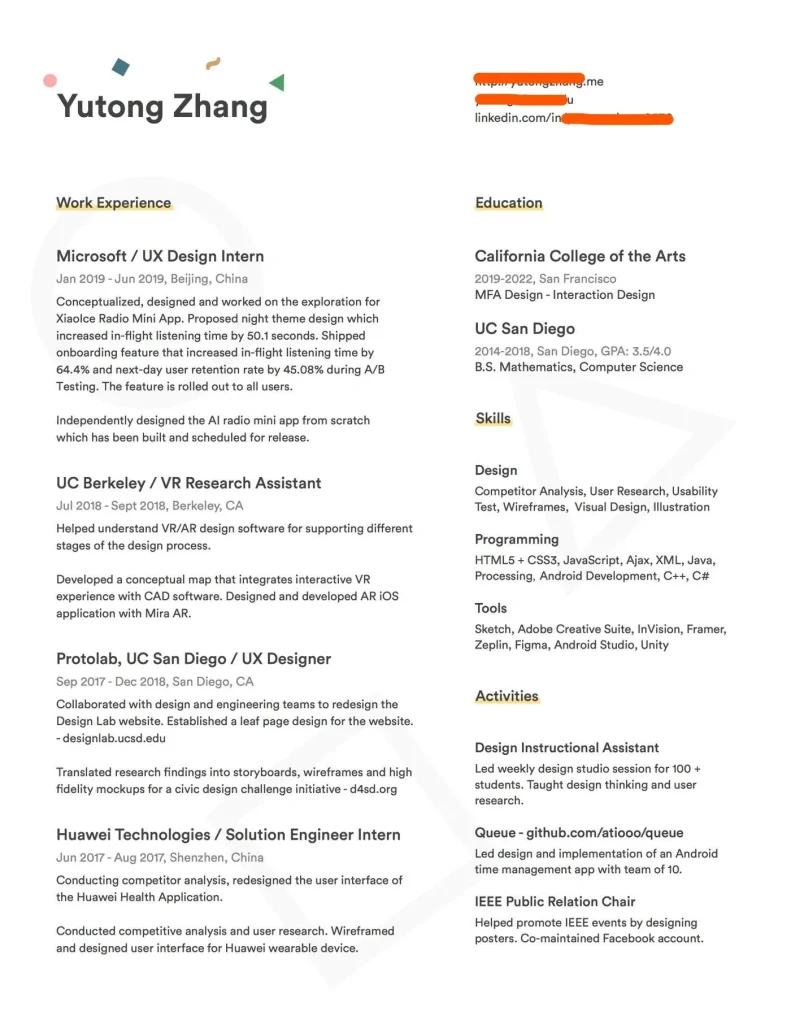
This UI/UX designer intern resume example is ideal for students who want to showcase academic projects and basic creative skills.
Why this UI/UX resume for interns work?
This UI/UX designer intern resume is a great example of how students can present their skills clearly. Here’s why it works:
● Clean layout: The structure is simple and easy to scan. Each section is neatly divided.
● Real results: It includes measurable outcomes like increased retention and faster onboarding.
● Readable design: The font choice and spacing make it professional without feeling overdesigned.
● Student-friendly: It highlights academic projects and internships effectively – ideal for someone starting their career.
2. UI/UX Designer Resume for Freshers (Entry-Level)
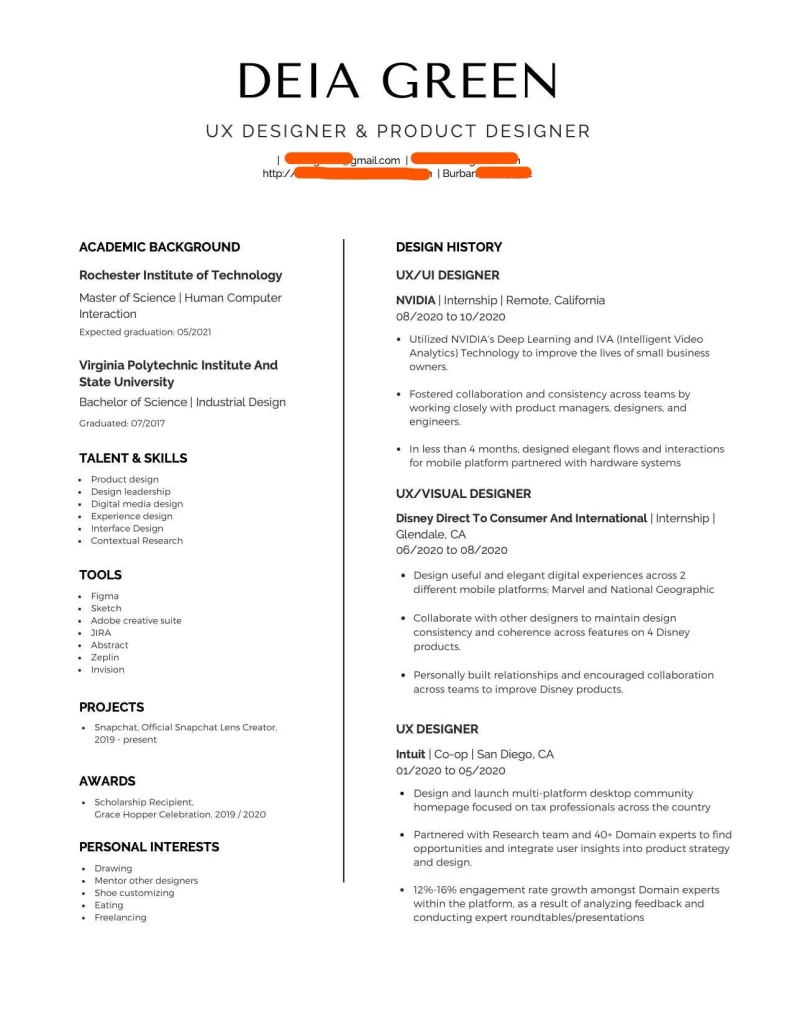
Here is a UI/UX resume example for entry-level designers that focuses on internships and early portfolio work to show potential.
Why this UI/UX resume for freshers works?
This UI/UX designer resume for freshers is well-structured and perfectly suited for early-career designers.
● Strong academic background: Lists both bachelor’s and master’s degrees in relevant design fields.
● Focused on internships: Highlights real design experience from companies like NVIDIA and Disney, proving hands-on exposure to design projects.
● Clear sectioning: The split layout makes it easy to scan skills, tools, and experience quickly.
● Personal touch: Adding interests and awards helps humanize the profile and shows passion beyond academics.
3. Resume of UI/UX Designer (Mid-Level)
This resume of UI/UX designer highlights real-world projects, collaboration and growth. It is perfect for designers with two to four years of experience.
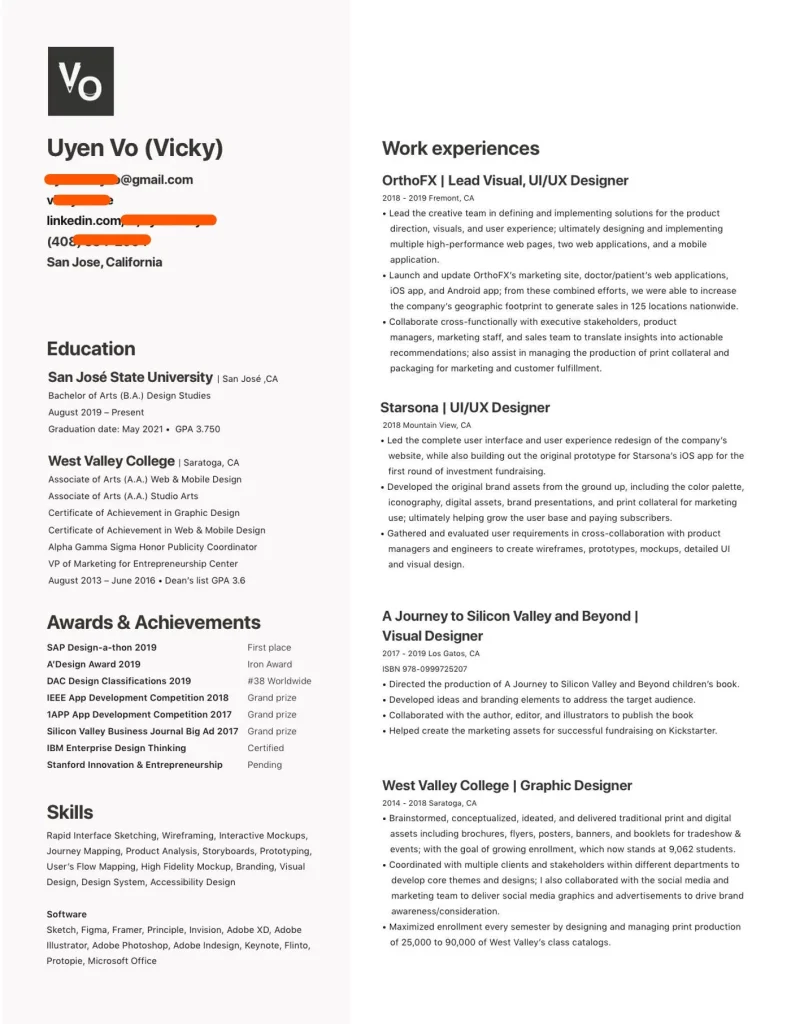
Why this resume works?
This resume of UI/UX designer is a great example of how mid-level professionals can present both experience and growth effectively.
● Strong experience timeline: Shows steady progress from education to mid-level roles.
● Balanced layout: The two-column format organizes skills, awards, and experience neatly without looking crowded.
● Skill diversity: Combines design, research, and branding expertise – ideal for mid-level UI/UX roles.
● Recognition and awards: Listing achievements adds credibility and shows industry appreciation for her work.
4. Experienced User Experience Designer Resume (Senior Level)
You can use this experienced user experience designer resume example to highlight your leadership and apply for senior-level roles.
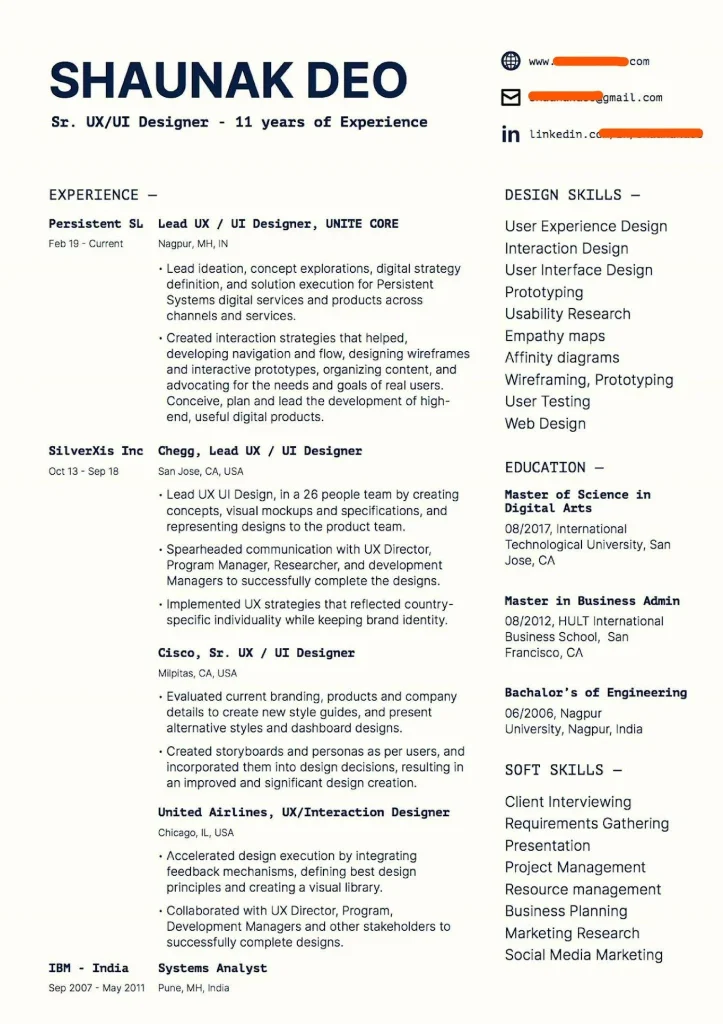
Why this resume works
This experienced user experience designer resume reflects a professional profile ideal for senior roles.
● Clear leadership focus: Each role highlights team management, strategic planning, and end-to-end product design leadership.
● Strong experience timeline: Over a decade of consistent progression from analyst to lead UX/UI designer shows solid career growth.
● Skill separation: Dividing design skills, education, and soft skills makes the resume easy to scan and well-structured.
● Professional tone: The clean layout, concise language, and readable typography create a senior-level impression.
Note: You can use the same format for UI/UX engineer resume.
5. Creative UI/UX Designer Resume (Modern)
This creative UI/UX designer resume features clean visual layout and personal style while keeping readability and balance intact.
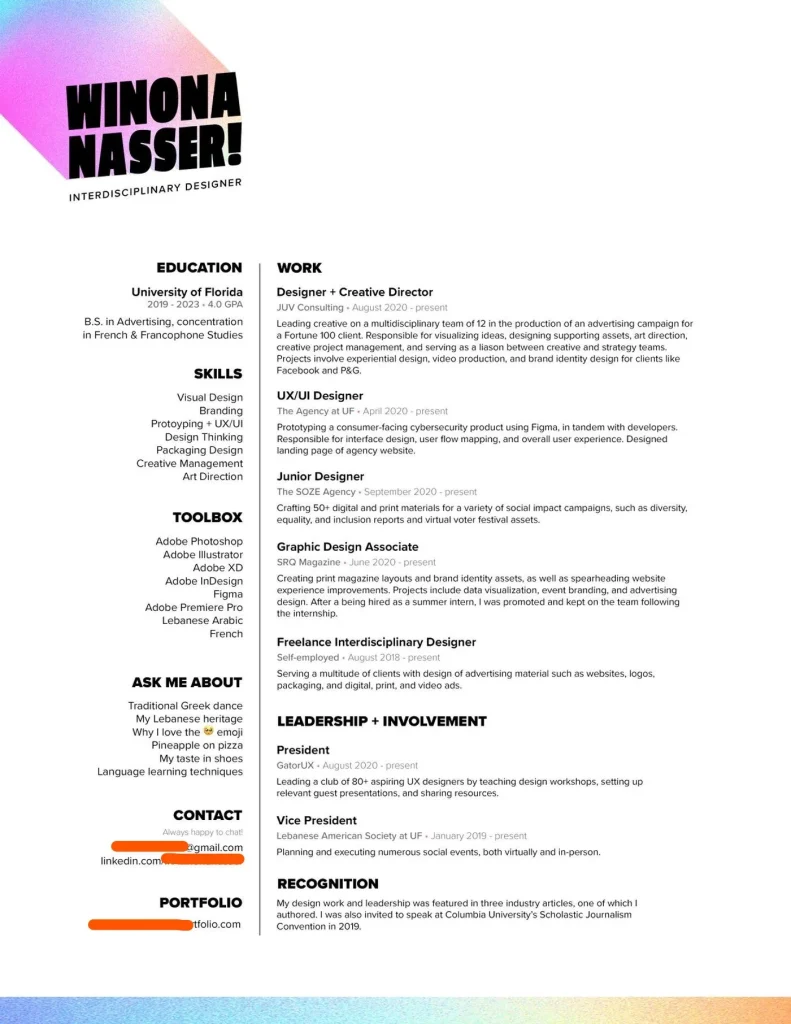
Why this resume works
This creative UI/UX designer resume perfectly shows how to blend creativity with structure.
● Unique visual identity: The colorful header instantly draws attention while keeping the overall design clean and professional.
● Balanced design and content: Despite its creative look, the layout is easy to scan with clear headings and readable text.
● Personality-driven: Sections like “Ask Me About” and “Recognition” make it personal and memorable to recruiters.
● Strong organization: Information is grouped logically with education, skills, and work neatly separated.
What Makes a Good UI/UX Designer Resume?
A strong user experience designer CV highlights creativity with clarity. Here is what makes it good:
● Clean and well-structured layout
● Focused professional summary
● Clear job titles and responsibilities
● Real project outcomes or metrics
● Balance between visual appeal and readability
● Skills section with tools and soft skills
● Link to online portfolio
● Consistent fonts and spacing
● Keywords from job description
Best UI and UX Designer Resume Format
Here are the best UI/UX designer resume format options for a clean and professional resume:
| Format Type | Best For | Description |
|---|---|---|
| Reverse Chronological | Experienced designers | Shows steady career growth with recent roles listed first. |
| Functional Format | Freshers or career changers | Focuses on skills, tools, and projects rather than job history. |
| Hybrid Format | Mid-level designers | Mixes both experience and skill sections for balanced presentation. |
| Minimal Layout | Creative designers | Uses clean design and spacing to highlight content over visuals. |
| Single Column Format | ATS compatibility | Keeps layout simple for online job systems and easy scanning. |
| Two-Column Format | Portfolio submissions | Offers modern, visual appeal for PDF or printed resumes. |
Key Components of a Great UI/UX Designer Resume
A perfect user experience designer resume includes all the right sections to show skills and experience clearly. Here are the key sections every resume of UI/UX designer should have:
● Header with name and contact details
● Short professional summary or objective
● Skills section highlighting design and research tools
● Work experience or internships
● Education details
● Certifications or design courses
● Portfolio or project links
● Awards or achievements (optional)
UI/UX Designer Resume Sample
Here is a UI/UX designer resume sample that follows the right format and includes all the key sections.
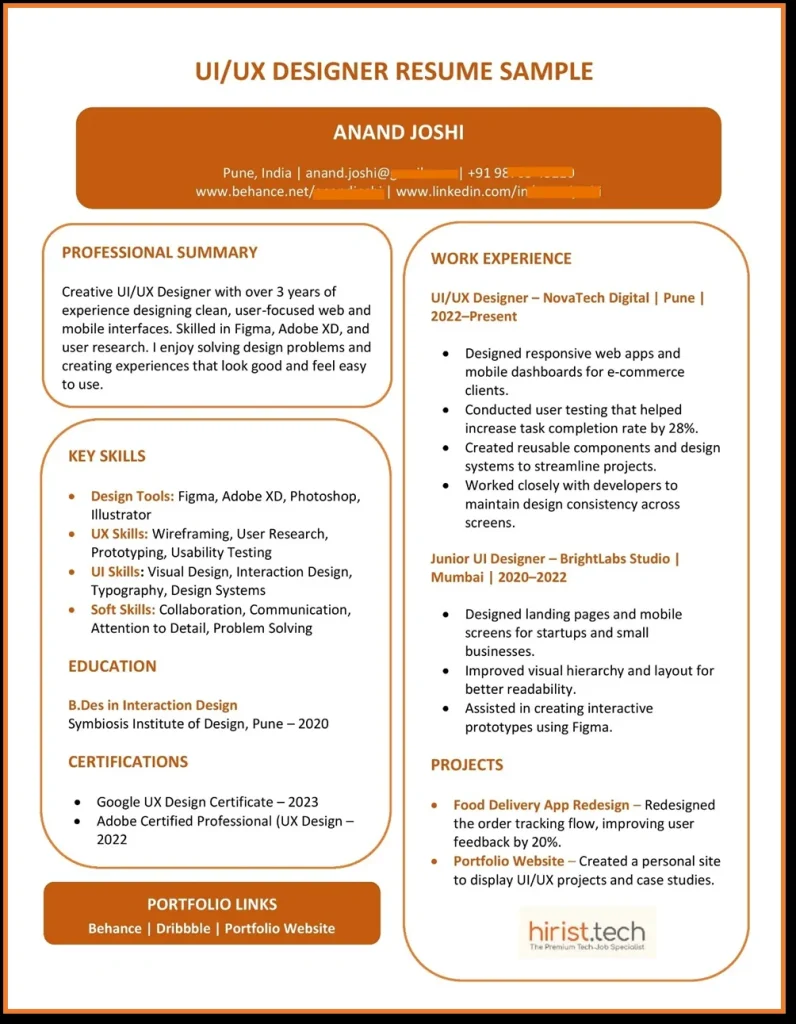
How to Write a UI/UX Resume Step-by-Step
Here’s how to write a UI UX designer resume that recruiters read. Works for freshers too with simple steps today.
Read the job description first
The first thing you should do is read the job description carefully and identify the main keywords. Once you have them, include them naturally in different parts of your resume.
Pick the right format
Reverse-chronological for experience. Functional for a UI UX designer resume for freshers. Hybrid to balance both.
Write a sharp summary
2–3 lines. Role, focus, tools, and impact.
Example: “UI/UX designer skilled in Figma and user research. Built mobile flows that improved task success.”
Build impact bullets (use a formula)
Action + What + Result.
Example: “Redesigned checkout flow → cut drop-offs by 18%.”
No experience? Use projects
For a UI UX designer resume with no experience, list class work, hackathons, case studies, and freelance.
Show your process
Mention research, wireframes, prototypes, testing, and handoff. One line each under key roles or projects.
Group your skills
Tools (Figma, Adobe XD), methods (usability testing, IA), soft skills (collaboration, communication). Keep it scannable.
Add a portfolio link at the top
Pick 2–3 best case studies. Match them to the job. A QR code is fine on PDF.
Include education and certifications
Degree, year, and relevant courses. Add Google UX or NN/g if you have them.
Use the right keywords naturally
Mirror the JD: platform, domain, tools, and outcomes. Do not stuff.
Name the file well
FirstName_LastName_UIUX_Resume.pdf keeps it tidy and easy to find.
Final “user test”
Print preview. Can you scan skills, projects, and results in 10 seconds? If yes, ship it.
Also Read - How to Become UI UX Designer – A Complete Step-by-Step Guide
How to Format Your Resume the Right Way
Formatting your UI/UX resume the right way makes a big difference in how recruiters view your profile. Here’s how to format your UI UX designer CV properly:
● Font style: Use clean fonts like Helvetica, Calibri, or Lato.
● Font size: 10–12 pt for text, 14–16 pt for headings.
● Margins: Keep 0.5–1 inch on all sides for balance.
● Line spacing: Use 1.15–1.5 for better readability.
● Alignment: Left-align all text; keep consistent spacing between sections.
● Length: One page for freshers, two pages for senior designers.
● File format: Save as PDF to preserve design and layout.
● Colors: Use 1–2 neutral colors (gray, blue, black) for a clean, professional look.
● Icons and visuals: Use only if they add clarity – avoid clutter.
● White space: Keep enough space to make each section stand out clearly.
Must-Have UI/UX Skills for Your Resume
Adding the right skills to your UI/UX designer skills resume helps recruiters see your strengths quickly. Here is a list every UI UX designer CV should include:
| Skill Category | Key Skills |
|---|---|
| Design Tools | Figma, Adobe XD, Sketch, Illustrator, Photoshop |
| Prototyping & Wireframing | Axure RP, InVision, Balsamiq, Marvel App |
| User Research | Surveys, Interviews, Usability Testing, A/B Testing |
| UI Design | Visual Design, Color Theory, Typography, Layout Design |
| UX Design | Journey Mapping, Information Architecture, Interaction Design |
| Front-End Knowledge | HTML, CSS, JavaScript (basic understanding) |
| Soft Skills | Communication, Collaboration, Problem-Solving, Time Management |
| Project Management | Agile, Scrum, Jira, Trello |
| Accessibility & Testing | WCAG Standards, Responsive Design, Cross-Browser Testing |
| Portfolio & Presentation | Case Studies, Design Storytelling, Client Communication |
Note: You can also add these skills when writing your user interface developer resume.
Common Mistakes to Avoid
Even a small UI/UX designer resume mistake can hurt your first impression. So, make sure you avoid these things:
● Overloading with visuals or fancy graphics
● Using too many fonts or colors
● Writing long paragraphs instead of short points
● Forgetting to add a portfolio link
● Ignoring measurable results or project outcomes
● Skipping proofreading for typos or grammar errors
● Submitting in Word format instead of PDF
● Leaving inconsistent spacing or misaligned sections
Free UI/UX Designer Resume Templates
Here are free UI/UX designer resume template examples to help you structure your own resume easily. Each UI/UX designer resume sample below fits different experience levels.
1. UI/UX Resume Template for Freshers
Best for students or beginners with internships or academic projects.
NAME:
Email | Phone | LinkedIn | Portfolio
OBJECTIVE:
A motivated design graduate skilled in Figma and user research, looking for an entry-level UI/UX role to grow and learn.
EDUCATION:
B.Des in Interaction Design – [University Name], [Year]
SKILLS:
● Figma
● Wireframing
● Prototyping
● Adobe XD
● Usability Testing
● Visual Design
PROJECTS:
● Redesigned a food delivery app prototype improving usability feedback by 25%.
● Created an e-commerce wireframe for a class project focused on user flow clarity.
CERTIFICATIONS:
Google UX Design Certificate, 2025
2. UI/UX Resume Template for Experienced Designers
Perfect for professionals with 3+ years of experience.
NAME:
Phone
Portfolio
PROFESSIONAL SUMMARY:
User-focused designer with 4 years of experience creating intuitive digital products. Skilled in UX research, prototyping, and cross-functional collaboration.
EXPERIENCE:
UX Designer – ABC Tech, 2022–Present
● Improved user onboarding by 30% through better flow mapping.
● Led usability testing sessions for two major app redesigns.
UI Designer – Pixel Studio, 2020–2022
● Created design systems for web and mobile platforms.
● Worked with developers to deliver responsive interfaces.
KEY SKILLS:
● Figma
● Adobe XD
● Sketch
● User Research
● Wireframing
● Design Systems
● HTML/CSS
EDUCATION:
B.Des in Communication Design – [University Name], [Year]
CERTIFICATIONS:
● NN/g UX Certification
● Google UX Certificate
Also Read - Top 30 UI UX Interview Questions and Answers
Wrapping Up
Your UI/UX designer resume should reflect how you think and work as a designer. Keep it simple, clear, and focused on results. Show what you have built, what problems you solved, and what impact you made. The right resume can help you land the job you have been aiming for.
If you are looking for UI/UX designer jobs, visit Hirist. It is an IT job portal where you can easily find the latest job openings for UI/UX roles.
FAQs
Include a brief summary, core design and coding skills, relevant tools (Figma, Adobe XD, HTML/CSS/JS), project highlights (academic, freelance, or personal), education, certifications, and a clickable portfolio or GitHub link.
Yes—use 1–2 subtle, professional colors that complement your design style. Ensure the text remains highly readable and the overall layout stays clean.
Focus on academic projects, design challenges, personal case studies, internships, or freelance work. Highlight your design process, tools used, and any measurable outcomes.
Absolutely. Freelance and self‑initiated projects demonstrate initiative, real‑world problem solving, and practical experience—especially valuable for early‑career designers.
Refresh it every 6–12 months or after completing a major project, certification, or new skill. Always tailor the content to match each job posting.