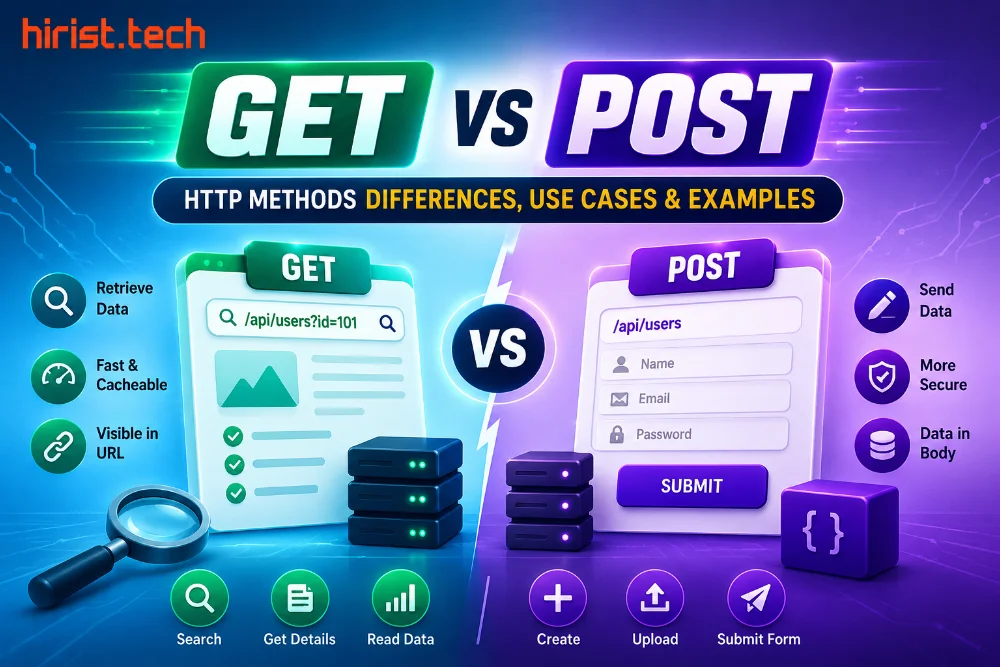
GET vs POST – Hypertext Transfer Protocol (HTTP) is how browsers and servers communicate. Whenever you open a website or search for something, HTTP controls how that data moves. It uses different request methods to decide what action should happen.
Among all of these, GET and POST are used the most.
- The GET method is used to request data from a server
- While the POST method is used to send data to it
Understanding the difference between GET and POST is important if you want to understand how websites work. This article explains GET vs POST HTTP methods in detail with examples.
GET vs POST method – Quick comparison
The HTTP GET vs POST request comparison becomes much clearer when you see how both methods behave side by side.
| Feature | GET Method | POST Method |
|---|---|---|
| Main purpose | Used to request or view data from the server | Used to send data to the server |
| Data location | Data is appended to the URL | Data is sent in the request body |
| Data visibility | Visible in the browser address bar | Not visible in the URL |
| Data size limit | Limited due to URL length restrictions | No practical data size limit |
| Data type support | Supports only ASCII string data | Supports string, numeric, and binary data |
| Security | Less secure since data is exposed in the URL | More secure as data is not exposed in the URL |
| Sensitive data usage | Should never be used for passwords or personal data | Suitable for sensitive information |
| Browser history | Stored in browser history | Not stored in browser history |
| Bookmarking | Can be bookmarked | Cannot be bookmarked |
| Caching | Often cached by browsers | Rarely cached |
| Encoding type | application/x-www-form-urlencoded | application/x-www-form-urlencoded or multipart/form-data |
| Data modification | Used only to read data | Can create or modify data |
| Common use cases | Search queries, page loading, filters | Login forms, registrations, payments, file uploads |
What is the HTTP GET method?
The HTTP GET method is used to request data from a server. It does not change anything on the server but only asks for information. With GET, the data is sent through the URL itself, which means it is visible in the address bar. This is why GET is mostly used for reading data like loading pages, search results, or filters.

Example of the GET method
Below is a simple example of a search feature on a website. When a user types a product name and clicks search, the browser sends that input to the server using the GET method.
HTML form using GET
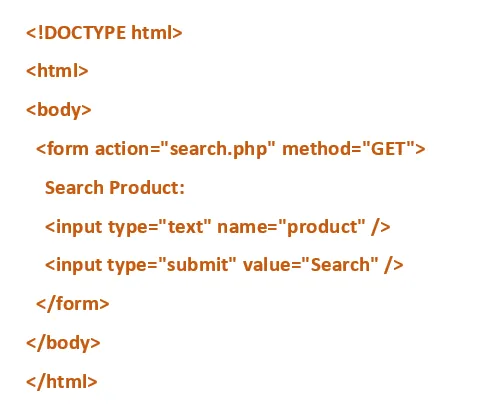
When the user searches for a product, the value is added to the URL. This is why you often see search words added to the address bar on shopping and blog websites.
PHP file (search.php)
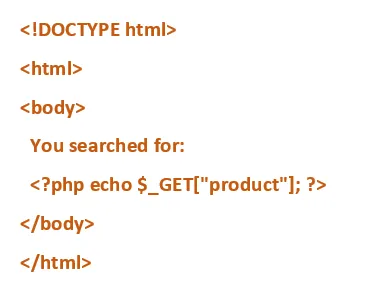
Here, the search term appears in the browser URL. This makes GET easy to share and bookmark, but unsafe for sensitive data.
What is the HTTP POST method?
The HTTP POST method is used to send data to a server. Unlike GET, the data is sent inside the request body, not the URL. This makes POST better for forms, personal details, and large data. POST is commonly used when something needs to be saved, processed, or changed on the server.

Example of the POST method
Below is a simple example of a feedback form on a website. When a user enters details and submits the form, the browser sends the data to the server using the POST method.
HTML form using POST
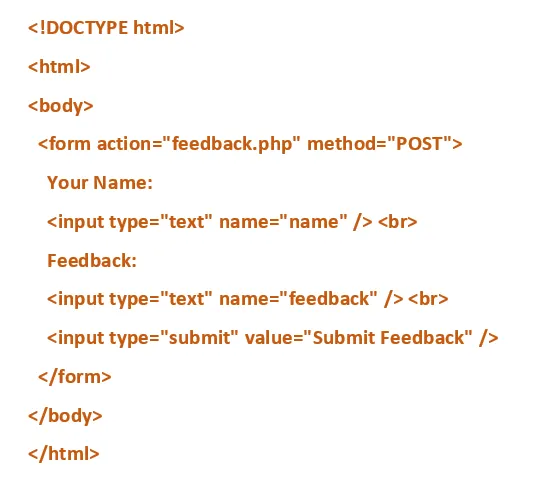
When the user submits the form, the entered data is sent inside the request body. It does not appear in the browser address bar.
PHP file (feedback.php)
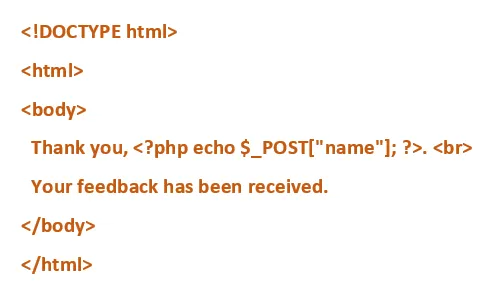
Here, the submitted data stays hidden from the URL. This is why POST is used for forms that send personal or important information.
Difference between GET and POST HTTP method
The HTTP GET vs POST request difference mainly comes down to how data is handled between the browser and the server. Both methods serve different roles, and using the wrong one can cause data exposure or functional issues.
- How data is sent
With GET, data is added directly to the URL. You can see it in the browser address bar. With POST, data is sent inside the request body, so it stays hidden from the URL.
- Data size limits
GET has limits because URLs can only be so long. This makes it unsuitable for large inputs. POST does not have this problem and can handle large amounts of data easily.
- Visibility and privacy
GET data is visible to anyone who sees the URL. It can appear in browser history, logs, and bookmarks. POST data is not visible in the URL, which makes it better for personal or sensitive information.
- Security
GET should never be used for passwords or private details. POST is safer for such data, especially when used with HTTPS. Still, POST alone does not guarantee security.
- Browser behaviour
GET requests can be bookmarked and cached. This is useful for search pages and filters. POST requests cannot be bookmarked and are usually not cached because they often trigger actions.
- Server-side action
GET is meant only for reading data. It should not change anything on the server. POST is used when data needs to be saved, updated, or processed.
Examples and use cases of GET and POST method
Below are simple examples that show how GET vs POST requests are used on everyday websites.
GET examples and use cases
- Browsing news articles: Opening a news article sends a GET request to fetch the content without changing anything on the server.
- Viewing product details: Clicking on a product listing uses a GET request to load details like price, images, and description.
POST examples and use cases
- Creating an account: Submitting a signup form sends a POST request with personal details to create a new user account.
- Sending a message: Filling out a contact form and clicking submit sends a POST request to deliver the message to the server.
GET vs POST: Which method to choose?
Choose GET when you only need to fetch or view data. It works best for searches, filters, and page loading where nothing changes on the server.
Choose POST when you need to send data or take action. It is the right choice for forms, logins, payments, uploads, or anything that saves or updates information.
A simple rule helps.
- If the action reads data, use GET.
- If the action sends data or changes something, use POST.
Wrapping up
GET vs POST method is something you should know if you are working with websites or preparing for tech interviews. These methods decide how data is sent and handled, and using the wrong one can cause real issues.
Interviewers often ask about the difference between GET and POST, and this blog helps you understand it clearly. For more tech interview questions and the best IT jobs in India, visit Hirist.
FAQs
Use GET to read data. Use POST to submit new data or trigger actions. Use PUT when you want to update an existing resource completely.
Neither is better by default. GET is better for reading and sharing data. POST is better for sending data, especially when it is private or large.
You can, but you should not. GET exposes data in the URL and should never be used for passwords, personal details, or form submissions.
No. POST hides data from the URL, but it is only safe when used with HTTPS. Without HTTPS, data can still be intercepted.
GET data is added to the URL, and browsers limit URL length. This makes GET unsuitable for large inputs.
Because it shows whether you understand how web requests work, how data is handled, and how to avoid common security mistakes.
In REST APIs, POST is used to create a new resource, while PUT is used to update an existing resource completely. POST can create duplicates, PUT does not.
In PHP, GET sends data through the URL and is accessed using $_GET. POST sends data in the request body and is accessed using $_POST.