Rate Limit – Key Highlights
- Rate limit meaning: A rate limit defines the maximum number of requests a user or system can make within a specific time window.
- What is rate limiting? Rate limiting is a method used by systems to track requests and restrict excess usage to keep services stable and responsive.
- How does rate limiting work? The system counts incoming requests within a time frame and blocks or slows requests once the predefined limit is crossed.
- What is API rate limiting? API rate limiting restricts how many API calls a client can make in a given time to prevent misuse and control costs.
- Why is rate limiting important? Rate limiting prevents abuse, reduces server overload, protects APIs, improves performance, and keeps services available for legitimate users.
- Rate limiting best practices: Set realistic limits, use different rules for actions, allow short bursts, monitor usage, show clear errors, and adjust limits based on real traffic.
Rate limit decisions affect how systems behave under pressure. When traffic increases or usage spikes, platforms must control request flow to avoid slowdowns and failures. This is especially important for APIs and backend services, where even a small surge can affect availability. Many teams notice rate limits only after users start seeing errors or performance drops. That makes understanding rate limiting a practical requirement for IT professionals.
This article explains what rate limiting means and how it works through real examples. It also covers the benefits of rate limiting and best practices to apply it correctly.
What Is Rate Limiting?
Before understanding what is rate limiting, it helps to first understand a rate limit.
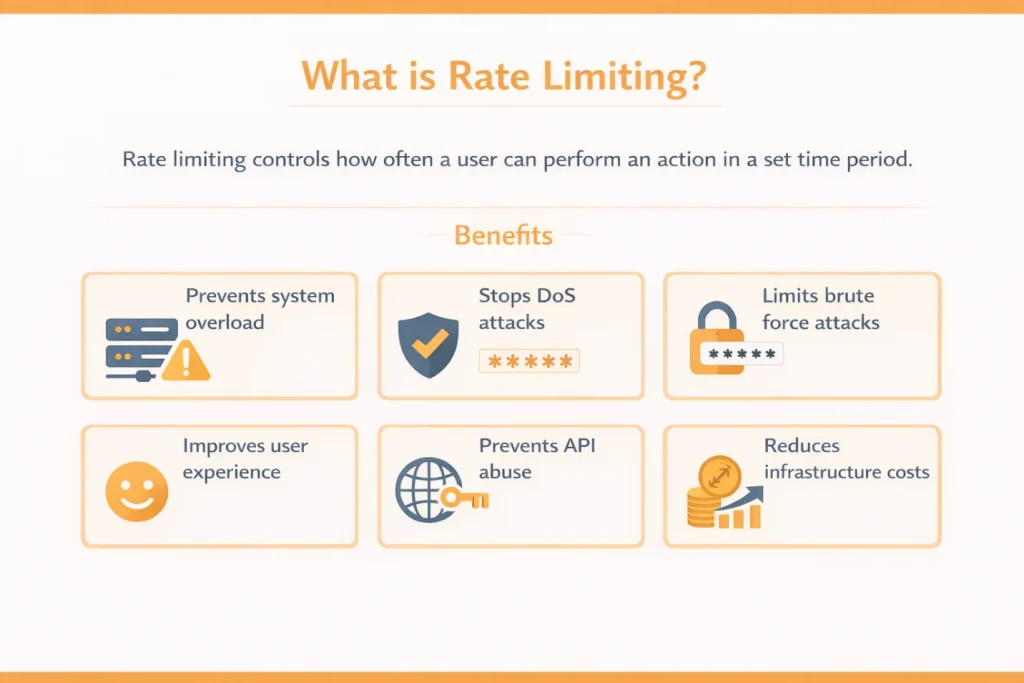
A rate limit is a rule that sets how often an action can happen in a given time. This could be a login attempt, an API call, or a page request. When the limit is reached, the system temporarily slows or blocks further requests.
Now, rate limiting is the process of applying and enforcing that rule. It is how systems monitor activity and decide when a rate limit has been crossed. You can think of it like a speed limit on a road. The speed limit sets the number. Traffic control enforces it to keep vehicles moving safely. Rate limiting is widely used to protect systems from overload and misuse.
In practical terms, rate limiting controls three things:
- Actions – Such as login attempts or form submissions
- Requests – Such as API calls or page loads
- Time – Which defines how often those actions are allowed
How Does Rate Limiting Work?
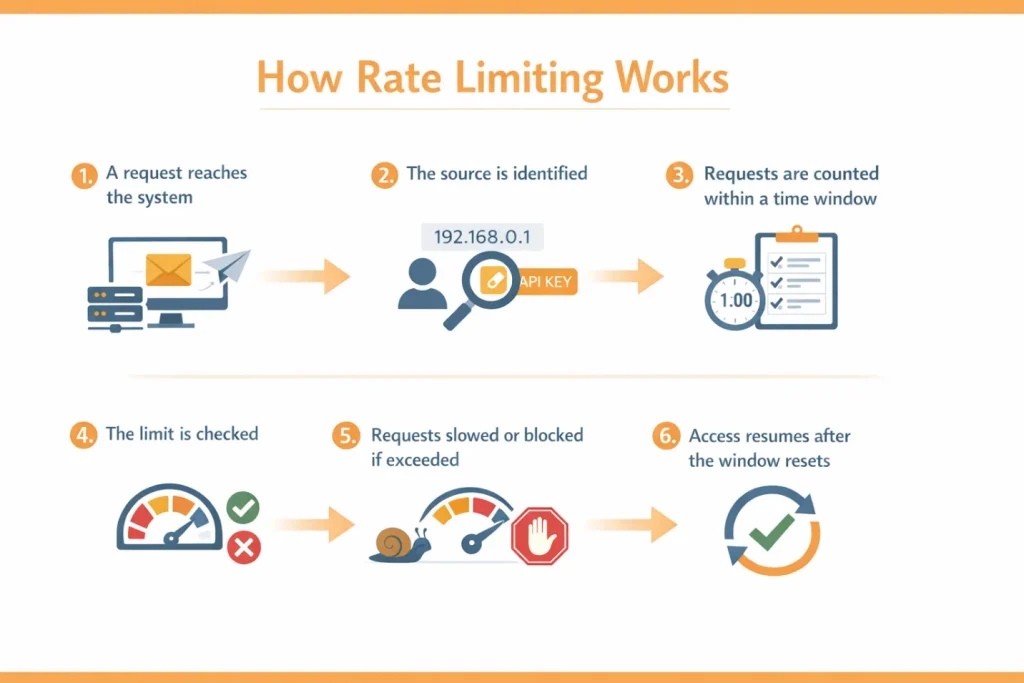
- A request reaches the application: This could be a login attempt or any action that triggers server processing. Rate limiting usually works at the application or API layer, not at the basic web server level.
- The system identifies the source: The request is linked to a source such as an IP address, user account, or API key. This helps the system understand who is making the request.
- The request count is checked: The system checks how many requests this source has already made within a defined time window, such as one minute or one hour.
- The limit is evaluated: If the request count is within the allowed limit, the request is processed normally. If the count exceeds the limit, the system takes action.
- Requests are throttled or blocked: Throttle – Requests are slowed down so the system can manage load without disruption. Block – Requests are rejected for a short period. APIs often return an HTTP 429 error when users see an exceeded API rate limit message.
- Limits are applied based on what needs protection: Rate limiting can be configured in different ways — request-based limits control how many requests a user or client can send in a given time; traffic-based limits manage the overall flow of data across a network; resource-based limits protect specific endpoints or services from overload.
- The time window resets: Once the time window ends, request counts are cleared and normal access resumes.
Example of Rate Limiting
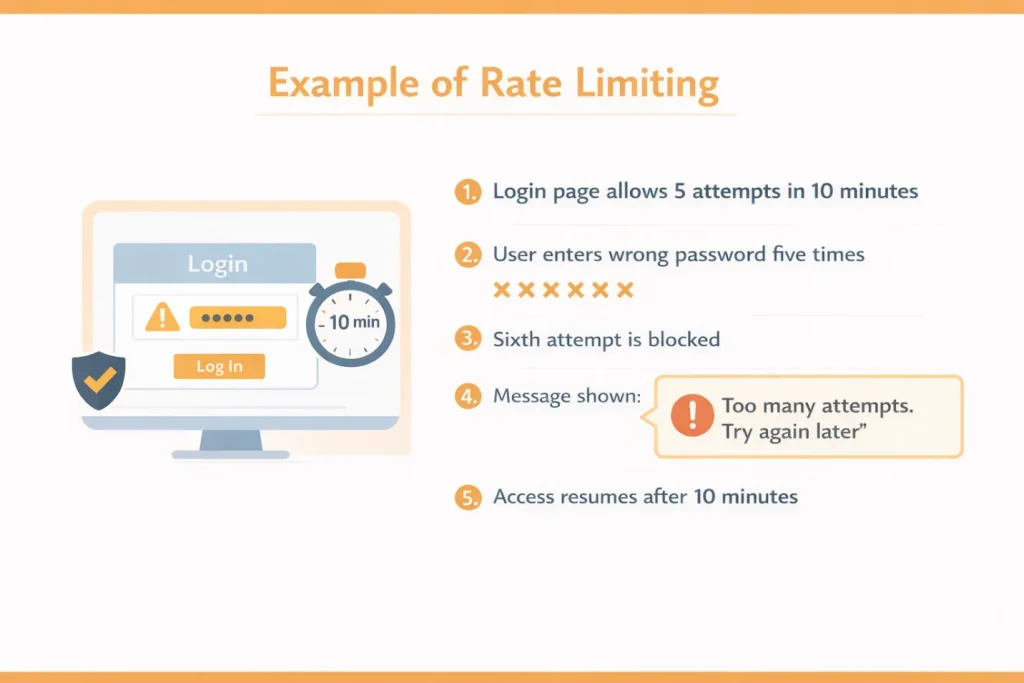
Let’s say a login page that allows 5 login attempts per user within 10 minutes.
- A user enters the wrong password five times
- On the sixth attempt, the system blocks further login attempts
- The user sees a message like “Too many login attempts. Try again after 10 minutes”
- After 10 minutes, the limit resets and login attempts are allowed again
This is rate limiting in action.
Why Is Rate Limiting Important?
Rate limiting is essential because modern systems handle large volumes of shared traffic. Below are the key benefits of rate limiting.
- Protects systems from overload: Every request consumes resources like CPU, memory, database connections, or bandwidth. Rate limiting keeps request volume within safe limits so systems do not slow down or crash.
- Reduces the impact of DoS and DDoS attacks: Attackers often flood systems with requests to make them unavailable. Rate limiting restricts how frequently requests are accepted, reducing pressure on servers during attacks.
- Prevents brute force and credential attacks: Login endpoints are common targets for repeated password attempts. Rate limiting slows these attempts and helps protect user accounts from takeover.
- Stops abuse and automated bot traffic: Bots can send thousands of requests in seconds. Rate limiting prevents a single script or bot from consuming shared system resources.
- Keeps systems usable during traffic spikes: Traffic surges from launches, campaigns, or peak hours can overload backend services. Rate limiting smooths incoming traffic so systems degrade gracefully instead of failing.
- Protects APIs from excessive usage: APIs are easy to overuse because they are accessed programmatically. A rate limit ensures fair usage across clients and keeps APIs available.
- Helps manage infrastructure costs: Uncontrolled traffic can trigger unnecessary scaling. Rate limiting reduces wasted compute usage and keeps operational costs under control.
Rate Limit vs API Rate Limiting
Understanding the difference helps avoid confusion when working with systems and APIs.
Rate Limit
A rate limit is a general rule that controls how often an action can happen within a fixed time. It can apply to logins, form submissions, searches, or repeated system actions.
API Rate Limiting
API rate limiting applies the same rule specifically to APIs and defines the rate limit in API usage. It controls how many API requests a client can send within a defined time window.
Why APIs Need Stricter Limits
- APIs are accessed by applications, not humans
- A single script can send thousands of requests in seconds
- Every API call uses CPU, memory, and network bandwidth
- Unchecked API usage can affect availability for all users
For this reason, the rate limit in API design focuses on fairness and stability. A proper rate limit API setup protects shared resources while allowing legitimate clients to function without disruption.
Common Types of Rate Limits
Rate limiting can be applied in different ways depending on what needs protection. Most systems use a combination of these limits to stay stable and fair, without adding unnecessary complexity.
| Rate Limit Type | What It Means | Example |
|---|---|---|
| Per user / per IP | Limits how many requests a single user or IP address can make in a time window | A login page allows only a few attempts per IP |
| Per API key | Applies limits based on an assigned API key | An API client can make 100 requests per minute |
| Per endpoint | Sets different limits for different endpoints | Search endpoints allow more requests than payment APIs |
| Per time window | Controls how many requests are allowed within a fixed period | 60 requests per minute with reset after one minute |
| Geographic rate limits | Applies limits based on country or region | Lower limits applied during off-hours in certain regions |
| Server-level rate limits | Protects individual backend services or servers | Stricter limits on less critical services |
What Are the Algorithms Used for Rate Limiting?
Rate limiting algorithms define how a system counts requests and decides when to allow or stop them. Different algorithms solve different problems, so there is no single best option for every use case. Below are the most commonly used rate limiting algorithms.
1. Fixed Window
The fixed window approach counts requests within a fixed time block, such as one minute or one hour.
For example, if a system allows 100 requests per minute, it will accept up to 100 requests between 10:00 and 10:01. At 10:01, the count resets and the user gets another 100 requests.
Why is it used:
- Simple to understand and implement
- Easy to monitor
Limitations:
- Can feel unfair at reset points
- A user can send many requests right before and right after the reset
2. Sliding Window
The sliding window method improves on fixed windows by tracking requests over a moving time range instead of fixed blocks. Instead of resetting at exact time boundaries, the window moves forward with each request. This creates smoother and more accurate limits.
Why is it used:
- More accurate request tracking
- Fairer for users
Limitations:
- Slightly more complex to implement
3. Token Bucket
The token bucket method works by giving requests “permission tokens.” Tokens are added to a bucket at a fixed rate. Each request needs one token to pass. If tokens are available, the request goes through immediately. If the bucket is empty, the request must wait or be rejected.
Why is it used:
- Allows sudden bursts without breaking the system
- Very common for API rate limiting
Limitations:
- Needs careful tuning to avoid abuse
- Too many tokens can still allow a brief overload
4. Leaky Bucket
The leaky bucket method lets requests pass at a fixed speed. Requests go into a bucket. The system takes them out at the same steady pace every time. If too many requests arrive at once, the bucket fills up. When the bucket is full, new requests are dropped or delayed. This method does not allow sudden bursts. Even if requests come in quickly, they are processed slowly and evenly.
Why is it used:
- Smooth and consistent traffic flow
- Useful for systems that need steady output
Limitations:
- Can feel strict
- Not ideal for bursty traffic
What Are the Best Practices for Rate Limiting?
A good rate limit in API design is not about blocking users. It is about protecting systems while keeping real usage smooth. These best practices help you do both.
1. Start Loose, Then Tighten Based on Data
Set a reasonable initial rate limit based on expected usage. Do not make it too strict on day one. Watch real traffic for a few days, then adjust limits using logs and patterns.
Tip: Begin with higher limits for read requests and lower limits for sensitive actions.
2. Use Different Limits for Different Actions
Not all actions have the same risk or system cost. Treating every request the same leads to poor control and unnecessary restrictions. Apply stricter limits where abuse causes real damage, and looser limits where usage is harmless.
Common examples:
- Login and OTP endpoints: Strict limits
- Search endpoints: Moderate limits
- Read-only endpoints: Higher limits
- Payment or export endpoints: Very strict limits
This approach reduces abuse without slowing normal users.
3. Plan for Burst Traffic
Real traffic does not arrive evenly. Users click quickly. Applications retry failed requests. Background jobs often run in batches. Your rate limiting strategy should allow short bursts while still preventing sustained abuse.
Use burst-friendly controls:
- Token bucket for short bursts
- Sliding window for fair counting
- Separate burst limits from long-term limits
This prevents brief spikes from causing unnecessary blocks.
4. Return Clear Errors and Retry Guidance
Hitting a rate limit should not feel like a system failure. Users need to understand what happened and when they can retry. If a user hits a limit, tell them what happened and what to do next.
A good response includes:
- HTTP 429 for blocked requests
- A message like “Too many requests, try again in 30 seconds”
- A retry time or reset timestamp when possible
This reduces support tickets and developer confusion.
5. Log and Monitor Rate Limit Events
Rate limits should never run silently. Without monitoring, you cannot tell if limits are too strict or too loose. Log every rate limit event and review trends regularly.
Log details such as:
- Who was limited
- Which endpoint was hit
- Request count and time window
- Whether it was throttled or blocked
Then monitor trends. If limits trigger too often, change limits or fix request patterns.
6. Never Surprise Users
Unexpected rate limits frustrate users and break integrations. Predictability is critical for developer trust. Make rate limits visible and consistent.
Avoid surprises by:
- Documenting limits clearly for API users
- Keeping limits consistent across environments
- Warning before hard blocks when possible
- Providing a path for higher limits for trusted clients
Common Rate Limiting Mistakes
Poor rate limiting usually comes from a rushed setup or wrong assumptions. These mistakes often cause user frustration or unnecessary system strain.
- Setting limits too low and blocking valid users
- Using the same rate limit for all actions
- Ignoring burst traffic patterns
- Failing to return clear error messages
- Not monitoring rate limit events
- Applying limits without documentation
- Blocking users without warning
- Treating human and bot traffic the same
Also Read - DevOps interview questions
Wrapping Up
Rate limiting is a practical concept that directly affects API performance and user experience. Knowing when and how to apply rate limits is important for IT professionals, as the topic often comes up in backend developer, API engineer, and system design interviews.
If you want to prepare better and apply these concepts in real roles, Hirist offers useful resources for IT professionals and also lets you apply for relevant tech jobs in one place.
PI gateway rate limiting controls how many requests pass through an API gateway within a fixed time. The gateway sits in front of backend services and applies limits before traffic reaches them. This protects APIs from overload, abuse, and sudden spikes while keeping backend systems stable. An API gateway rate limit is often applied per IP, API key, or client.
OpenAI applies rate limits on API usage based on your account, model, and tier. OpenAI API rate limits include: Requests Per Minute (RPM) – how many calls you can make per minute Tokens Per Minute (TPM) – how many tokens processing (input + output) you can use per minute For example, many users see limits such as 3,500 RPM and 90,000 TPM for GPT-4 in some tiers, although exact numbers vary by model and account settings. Exceeding either RPM or TPM can trigger a rate limit and return a HTTP 429 error.
Rate limiting in microservices is used to protect individual services from being overwhelmed by internal or external traffic. Limits are often applied at the API gateway or service level. Each service can have its own limits based on usage and cost. This prevents one service from affecting others and improves overall system stability.
To implement a rate limit in Node.js, developers commonly use middleware libraries like express-rate-limit. These tools track request counts per IP or user within a time window. Rate limiting Node.js applications helps control traffic, prevent abuse, and protect APIs with minimal setup.
In Golang rate limit implementations, developers often use built-in time packages or external libraries like golang.org/x/time/rate. These tools control how frequently requests are processed. Rate limiting in Golang is commonly applied in APIs and microservices to manage request flow and prevent overload.
GitHub’s REST API enforces limits on requests per hour. Common published values for GitHub API rate limit include: Unauthenticated requests: 60 requests per hour uthenticated requests: up to 5,000 requests per hour per user token GitHub App installation limits: often 5,000 requests per hour, with variations possible for enterprise or large installs. If you exceed these limits, GitHub returns a rate limit exceeded response and you must wait until the limit window resets before making more requests.
When you see “exceeded API rate limit”, it does not mean your request was invalid. It means the API accepted too many requests from your source within a short time. This is a safety measure, not an error in your code.