Finding a good job as an SQL developer often starts with one thing – a strong SQL developer resume. If you have been struggling to build one that actually gets noticed, this guide will make it easier. Many resumes get skipped because they are too generic or fail to show what you can really do.
In this guide, you will learn how to create a powerful SQL developer resume that not only passes the ATS system but also impresses recruiters. We are also sharing some of the best SQL developer resume samples for both freshers and experienced professionals to help you write your own.
SQL Developer Resume Example
Before we start with the blog, let’s take a quick look at what a strong resume actually looks like. Below is an SQL developer resume example you can use as a guide to structure your own. It shows how to present all your details in a professional way.
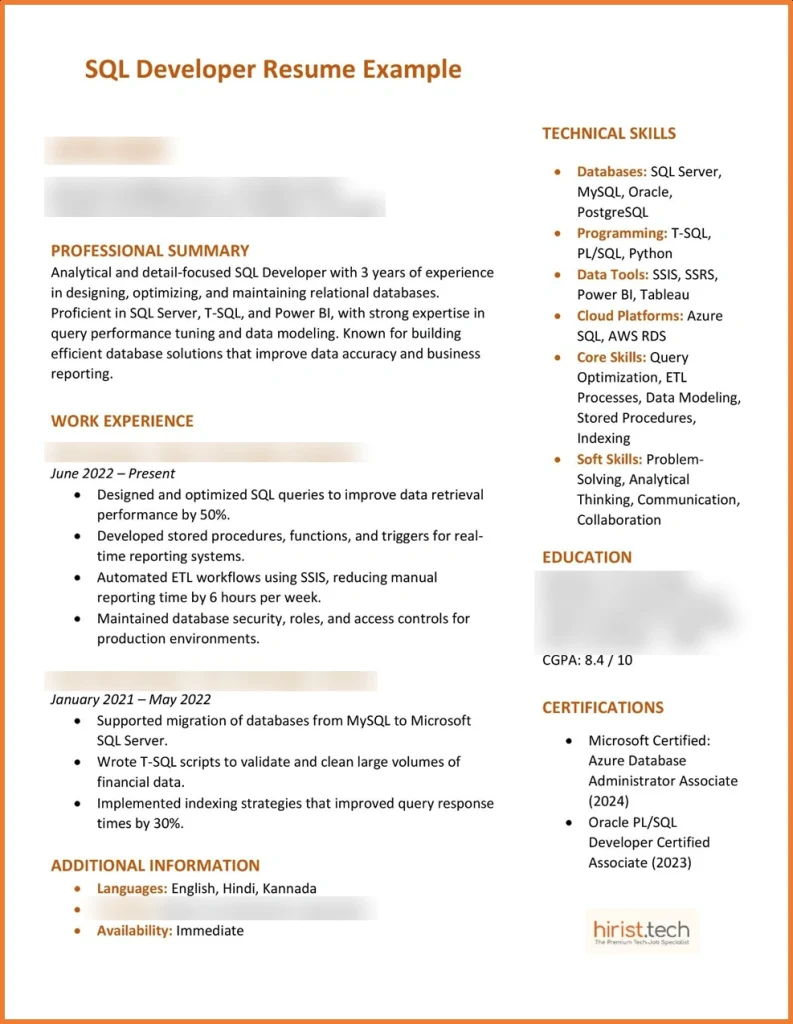
Why this sample resume for SQL developer works?
- Highlights measurable results
- Uses clear and action-based verbs for every achievement
- Shows both technical and soft skills
- Includes relevant certifications
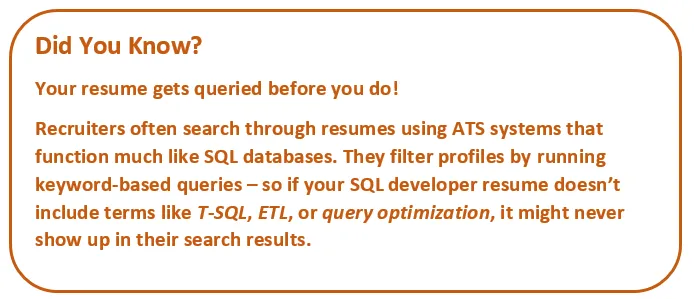
- ATS-friendly formatting with keywords like SQL Server, ETL, Power BI
Also Read - Top 50+ SQL Server Interview Questions and Answers
SQL Developer Resume Basics – A Complete Overview
Here is a quick summary table that gives you an overview of everything you need to know about writing a strong SQL developer CV – from the right format and key sections to practical tips that help you make a great first impression.
| Category | Details |
|---|---|
| Resume length | SQL resume for freshers: 1 pageExperienced Professionals: Up to 2 pages |
| SQL developer resume format | Reverse Chronological – Best for most SQL developersFunctional – Great for freshers or career changersHybrid (Combination) – Ideal for mid-level or senior professionals |
| Font type | Use clean, easy-to-read fonts like Calibri, Arial, or Helvetica |
| Font size | 10–12 pt for main text, 14–16 pt for section headings |
| Key sections to include | Header (Name, Contact, LinkedIn, GitHub)Professional Summary or Career ObjectiveTechnical SkillsWork Experience or ProjectsEducationCertificationsAchievements (optional) |
| Portfolio links | Add GitHub, Kaggle, or LinkedIn links to showcase real SQL projects and code samples |
| Top SQL resume skills | SQL, T-SQL, PL/SQLDatabase Design & ModelingPerformance Tuning, Query OptimizationSSIS, SSRS, ETL ProcessesMySQL, Oracle, PostgreSQL, SQL ServerData Analysis, BI Tools, Cloud (AWS, Azure) |
| Best file format | PDF – Keeps layout consistent and is ATS-friendly |
| Certifications to add in SQL developer CV | Microsoft Certified: Azure Data FundamentalsOracle Database SQL Certified AssociateAWS Certified Database – SpecialtyIBM Data Engineering Professional Certificate |
| ATS optimization tip | Add job-specific keywords naturally, like database management, query tuning, ETL pipelines, and data warehousing. Avoid tables or images that confuse ATS systems. |
| Tips to follow | Use short, action-based bullet pointsQuantify achievementsCustomize your resume to each jobKeep your formatting simple and professional |
| Common mistakes to avoid | Using long paragraphsMissing SQL-specific keywordsIncluding outdated toolsOverusing design-heavy templates |
| Average salary range | ₹2.1 LPA – ₹9 LPA depending on experience, role, and skill set (AmbitionBox) |
| Top job platforms | Hirist, LinkedIn, Naukri |
Also Read - Top 25+ PostgreSQL Interview Questions and Answers
How to Write an SQL Developer Resume?
A strong SQL developer resume should quickly show what you can do and why you are a good fit. Here are the steps you should follow when creating your SQL developer CV.
1. Start with the right resume format
The first step in building a solid SQL developer resume is choosing the right layout. Recruiters and ATS tools prefer simple and structured resumes that are easy to scan.
Here are the most common types of resume formats:
- Reverse chronological format: This is the most popular choice for SQL developers with experience. It lists your latest job first and works best when you want to highlight your career growth and achievements.
- Functional format: It is ideal for freshers or those switching careers. This structure focuses on skills and projects rather than job titles.
- Combination format: This format is great for mid-level professionals. It blends both your technical SQL resume skills and work experience.
A clean and professional layout is the best resume format for SQL developer roles.
2. Write a short and impactful summary for your SQL developer resume
Once you have chosen the right format and added your name and contact details, focus on writing a short profile summary. Keep it within three lines and make it count. This section should quickly show your value. Think of it as your elevator pitch to the recruiter.
For experienced professionals (Profile summary):
Your summary should include your experience level, core SQL expertise, and one key achievement or area of strength.
Here is an example
Results-driven SQL Developer with 4+ years of experience in writing optimized queries, managing complex databases, and improving data efficiency across enterprise systems.
For freshers (Objective statement):
Freshers should write “objective statement” instead of a profile summary. Here, you should talk about the key skills you have that make you the right candidate for the job.
Here is an example
Motivated computer science graduate seeking an entry-level SQL developer role. Skilled in writing queries, designing database structures, and optimizing data flow through academic and internship projects.
3. Highlight your technical SQL develop skills clearly
The skills section is where you show what you know. Don’t just list tools – group them by category so it is easy to scan. A smart way to do this is by checking the job description, picking the key skills it mentions, and adding the ones you truly have to your resume.
Key SQL resume skills:
| Category | Skills |
|---|---|
| Core Database Skills | SQL, T-SQL, PL/SQL, MySQL, PostgreSQL, Oracle Database, SQL Server, NoSQL (MongoDB, Cassandra) |
| Data Management & Tools | SSIS, SSRS, ETL Processes, Data Modeling, Query Optimization, Indexing, Data Warehousing, Stored Procedures, Triggers, Views |
| Programming & Automation | Python, C#, Java, R, Shell Scripting, PowerShell, Bash, JSON, XML |
| Cloud & BI Tools | AWS RDS, Azure SQL Database, Google Cloud SQL, Power BI, Tableau, Snowflake, BigQuery |
| Performance & Security | Database Performance Tuning, Query Execution Plans, Caching, Backup & Recovery, Access Control, Data Encryption |
| DevOps & Version Control | Git, Jenkins, Docker, CI/CD Pipelines, Database Deployment Automation |
| Soft Skills | Problem-Solving, Analytical Thinking, Collaboration, Communication, Attention to Detail, Documentation, Teamwork |
4. Describe SQL developer work experience with measurable impact
In your work experience section, don’t just list duties — show what you’ve achieved. Start with your job title, company name, and employment dates. Then, add short bullet points that highlight your key contributions. Each bullet point should start with an action verb and, where ever possible, include a result or percentage.
For example:
- Optimized SQL queries and reduced data retrieval time by 30%.
- Developed automated backup scripts improving data recovery speed by 25%.
- Collaborated with cross-functional teams to design and implement scalable database structures.
Tip: Keep your bullet points short and easy to scan. Recruiters spend only a few seconds deciding whether to read further.
5. Add projects and internships for freshers
If you are new to the industry, your projects matter more than job titles. In your SQL resume for freshers, include academic or internship projects that show your technical ability.
Example:
- Designed a library management database using MySQL with tables for users, books, and transactions.
- Built a student record system to track attendance and performance using SQL and Python.
This kind of detail proves you understand database concepts and can apply them practically. Your SQL developer resume for freshers should emphasize learning and a willingness to solve real problems.
6. List education and certifications
For freshers, your degree should appear before experience. For experienced professionals, place it later in your resume.
You can also include certifications like:
- Microsoft Certified: Azure Data Fundamentals
- Oracle Database SQL Certified Associate
- AWS Certified Database – Specialty
These validate your skills and show continuous learning.
7. Final checks before sending
Once you are done with your SQL developer resume, follow these final tips to make it perfect.
- Keep your resume one page (two max if you have extensive experience).
- Proofread for grammar or spacing errors.
- Add links to your GitHub or portfolio if you have live SQL projects.
- Save in PDF format to avoid layout changes.
Also Read - Top 100+ SQL Query Interview Questions and Answers
SQL Developer Resume Samples
Here are a few SQL developer resume samples to help you understand how to format your profile. Each sample resume for SQL developer and SQL developer CV sample highlights skills and achievements recruiters look for.
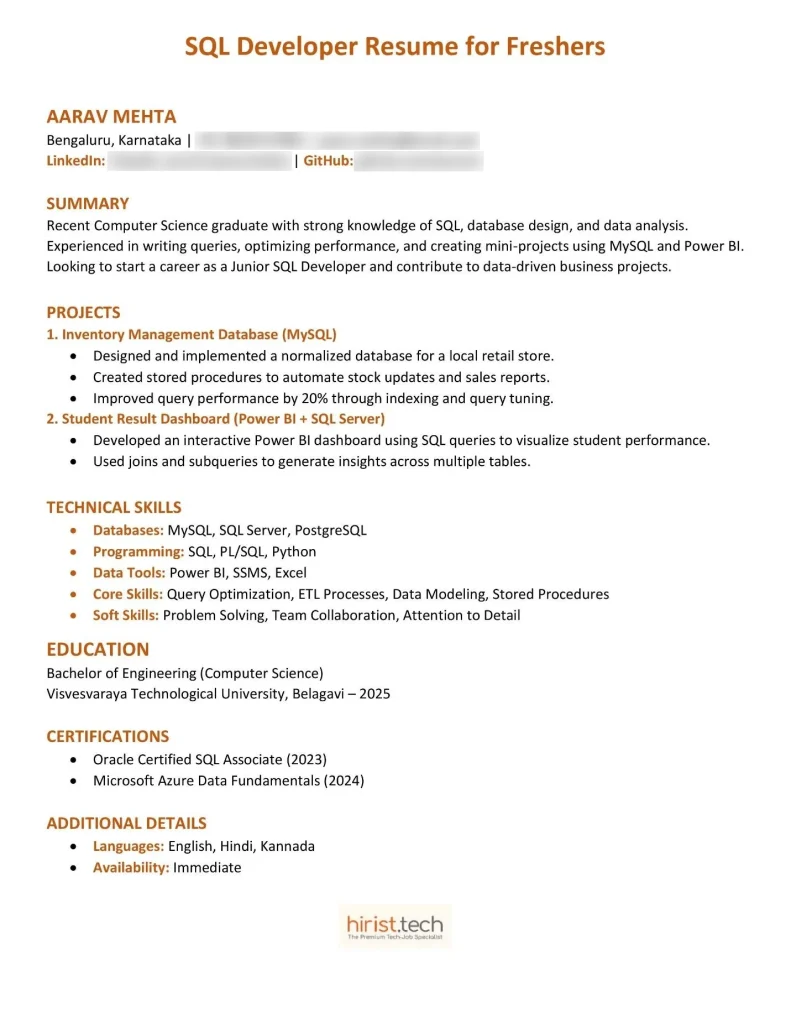
Example 1: SQL Developer Resume Sample for Freshers
Here is a sample to help you create a strong SQL resume for freshers with clear structure and relevant projects.
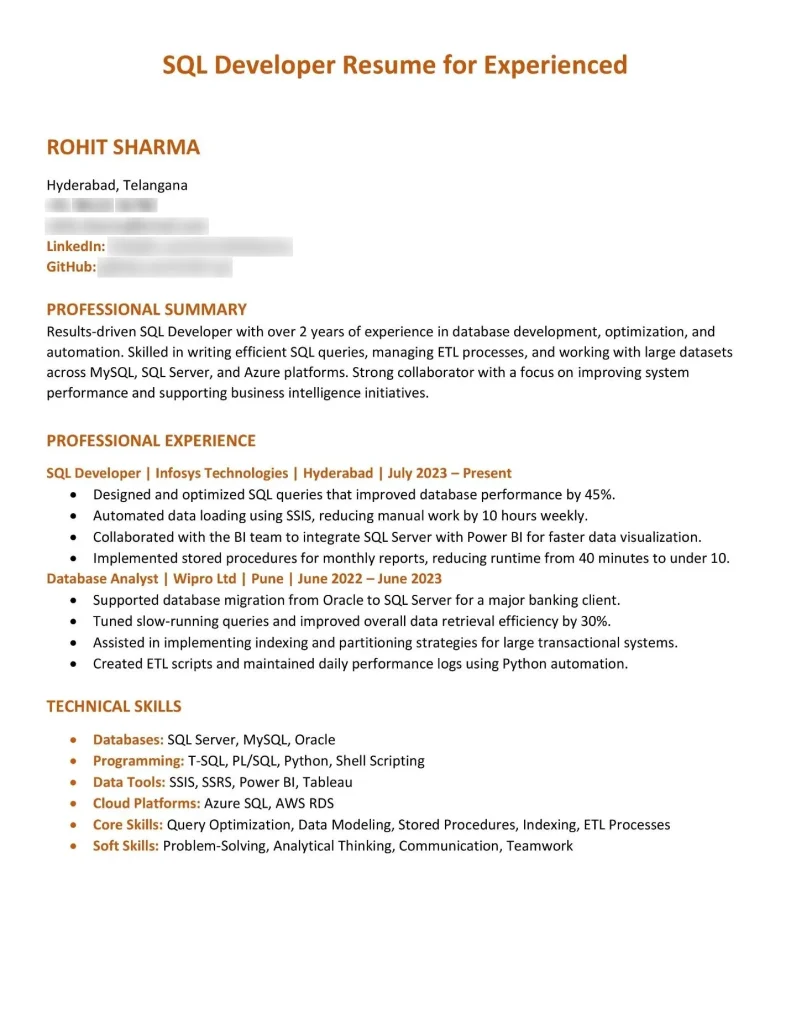
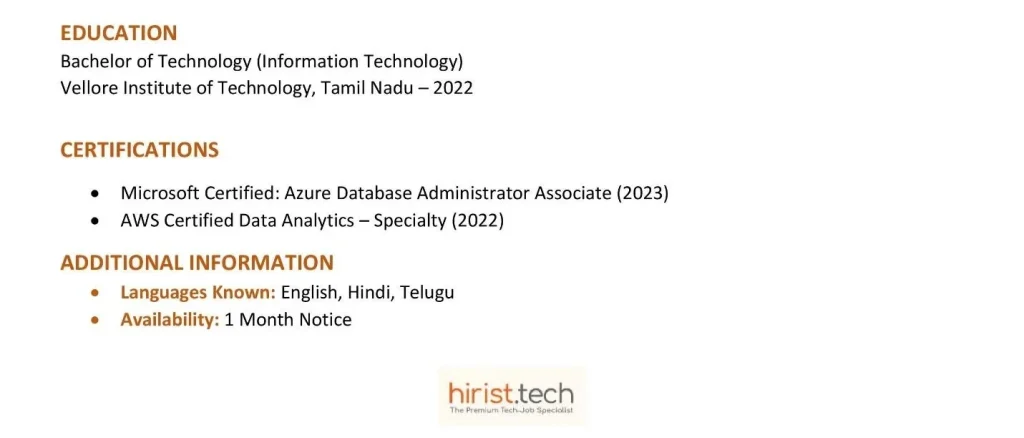
Example 2: SQL Developer Resume Sample for Experienced
You can use this sample resume for SQL developers with experience. It is perfect for those building an SQL developer resume with 2 years of experience.
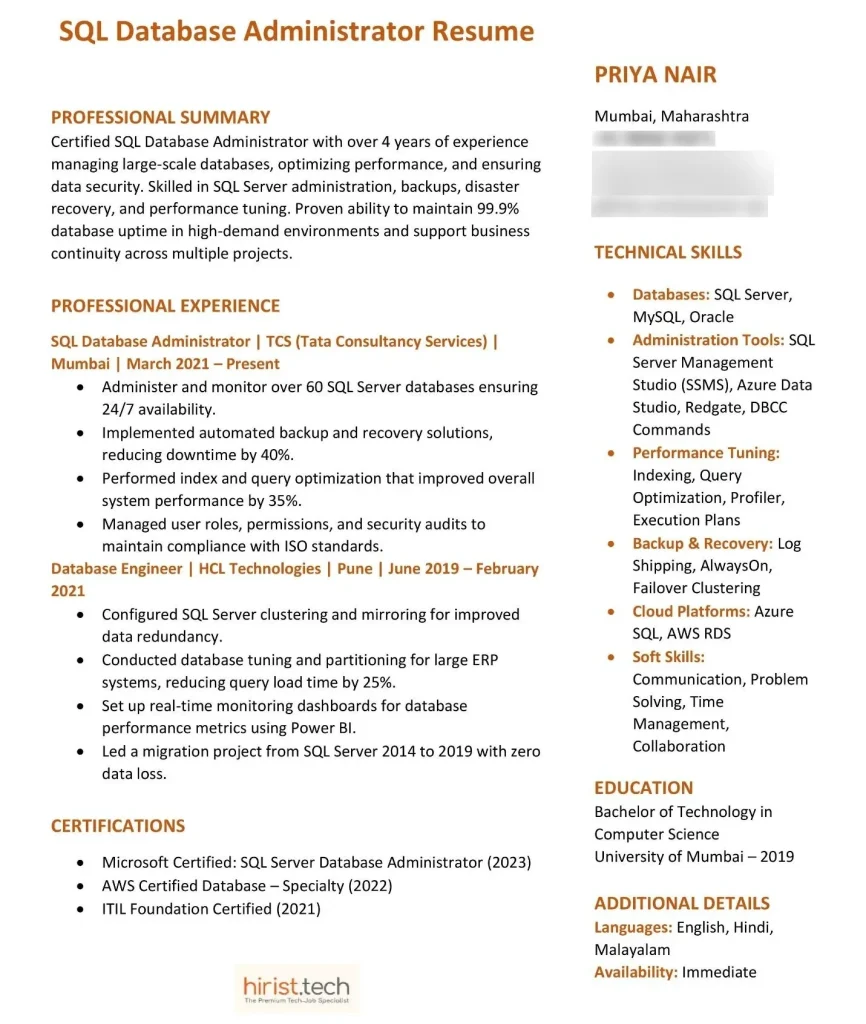
Example 3: SQL Database Administrator Resume
Below is an SQL DBA resume example showing how to highlight database management and security expertise.
Also Read - Top 25+ SQL DBA Interview Questions and Answers
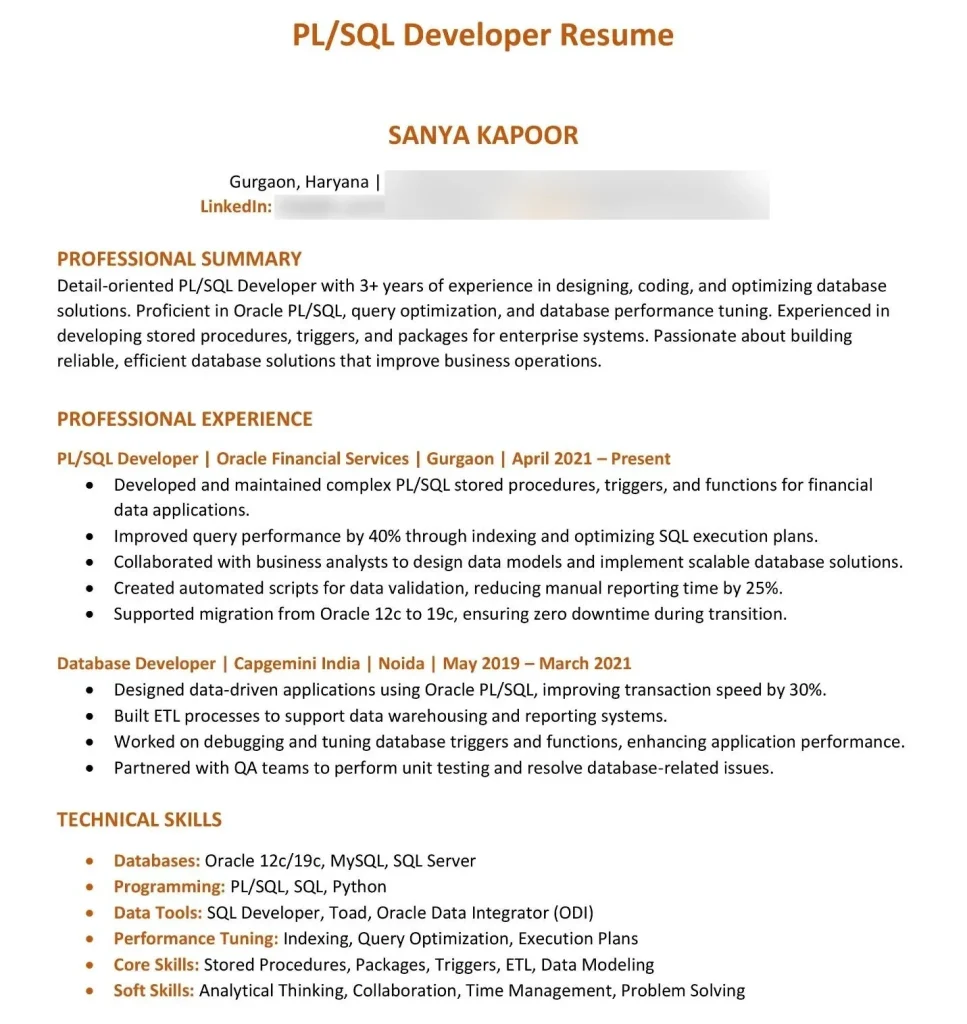
Example 4: PL/SQL Developer Resume

Also Read - Top 30+ PL/SQL Interview Questions and Answers
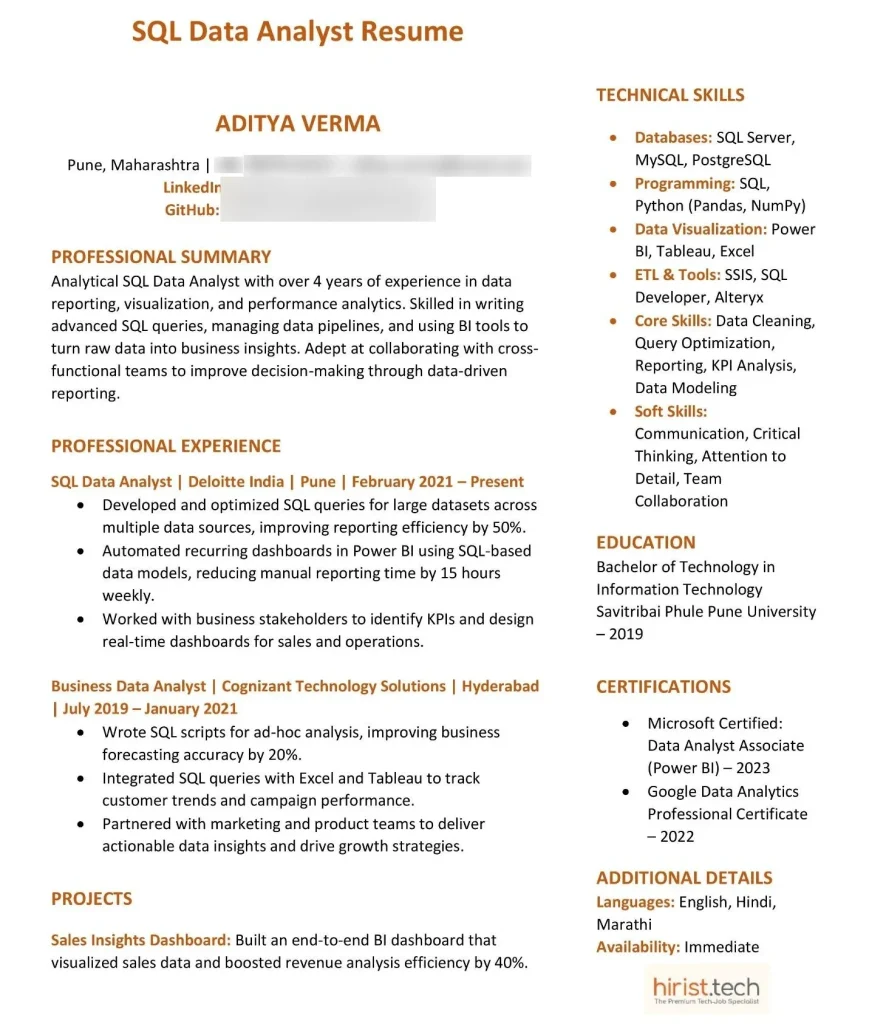
Example 5: SQL Data Analyst Resume
Free SQL Developer Templates
If you need an outline to create your SQL programmer resume, here are two free templates you can use. These are editable SQL developer templates for freshers and experienced professionals.
Template 1: SQL Developer Resume for Freshers
Here is a template to create a strong SQL resume for freshers or SQL developer resume for freshers with projects and skills.
NAME
Email | Phone Number | LinkedIn Profile | City
CAREER OBJECTIVE
Motivated computer science graduate with hands-on experience in SQL, database design, and query optimization. Skilled in writing complex queries, managing data, and building small-scale database projects. Eager to start a career as an SQL Developer and contribute to real-world applications.
PROJECTS
Student Management Database System – Designed a MySQL-based system to manage student records and automate attendance tracking.
E-Commerce Data Analysis – Created SQL queries to extract sales insights, improving reporting efficiency by 25%.
TECHNICAL SKILLS
- Databases: MySQL, SQL Server, PostgreSQL
- Programming: Python, C#, PL/SQL
- Data Tools: SSIS, SSRS, Power BI
- Core Skills: Query optimization, indexing, database normalization, data modeling
EDUCATION
Bachelor of Technology in Computer Science | University Name | Year of Graduation
CERTIFICATIONS
- Oracle Database SQL Certified Associate – Oracle
- Microsoft Certified: Azure Data Fundamentals
ADDITIONAL DETAILS
- Academic project GitHub: GitHub Link
- Languages: English, Other Languages if applicable
Also Read - Top 25+ Oracle SQL Interview Questions With Answers
Template: SQL Developer Resume for Experienced
Use this template to design an impressive SQL developer resume for professionals with 2 years of experience.
FULL NAME
Email | Phone Number | City, Country
LinkedIn | Portfolio/GitHub
PROFESSIONAL SUMMARY
Results-driven SQL Developer with 2+ years of experience in designing, optimizing, and managing large-scale databases. Skilled in query performance tuning, ETL processes, and ensuring data integrity. Proven ability to support cross-functional teams with clean, well-structured database solutions.
WORK EXPERIENCE
SQL Developer | Company Name | Start Date – Present
- Developed and optimized T-SQL queries, improving database response time by 40%.
- Designed data models and reports using Power BI and SSRS.
- Monitored and troubleshot production databases to maintain uptime.
Junior SQL Developer | Previous Company Name | Start Date – End Date
- Assisted in migrating legacy databases to SQL Server 2019.
- Built ETL pipelines for data transformation and loading using SSIS.
- Improved data accuracy by implementing validation scripts and indexing strategies.
TECHNICAL SKILLS
- Databases: SQL Server, MySQL, Oracle, PostgreSQL
- Tools: SSIS, SSRS, Power BI, Azure SQL
- Programming: T-SQL, PL/SQL, Python
- Core Areas: Query optimization, data modeling, indexing, stored procedures, performance tuning
EDUCATION
Bachelor of Computer Science | University Name | Year of Graduation
CERTIFICATIONS
- Microsoft Certified: SQL Database Developer
- Oracle PL/SQL Developer Certified Associate
Also Read - Top 50+ MySQL Interview Questions and Answers
Tips to Make Your SQL Developer Resume Better
Here are some quick tips to make your SQL developer resume stronger and more professional. These work for both CV SQL developer and SQL programmer resume formats.
- Keep it one page and easy to read
- Use clean fonts and simple design
- Add measurable results for each project
- Highlight top SQL tools and frameworks
- Include certifications or SQL-related courses
- Add keywords from the job post
- Avoid spelling or grammar errors
- Keep updating your skills section regularly
- Link your GitHub or project portfolio
Also Read - Top 50+ SQL Interview Questions and Answers
Things to Avoid When Writing Your SQL Developer Resume
When writing your SQL developer resume, small mistakes can reduce your chances. These tips apply to all types of SQL resumes.
- Don’t use fancy templates or graphics
- Avoid long paragraphs or unclear sections
- Don’t list outdated database tools
- Skip irrelevant personal details
- Avoid spelling and formatting errors
- Don’t copy sample resumes word-for-word
- Avoid missing project details or results
- Don’t forget to proofread before sending
- Never send the same resume for every job – customize it each time
How to Make Your SQL Developer Resume ATS-Friendly?
Making your SQL developer resume ATS-friendly helps recruiters find you faster. These tips work for SQL developer CV for experienced professionals and SQL resume for freshers.
- Choose the right resume format for SQL developer roles – reverse chronological is safest
- Set margins to 1 inch (2.54 cm) on all sides
- Use fonts like Calibri, Arial, or Helvetica
- Keep font size between 10–12 pt for body and 14–16 pt for headings
- Maintain 1.15 line spacing for neat readability
- Avoid tables, graphics, or multiple columns – they confuse ATS systems
- Save your file as PDF or DOCX, never image-based
- Add clear section headings like Technical Skills, Experience, and Education
- Name your file professionally like, Rahul_Sharma_SQL_Developer_Resume.pdf
- Write job titles exactly as listed
- Use short bullet points instead of paragraphs
Wrapping Up
And that’s how you create an SQL developer resume that truly works – simple, easy to read, and built to get noticed. Make sure you modify your resume for every job you apply for. Add the right keywords to easily pass ATS systems.
Once your resume is ready, visit Hirist – create your profile, upload your CV, and find the best SQL developer jobs with ease.
FAQs
A reverse‑chronological format is most effective for most professionals, as it highlights recent work first. Beginners or those changing careers may prefer a functional format that emphasizes skills and projects over job history.
Include academic projects, internships, certifications, and any personal database work. List the tools you used—MySQL, Oracle, SSIS—and describe tangible outcomes, such as query optimization or performance improvements.
Core skills include SQL, PL/SQL, T‑SQL, data modeling, query optimization, and ETL processes. Add tool proficiency like SSIS, SSRS, Power BI, Tableau, MySQL, Oracle, SQL Server, and PostgreSQL, along with soft skills such as problem‑solving and collaboration.
Quantify your achievements—e.g., “optimized queries to improve database speed by 30%.” Use metrics, action verbs, and concise bullet points to demonstrate impact and keep the resume focused and readable.