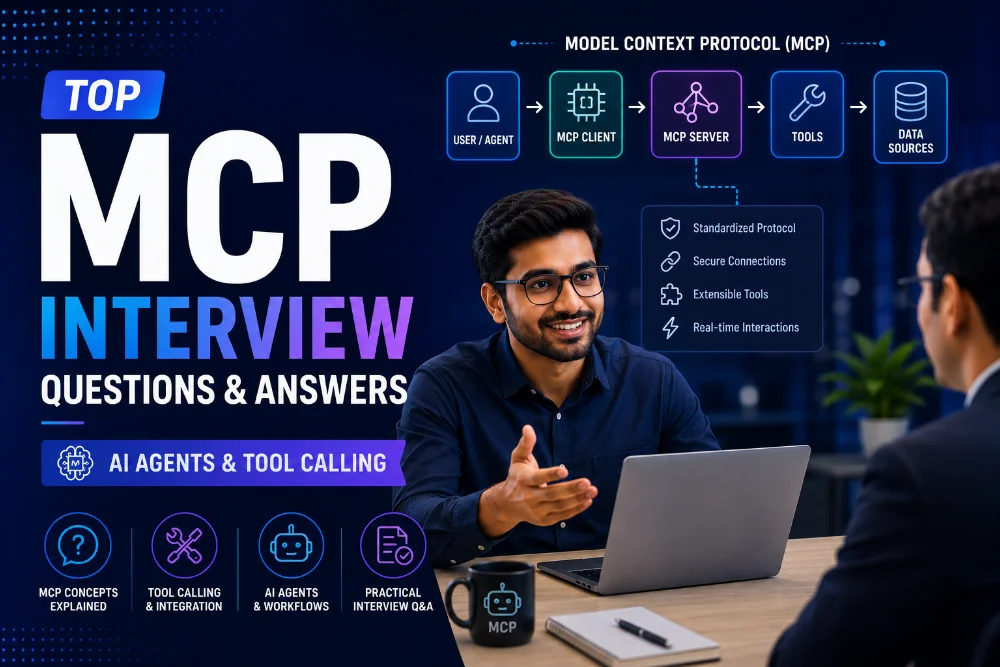
Model Context Protocol or MCP is an open standard introduced by Anthropic in November 2024 to help AI systems connect with tools, apps and data sources in a safer and more organized way. It started as a solution for the growing tool integration problem in AI workflows. Today MCP is used in AI agents, coding assistants, enterprise automation and real-time data access. This is why roles like AI engineer, LLM developer, agent developer and backend engineer now include MCP skills. In this article, we have shortlisted the most common MCP interview questions and answers to help you prepare.
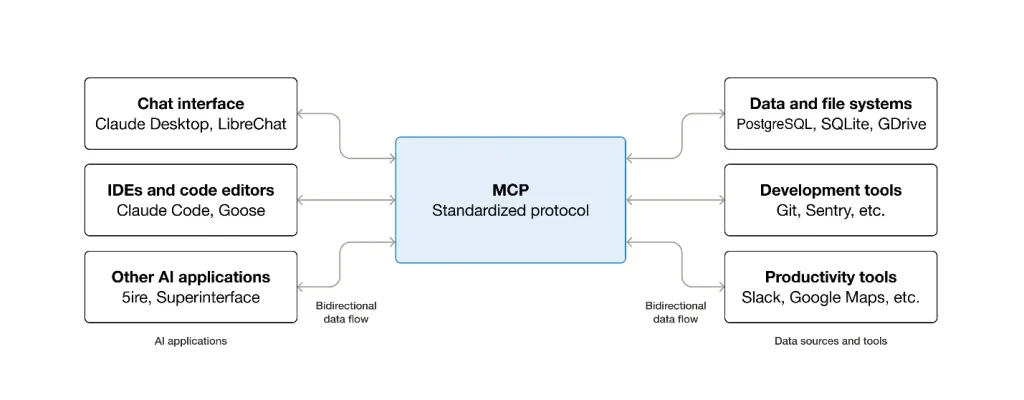
Fun Fact: MCP is often compared to a “USB-C port for AI.” Just like USB-C helps different devices connect through one standard port, MCP helps AI apps connect with different tools and systems through one common protocol.
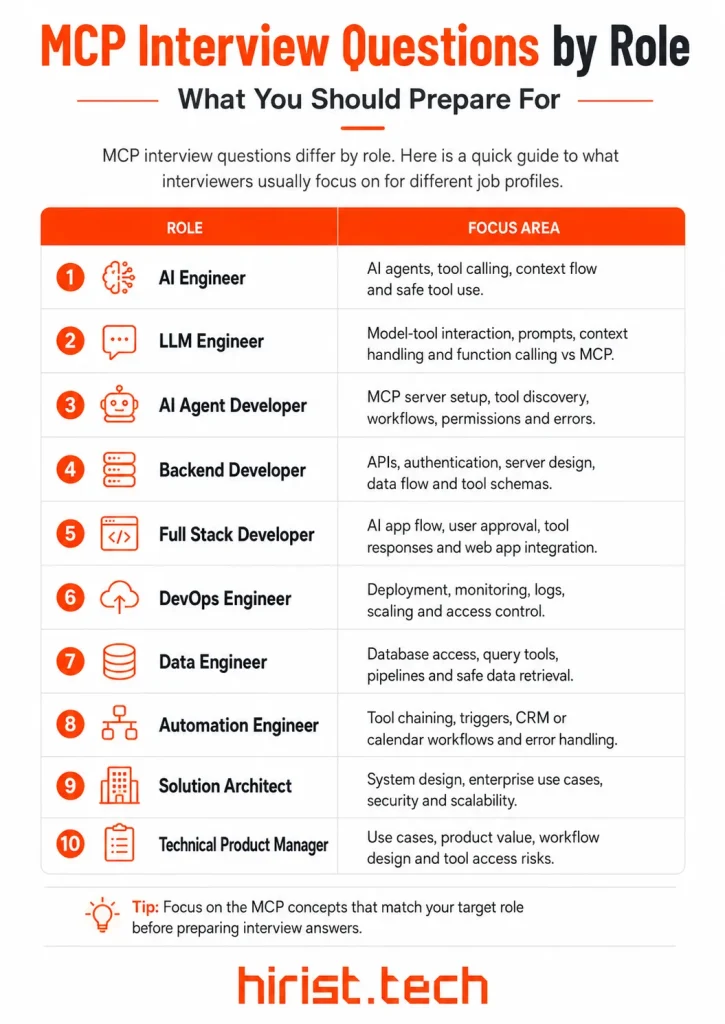
MCP Interview Questions by Role: What You Should Prepare For
Model Context Protocol interview questions differ by role. AI engineers may face questions on agents and tool calling. Backend developers may get questions on servers and APIs. Product managers may be asked about use cases and business value.
That is why it helps to know what type of MCP questions match your job role. This will help you prepare smarter instead of memorizing random answers.
| Job Role | MCP Questions Usually Focus On |
|---|---|
| AI Engineer | AI agents, tool calling, context flow and safe tool use |
| LLM Engineer | Model-tool interaction, prompts, context handling and function calling vs MCP |
| AI Agent Developer | MCP server setup, tool discovery, workflows, permissions and errors |
| Backend Developer | APIs, authentication, server design, data flow and tool schemas |
| Full Stack Developer | AI app flow, user approval, tool responses and web app integration |
| DevOps Engineer | Deployment, monitoring, logs, scaling and access control |
| Data Engineer | Database access, query tools, pipelines and safe data retrieval |
| Automation Engineer | Tool chaining, triggers, CRM or calendar workflows and error handling |
| Solution Architect | System design, enterprise use cases, security and scalability |
| Technical Product Manager | Use cases, product value, workflow design and tool access risks |
Basic MCP Interview Questions
Here are the basic-level MCP interview questions and answers. These are commonly asked at the beginning and usually cover core concepts, fundamentals and simple comparisons.
- What is MCP and why was it created?
MCP stands for Model Context Protocol. It is an open-source standard that lets AI applications connect with external tools, data sources and workflows. MCP was introduced by Anthropic in November 2024 to reduce the need for custom integrations between every AI app and every tool.
Before MCP, teams often built separate connectors. That was slow. MCP gives AI agents a common way to access context and call tools.
- Who introduced the Model Context Protocol and why is it important for AI applications?
Anthropic introduced the Model Context Protocol. It was launched as an open standard for connecting AI-powered tools with external data sources in a secure two-way manner.
It matters because modern AI apps need more than text generation. They need to read files, query databases, call APIs and work with apps. MCP gives them a structured way to do that. This makes AI agents more useful in real projects.
- How is MCP different from function calling?
MCP and function calling are related, but they are not the same. Function calling helps the model decide what function to call. MCP defines how the AI app connects with external tools and systems.
| Point | Function Calling | MCP |
|---|---|---|
| Meaning | A model feature used to call functions with structured input | A protocol used to connect AI apps with tools, resources and prompts |
| Where it works | Near the LLM or model layer | Between the AI app and external systems |
| Main role | Helps the model choose and format a function call | Handles tool access, server connection and context flow |
| How they work together | The model selects the function | MCP manages the tool connection and returns the result |
- What is the difference between MCP and a standard REST API?
MCP is built for AI agents and tool calling. A REST API is built for general software communication. REST usually needs custom integration code. MCP gives AI apps a standard way to find tools, understand inputs and get results.
| Point | REST API | MCP |
|---|---|---|
| Main purpose | Connects software systems through HTTP endpoints | Connects AI apps with tools, resources and prompts |
| Designed for | General application integration | AI agents and tool-based workflows |
| Tool discovery | Developers read API documentation manually | The server shares available tools in a structured format |
Input handling | Developers define request formats in code | Tools expose input schemas for the AI app
AI readiness | Not designed specifically for LLMs | Built to help AI systems access context and tools
- Can MCP replace Retrieval-Augmented Generation or do they solve different problems?
MCP does not replace RAG. They solve different problems.
RAG helps an AI system search documents or knowledge bases and add useful information to the prompt. MCP helps an AI app connect with tools, data sources and workflows.
They can also work together.
For example, an MCP server can connect an AI agent to a company’s knowledge base. The search logic may use RAG, while MCP becomes the access path.
Also Read - Top RAG Interview Questions and Answers
Technical MCP Interview Questions
After understanding the basics, it becomes important to know how MCP works in AI systems. This section includes MCP interview questions and answers on architecture, AI agents, tool calling, implementation and use cases.
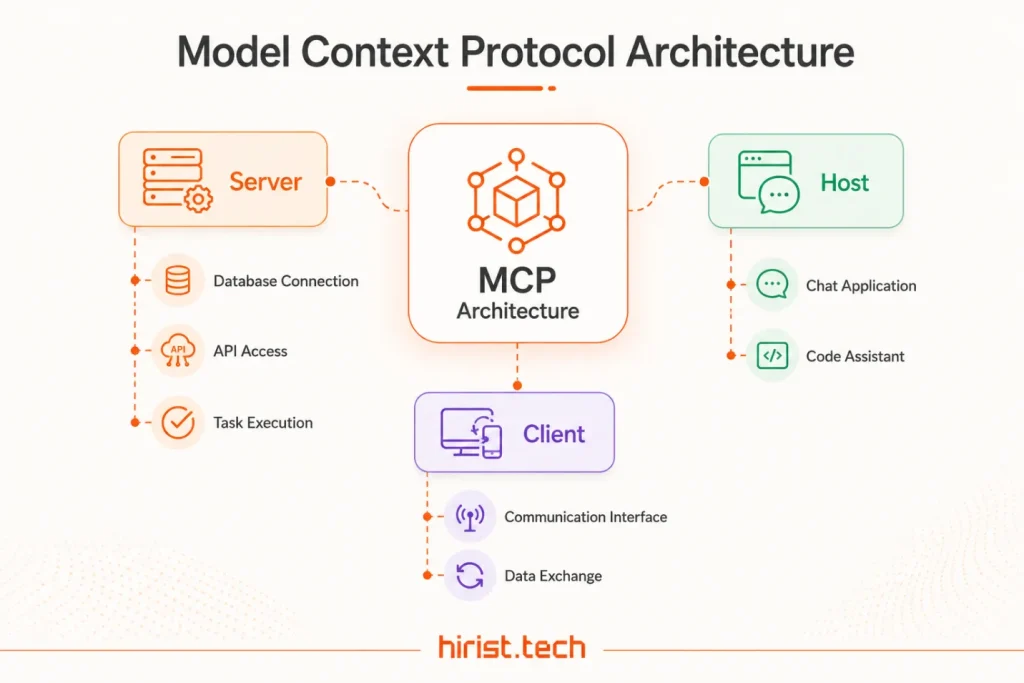
- What are the three main components of MCP architecture and how do they work together?
MCP has three main parts: host, client and server.
Host: The AI application users interact with. It can be an IDE, chatbot or AI assistant.
Client: The connection layer inside the host. It manages communication with the MCP server.
Server: The system that exposes tools, resources or prompts to the AI application.
A host can connect to multiple MCP servers through separate client instances. This helps an AI agent work with different tools, apps and data sources without building a custom integration for every system.
- How does an AI agent discover and call tools through MCP?
An AI agent discovers tools through the MCP client-server connection.
- The host connects to an MCP server through a client.
- The server shares available tools.
- Each tool has a name, description and input schema.
- The host gives this tool information to the model.
- The model selects a tool when the user task needs it.
- The client sends the tool request to the server.
- The server runs the tool and returns the result.
This is why MCP is useful for tool calling. The agent gets a clear list of what it can use instead of guessing.
- What is the difference between tools, resources and prompts in MCP?
Tools are used for actions. They can query a database, call an API or run a computation. Resources provide context. They are used for data such as files, database schemas or app information. Prompts are reusable templates that guide how the model should work with a task. In interviews, explain it simply: tools act, resources inform and prompt guide.
| MCP Feature | Meaning | Example |
|---|---|---|
| Tools | Functions the model can call to perform an action. | Search a database, send an email or call an API. |
| Resources | Data shared with the model as context. | Files, database schemas or app-specific information. |
| Prompts | Reusable templates that guide model behavior. | A prompt for summarizing issues or preparing a report. |
- How does an MCP server expose tools, input schemas and outputs to an AI agent?
An MCP server exposes tools through the protocol’s tool feature. Each tool includes:
- Name: what the tool is called.
- Description: what the tool does.
- Input schema: what data the tool needs.
- Output: the result returned after execution.
For example, a calendar tool may ask for a date range. A database search tool may ask for a query and limit. The schema helps the model send the right input. The server then returns the tool result to the client.
- What happens step by step when an AI agent makes a tool call through MCP?
The tool calling flow is usually simple:
- The user asks for a task
- The host sends the request to the model
- The model decides a tool is needed
- The host routes the call through the MCP client
- The client sends the request to the MCP server
- The server runs the selected tool
- The server returns the result
- The model uses that result to answer the user
For example, if a user asks about open GitHub issues, the agent may call a GitHub MCP tool and then summarize the returned issues. MCP gives this whole process a standard client-server structure.
- What transport types are used in MCP and when should STDIO or Streamable HTTP be used?
Current MCP transports include STDIO and Streamable HTTP. STDIO is best for local tools. It is common when the server runs as a child process on the same machine. Streamable HTTP is better for remote servers. It can use HTTP POST and GET requests, with optional SSE for streaming server messages. Use STDIO for desktop tools. Use Streamable HTTP for cloud or shared services.
Advanced MCP Interview Questions
- How would you design a basic MCP server for a real use case like database search, calendar access or GitHub automation?
For an interview, pick one use case and explain the design clearly. Example: Database search MCP server Create a tool called search_records. Add inputs like query, table_name and limit. Use resources for schema details or allowed tables. Keep access limited to approved data. Return only the required rows. Add clear errors for invalid queries. Log tool calls for review. The same idea applies to calendar or GitHub automation. A calendar server may expose tools for reading events or creating meetings. A GitHub server may expose tools for searching issues, pull requests or commits. Keep every tool small, clear and easy to test.
- What enterprise security concerns are associated with MCP?
MCP security is important because AI agents can access tools, data and internal systems. The risk is not MCP alone. The risk is giving agents broad access without proper limits. Key enterprise security concerns include:
- Access control: Agents should only access tools and data allowed for that user.
- PII leakage: MCP tools should not return sensitive data unless it is needed.
- Prompt injection: Malicious text can trick an agent into calling unsafe tools.
- Unsafe tool actions: Tools that send emails, update records or delete data need user approval.
- Remote server authentication: Remote MCP servers should use secure tokens, headers or auth checks.
- Logging: Tool calls should be recorded for review and debugging.
A strong interview answer should mention permissions, user approval and audit logs.
- How would you handle long-running tasks in an MCP server?
Long-running tasks should not block the AI host. The server should handle them in the background and return status updates. A good approach is:
- Start the task asynchronously
- Return a task ID or status response
- Share progress updates when possible
- Allow the client to check task status
- Add cancellation support
- Set clear timeout rules
- Store the final result safely
- Return a useful error if the task fails.
In the 2025-11-25 MCP specification, tasks are defined as durable state machines with task IDs for polling and deferred result retrieval. They are still marked experimental, so mention that in senior-level interviews.
- How would you debug failed or incorrect tool calls in an MCP server?
Debugging should start with the tool contract. Most MCP tool issues happen because the schema, input, output or server logic is not clear. Use this checklist:
- Check the tool name and description
- Validate the input schema
- Test the same call manually
- Review server logs
- Check transport errors
- Confirm the server returned valid JSON-RPC
- Look for permission or auth failures
- Return clear error messages to the model
- Test the tool with different inputs
The MCP Inspector is a useful debugging tool because it lets developers test MCP servers, call tools and view protocol messages directly.
- How does MCP use JSON-RPC for client-server communication?
MCP uses JSON-RPC 2.0 as the message format between clients and servers. This gives MCP a standard way to send requests, receive results and handle one-way notifications.
| Message Type | Use in MCP | Example |
|---|---|---|
| Request | Starts an operation and expects a response | Client asks server to call a tool |
| Response | Returns the result or error for a request | Server returns tool output |
| Notification | Sends a one-way update without a response | Server sends status or change updates |
In an interview, say this simply: JSON-RPC gives MCP a structured request-response system for tool calls, errors, lifecycle events and notifications.
- What are Roots and Sampling in MCP and why are they important for AI agents?
Roots and Sampling are client-side MCP features. They are useful in advanced agent workflows.
| Feature | Meaning | Why It Matters |
|---|---|---|
| Roots | Filesystem boundaries shared by the client | Helps coding agents work only inside approved folders |
| Sampling | Lets a server request model output through the client | Helps servers run agent-like reasoning without owning model access |
Roots are important for IDEs and coding agents because they define where a server can operate in the filesystem. Servers should respect those boundaries. Sampling is useful when an MCP server needs the client’s model to generate text, review output or continue a multi-step workflow. The client still controls model access and permissions.
Tips to Prepare for MCP Interview
MCP interviews are easier when you understand how AI agents use tools in actual systems. Here are some tips to help you prepare better:
- Learn MCP as a tool-connection standard, not just a theory topic
- Practice explaining MCP with one simple AI agent example
- Know the difference between tools, resources and prompts
- Be clear about MCP vs function calling
- Learn how tool discovery works in MCP
- Study how MCP helps agents access files, APIs and databases
- Prepare one use case like calendar access or GitHub automation
- Talk about permissions, user approval and audit logs
- Practice how to handle failed tool calls
- Keep answers short, practical and example-based
Also Read - Top 25 LLM Interview Questions and Answers
Wrapping Up
These are the MCP interview questions and answers that can help you prepare. MCP is becoming an important skill as more companies build AI systems that work with tools and data. If you are looking for AI Engineer, LLM Engineer, AI Agent Developer, Backend AI Developer or Automation Engineer jobs, MCP can be a useful skill to show. You can visit Hirist, an online job portal where you can find the latest AI job openings in India.
FAQs
Yes, for technical roles. You should know basic APIs, JSON, client-server architecture and tool calling. For developer roles, interviewers may also ask how you would build a simple MCP server for a database, calendar or GitHub workflow.
Yes, especially for roles linked to AI agents, LLM apps, coding assistants, automation and backend AI systems. MCP is still new, so most interviews may not go very deep. But strong candidates are expected to know how MCP supports tool calling and integrations.
For AI agent roles, questions usually focus on tool discovery, tool calling flow, permissions, failed tool calls and multi-step workflows. You may also be asked how an agent can use MCP to access files, databases, GitHub, calendars or internal business tools.
Say it simply. Function calling helps the model decide which function to call. MCP defines how the AI app connects with external tools and systems. In real projects, the model may choose the tool, while MCP manages the connection and result flow.
MCP can give AI agents access to real tools and private data. That makes security very important. Interviewers may ask about user approval, scoped permissions, prompt injection, audit logs, PII leakage and safe handling of tools that can change or delete data.
good example is a GitHub MCP server. The AI agent can search issues, read pull requests or summarize commits. This example works well because it shows tool calling, authentication, structured inputs, external data access and real developer productivity.