
Android is a mobile operating system created by Android Inc. in 2003 and later acquired by Google in 2005. It was founded by Andy Rubin and became popular for powering smartphones, tablets, and smart devices. Over the years, Android has grown into a leading platform with millions of apps and users worldwide. Today, companies hire Android developers, engineers, and architects to build modern mobile apps. If you are preparing for one of these roles, this blog will help. Here are the top 50+ Android interview questions you should know.
Android Interview Overview
| Job Roles | Android Developer, Mobile Engineer, Application Architect |
| Interview Rounds | MCQs or Aptitude (for freshers), Technical Q&A, Live Coding, Architecture/System Design (for seniors) |
| Typical Duration | 60 – 90 minutes |
| Question Types | Activities, Fragments, Jetpack, MVVM, Kotlin, UI/UX, Testing, Performance |
| Preparation Time | 2 – 4 weeks (depending on experience level) |
| Top Hiring Companies | Google, Amazon, Swiggy, Flipkart, Paytm, TCS, Infosys |
| Salary Range (India) | ₹1.5 L–₹13 L (Avg), ₹4 L–₹25 L (Mid), ₹10 L–₹45 L (Lead/Architect) |
Android Interview Questions for Freshers
If you are just starting with Android, expect basic Android interview questions like:
- What are Activities in Android and their purpose?
Activities are core UI components that have a screen interface allowing users to interact with the app. Each activity represents a single screen or app interface. Activities are used to build the user interface screens, display content on the screen like images/text/videos, and handle user interactions with UI elements like clicks/swipes. They make up the structure of user flow in apps.
- What are Intents in Android and types of intent?
Intents are asynchronous messages that activate components in Android like activities and services. The two types are – explicit intents, which specify the exact target component to trigger using a class name and implicit intents, which specify a generic action string allowing Android to resolve to appropriate components at runtime based on registered intent filters.
- List the languages used to build Android.
Building Android applications involves using various programming languages. Here are some popular ones:
Java:
- Widely adopted by Android developers.
- Often chosen by newcomers in the development scene.
- Supported by popular Integrated Development Environments (IDEs) such as Eclipse, NetBeans, and IntelliJ.
Kotlin:
- A modern, secure, and object-oriented language.
- Gaining popularity for Android app development.
- Supported by IDEs like Android Studio and Eclipse.
C#:
- Enables the development of native iOS and Android apps.
- Utilizes tools like Visual Studio for Android application creation.
Python:
- Known for its dynamic and object-oriented nature.
- Widely used in machine learning.
- Supported by code editors like Pydroid 3, Dcoder, and spck code editor.
- Other languages compatible with Android development include:
C++:
- Supported by IDEs like C4droid, CppDroid, and AIDE.
HTML 5:
- Used for web-based Android applications.
- Supported by IDEs like Acode and spck code editor.
Choosing the right language depends on the developer’s preferences and project requirements. Each language offers unique advantages for creating diverse Android applications.
- What are resources in Android? Name some commonly used resources.
Resources are assets and media files used in Android apps. Commonly used resources include images, strings, colors, styles, array and dimensions resources.
- What are Views and Layouts in Android? How are they related?
Views are UI building blocks that render onto the screen like buttons, fields or graphs. Layouts are containers that organize views and other UI components to build the app’s user interface.
Android Interview Questions for Experienced
Senior Android candidates should prepare for architect-level Android interview questions like:
- What is an Adapter in Android?
In Android, an adapter serves as a crucial link connecting an AdapterView with the data it displays. Essentially, it acts as a mediator, managing the data and facilitating its transfer to the AdapterView. The AdapterView, in turn, extracts this data and presents it through various views such as spinners, list views, grid views, and more.
In a nutshell, an adapter plays the pivotal role of enabling the seamless interaction between the underlying data and the user interface elements, ensuring a smooth and dynamic display of information in Android applications.
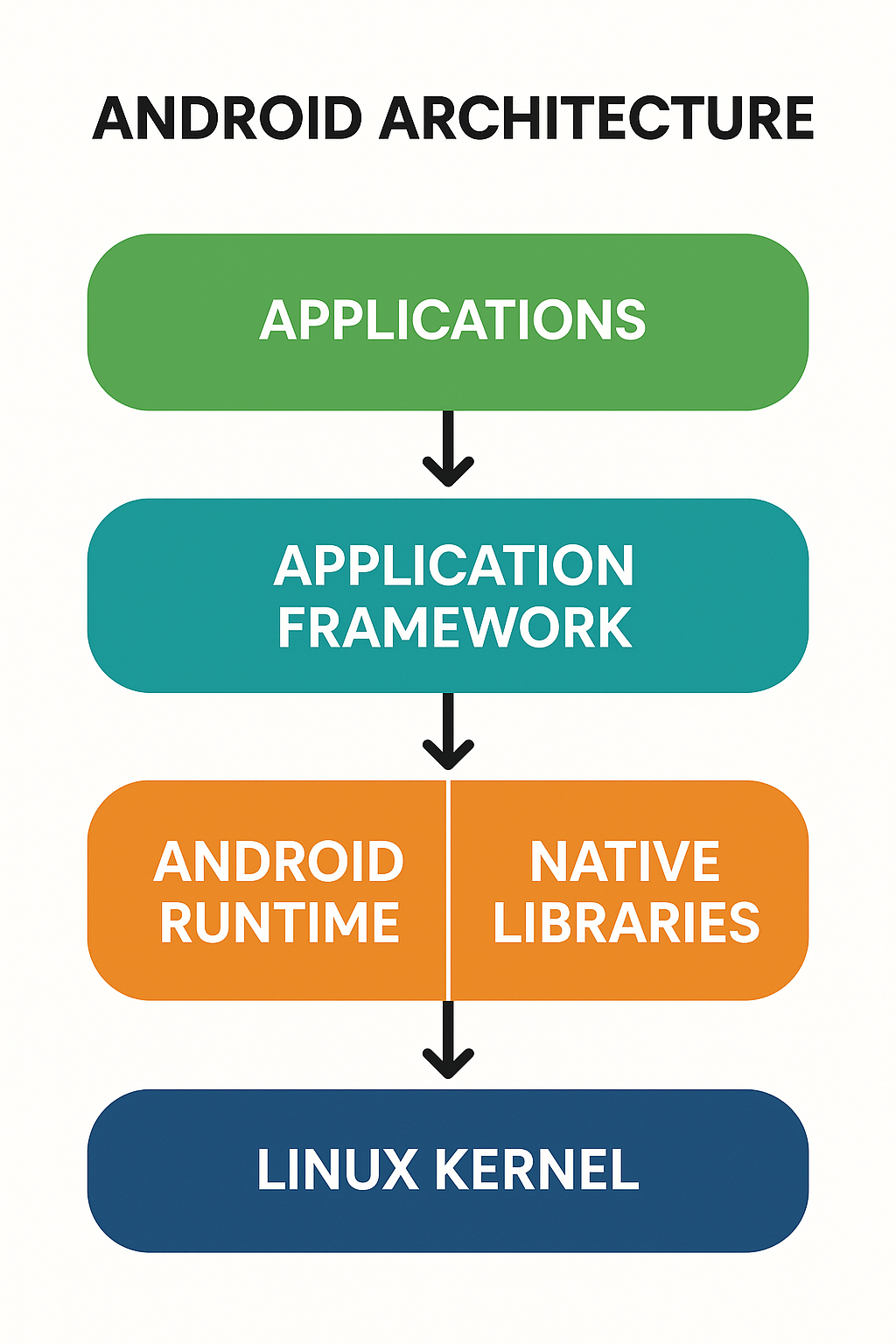
- What is the Android architecture? Describe its components.
The Android architecture has a layered modular approach spanning across – Linux kernel at the lowest level, above that are native libraries and Android runtime along with core Java APIs, then the Application Framework layer with building blocks like Activity Manager, Window Manager, Package Manager etc. Finally, at the top layer are applications written leveraging these underlying frameworks, SDKs and modules.
- What is ADB in Android and how do you use it?
ADB or Android Debug Bridge allows executing commands on emulators/devices from PC. Useful for debugging apps, changing permissions, transferring files or adjusting layouts remotely.
- Why is XML used for frontend development in Android?
XML, or Extensible Markup Language, is employed in Android frontend development due to its versatile nature. Similar to HTML, XML serves as a markup language for describing data. One of its key advantages is readability, making it comprehensible for both humans and machines. Additionally, XML is scalable and straightforward to work with.
In the context of Android, XML is favored for designing layouts because it is a lightweight language. This characteristic ensures that the layout remains efficient and doesn’t introduce unnecessary complexity.
- What is Jetpack Compose and how is it different from XML-based layouts?
Jetpack Compose is Android’s modern UI toolkit that lets you build UIs using Kotlin code instead of XML files. It simplifies UI development with less boilerplate, better code reusability, and a fully declarative approach.
In XML-based layouts, you define UI in .xml files and then access them using findViewById() or ViewBinding. In Jetpack Compose, UI is written as Kotlin functions using @Composable annotations – no need for layout files or manual view referencing.
Key Differences Between Jetpack Compose and XML Layouts
| Feature | XML Layouts | Jetpack Compose |
| Language | XML + Kotlin/Java | Pure Kotlin |
| UI Declaration | Separate from logic | Combined with logic |
| View Access | findViewById() or ViewBinding | Direct via Kotlin |
| Boilerplate | More | Less |
| Preview & Reusability | Limited | Better previews & reusable UIs |
XML Layout Example:
<TextView
android:id=”@+id/welcomeText”
android:layout_width=”wrap_content”
android:layout_height=”wrap_content”
android:text=”Welcome XML” />
Jetpack Compose Example:
@Composable
fun WelcomeText() {
Text(text = “Welcome Compose”)
}
Compose is ideal for new projects or screens that demand flexibility, animations, or real-time UI updates. XML still works well for legacy apps or when working with older UI components.
- What are the components of the Android Application?
Android applications are built upon several essential components, which are loosely connected and defined in the application manifest file. This file outlines each component’s description and their interactions. The primary components of Android applications include:
Activities:
- Represent individual screens or user interfaces.
- Handle user interactions and provide a visual interface.
Services:
- Run in the background to perform tasks without a user interface.
- Can handle long-running operations independently of user interaction.
Content Providers:
- Manage and share application data with other applications.
- Enable data access and modification through a unified interface.
Broadcast Receiver:
- Respond to system-wide broadcasts or announcements.
- Triggered by events or messages, allowing applications to respond to changes in the system.
Intents:
- Facilitate communication between components.
- Used to request actions from other app components or to announce state changes.
- What is Gradle and how is it used in Android development?
Gradle serves as an open-source build system designed to automate various tasks in the software development lifecycle, including building, testing, and deployment.
It employs scripts, often found in files named “build.gradle,” to execute and automate these tasks. An example of its utility includes copying files between directories before the actual build process.
In Android development, Gradle plays a pivotal role in the process of transforming source code into a functional Android application. Here’s a breakdown of its usage:
Task Automation:
Gradle allows developers to automate tasks such as copying files, running tests, and managing dependencies.
This automation ensures efficiency and consistency in the build process.
Build Script:
Developers utilize the “build.gradle” scripts to define how the project should be built.
These scripts specify configurations, dependencies, and other build-related details.
Generating APK (Android Package):
Gradle is essential for every Android project as it takes the source files, including .java and .xml files.
It applies various tools and processes, such as converting Java files into DEX files (Dalvik Executable), compressing resources, and assembling them into a single file known as an APK (Android Package).
Dependency Management:
Gradle simplifies the management of project dependencies, making it easier to include external libraries and modules.
Customisation:
Developers can customize the build process according to the project’s requirements by modifying the Gradle build scripts.
- What is ProGuard and why is it used in Android?
ProGuard is a code shrinker and obfuscator. It removes unused code, renames classes and methods, and makes reverse engineering more difficult.
It helps:
- Reduce APK size
- Obfuscate app logic
- Improve performance slightly
- Protect intellectual property
To enable it, update build.gradle:
minifyEnabled true
proguardFiles getDefaultProguardFile(“proguard-android-optimize.txt”), “proguard-rules.pro”
- How do you reduce APK size before release?
APK size optimization tips:
- Enable code shrinking with ProGuard or R8
- Use App Bundles (AAB) instead of APKs
- Compress images using WebP format
- Remove unused resources (resConfigs, shrinkResources)
- Avoid large native libraries unless necessary
android {
buildTypes {
release {
shrinkResources true
minifyEnabled true
}
}
}
- What’s the difference between ProGuard, R8, and DexGuard?
| Tool | Function | Status |
| ProGuard | Shrinks and obfuscates Java bytecode | Deprecated (used before R8) |
| R8 | Shrinks, optimizes, obfuscates, and compiles to DEX | Default in Android Studio |
| DexGuard | Commercial tool with extra security (encryption, tamper detection) | Paid version of ProGuard |
R8 is more efficient than ProGuard as it merges shrinking + DEX compilation in one step.
Android Interview Questions on Architecture
Architecture decisions ensure maintainable, scalable Android apps. Get ready for coding architect interview questions like:
- What is the Android architecture guideline?
The architecture guideline revolves around separate domain layers – data layer, domain layer, presentation layer and data binding between them. This ensures separation of concerns and testability.
- Explain Model-View-ViewModel (MVVM) for Android.
MVVM stands for Model-View-ViewModel. It is an architecture pattern that helps separate the UI from business logic in Android apps. It improves maintainability, testability, and readability.
- View: XML layouts and UI components (Activity/Fragment). Observes data and displays it.
- ViewModel: Stores and manages UI-related data. Survives configuration changes and uses LiveData or StateFlow to communicate.
- Model: The data layer. Handles data operations like network calls or database queries.
Lifecycle Flow:
User → View → ViewModel → Model → ViewModel → View
MVVM Android Example:
// ViewModel
class UserViewModel : ViewModel() {
val userData: LiveData<User> = repository.getUserLiveData()
}
// View (Fragment)
userViewModel.userData.observe(viewLifecycleOwner) { user ->
binding.nameTextView.text = user.name
}
- What are ViewModel and LiveData used for in MVVM?
- ViewModel stores UI state and business logic. It survives screen rotations.
- LiveData is an observable data holder. It automatically updates the UI when the data changes.
Why it matters in interviews – These components are core to Jetpack architecture and clean app design.
- How does MVVM compare to MVP in Android?
| Feature | MVP | MVVM |
| Middle Layer | Presenter | ViewModel |
| Data Flow | View ↔ Presenter ↔ Model | View ← ViewModel ↔ Model |
| View-Presenter Link | Strongly coupled | Loose coupling via LiveData |
| Lifecycle Aware | No | Yes (ViewModel survives config) |
| Google Support | No (manual) | Yes (Jetpack Architecture) |
In summary:
- Use MVP when you want more control but are okay with boilerplate.
- Use MVVM for cleaner, lifecycle-aware code with Jetpack support.
Android Interview Questions on Databases and ORMs
Storing data consistently is crucial for robust Android apps. Be ready with:
- What databases does Android support? Explain the options.
Android supports both SQLite and cloud datastores like Firebase or Realm for persistence. SQLite directly uses filesystem while cloud datastores are more complex offering sync capabilities.
- What are ORM frameworks for Android? How do they simplify app development?
ORM or Object Relational Mapping libraries like Room Persistence Library simplify database access by providing abstraction and handling lower-level details themselves.
Android Interview Questions on App Performance
Performance tuning ensures smooth 60fps app user experiences. Some performance interview questions include:
- What tools help profile CPU, memory and network usage in Android apps?
Android Studio Profiler, Systrace, Dumpsys and Debug GPU Overdraw are handy tools to profile CPU, memory and network usage and optimize performance.
- What are some Android app optimization best practices?
Best practices are optimizing images, using suitable layouts, keeping app footprint small, profiling regularly and avoiding memory leaks through static analysis.
- What is ANR in Android? How can it be prevented?
ANR (Application Not Responding) occurs when the UI thread is blocked for more than 5 seconds. It usually happens due to long-running operations like database access or network calls on the main thread.
Prevention Tips:
- Never perform heavy work on the main thread.
- Use Coroutines, AsyncTask (deprecated), Executors, or HandlerThread.
- Move disk and network operations to Dispatchers.IO.
- Keep UI updates minimal and efficient.
- What does onTrimMemory() do in Android?
onTrimMemory() is a lifecycle callback that informs the app about memory availability. It helps developers free up resources when the system is low on memory.
Levels include:
- TRIM_MEMORY_UI_HIDDEN – App’s UI is no longer visible.
- TRIM_MEMORY_RUNNING_LOW – App is running but system needs RAM.
Use case:
override fun onTrimMemory(level: Int) {
if (level == ComponentCallbacks2.TRIM_MEMORY_UI_HIDDEN) {
imageCache.clear()
}
}
This helps prevent crashes due to OutOfMemoryError.
- How can you optimize battery usage in Android apps?
Battery optimization tips:
- Use WorkManager for deferrable background tasks.
- Avoid frequent wakeups—batch network calls and alarms.
- Prefer JobScheduler or AlarmManager with setExactAndAllowWhileIdle().
- Use foreground services only when necessary.
- Optimize location access with FusedLocationProviderClient and appropriate intervals.
Bonus Tip – Use Doze Mode detection APIs and Battery Historian to analyze power usage.
- What are best practices for logging in Android production apps?
While Log.d() is fine during development, production logging should be structured, secure, and optional.
Best Practices:
- Use Timber for cleaner log trees and centralized control.
- Create custom logging trees for release builds to suppress logs.
- Never log sensitive data like tokens, passwords, or PII.
- Use tools like Firebase Crashlytics for crash reporting with log breadcrumbs.
Example using Timber:
Timber.plant(Timber.DebugTree())
Timber.d(“Fetching user data from API…”)
In production:
class ReleaseTree : Timber.Tree() {
override fun log(…) {
// Suppress or send to server
}
}
Android Interview Questions on Unit Testing
Unit testing is crucial for Android code quality. Interviewers may ask Android testing interview questions like:
- What testing approaches help ensure robust Android apps?
A combination of unit testing isolated components, integration testing complex flows, UI testing key user journeys on emulators and profiling helps ensure robust Android apps.
- What are some popular unit testing frameworks for Android?
Some popular Android unit testing frameworks are JUnit and Mockito for overall testing, Espresso for UI testing and Robolectric for running tests without emulator.
- How do you write test cases for orientation changes?
Use ActivityScenario to test how your UI and data survive orientation changes.
ActivityScenario.launch(MainActivity::class.java).recreate()
Check if ViewModel or UI state is retained correctly after rotation.
- How do you test battery-consuming features?
Use Battery Historian, adb shell dumpsys batterystats, and Profile GPU Rendering to analyze usage.
Write instrumentation tests to verify that background tasks (e.g., location updates) are throttled or paused as expected.
- How do you simulate sensors in Android UI tests?
Use SensorManager mock or Android Emulator Extended Controls to simulate inputs like accelerometer, gyroscope, or proximity.
In unit tests, use Dependency Injection to provide fake sensor values or listeners.
Android Interview Questions for Senior Developers
Get ready for in-depth architect level questions, like:
- What is ORM and how does Room Persistence Library compare with SQLite in Android?
ORM libraries like Room abstract underlying database complexities providing a clean API in native language. In Android, Room has compiles SQL validation and handles migrations automatically unlike SQLite.
- What is dependency inversion principle? How is it implemented in Android?
Dependency inversion suggests depending on abstractions rather than concrete classes improving flexibility through loose coupling. Android leverages interfaces, abstract classes and dependency injection.
- Explain REST API integration best practices for optimal Android performance.
Best practices for REST API calls include offloading network calls through AsyncTask, Request queues, and background dispatchers like Kotlin coroutines. Parsing responses asynchronously also helps.
- What is RecyclerView in Android and How Does it Work?
RecyclerView in Android is a versatile ViewGroup introduced as an upgrade to both GridView and ListView in Android Studio. It serves as a powerful tool for constructing lists with customizable XML layouts, addressing the limitations of its predecessors while enhancing the efficiency of displaying large datasets.
Key Characteristics:
- Customisable XML Layouts: RecyclerView allows developers to create lists with XML layouts for each item, providing extensive customization options.
- Efficiency Improvement: It significantly improves the efficiency of displaying lists compared to traditional ListViews and GridViews.
- View Recycling: One of the main features of RecyclerView is the recycling of views that are out of the user’s visibility.
For instance, if a user scrolls down, items that are no longer visible (e.g., items 1, 2, and 3) are cleared from memory to reduce memory consumption.
- What are Kotlin Coroutines and how do they differ from Threads?
Coroutines are lightweight, cooperative threads used for asynchronous programming in Kotlin. Unlike Java threads, coroutines don’t block the main thread and consume fewer resources.
Coroutines vs Threads:
| Feature | Thread | Coroutine |
| Resource usage | Heavy (OS-level) | Lightweight (language-level) |
| Creation time | Slow | Fast |
| Blocking | Blocks thread | Non-blocking (suspending) |
| Cancellation | Harder to manage | Structured cancellation |
Example – Coroutine to fetch API data:
lifecycleScope.launch {
val data = withContext(Dispatchers.IO) {
apiService.getUserDetails()
}
updateUI(data)
}
- What is a Coroutine Dispatcher in Android?
A Dispatcher defines the thread a coroutine runs on.
| Dispatcher | Description | Use Case |
| Dispatchers.Main | Main/UI thread | UI updates, LiveData observers |
| Dispatchers.IO | For disk, database, and network operations | API calls, file read/write |
| Dispatchers.Default | CPU-intensive tasks | Sorting, JSON parsing |
| Dispatchers.Unconfined | Starts in caller thread, switches later | Not recommended for Android UIs |
Tip: Use Dispatchers.IO for anything that would normally go in an AsyncTask.
- When should you use WorkManager instead of Coroutines?
Use WorkManager when:
- You need guaranteed execution (even after reboot).
- Task must run even if the app is killed.
- The work is deferrable and asynchronous (e.g., sync, backups, uploads).
Use Coroutines when:
- Task is tied to lifecycle (e.g., fetch data in a Fragment).
- You want better control over cancellation and threading.
- The operation is short-lived and UI-bound.
Example – Using WorkManager:
val uploadRequest = OneTimeWorkRequestBuilder<UploadWorker>().build()
WorkManager.getInstance(context).enqueue(uploadRequest)
Inside UploadWorker:
class UploadWorker(appContext: Context, params: WorkerParameters)
: Worker(appContext, params) {
override fun doWork(): Result {
uploadFileToServer()
return Result.success()
}
}
- What is the difference between Dalvik and ART in Android?
Both Dalvik and ART are Android runtime environments responsible for executing app code.
| Feature | Dalvik | ART (Android Runtime) |
| Compilation | Just-In-Time (JIT) | Ahead-Of-Time (AOT) |
| Performance | Slower at runtime | Faster app startup & execution |
| Battery Usage | Less efficient | More efficient |
| Introduced In | Android 2.1 – 4.4 | Default from Android 5.0 (Lollipop) onwards |
Key difference:
Dalvik compiles code at runtime, while ART compiles it during app installation, resulting in better performance and smoother UI.
- What is NDK in Android and when should it be used?
NDK (Native Development Kit) allows you to write performance-critical parts of your app in C or C++ instead of Java/Kotlin.
Use cases for NDK:
- Real-time audio/video processing
- Signal/image processing
- Cryptography
- Using legacy C/C++ libraries
- Game engines
Avoid NDK unless performance or compatibility absolutely requires it, as it increases complexity and maintenance effort.
- How does Android execute native code?
When using the NDK, native code (written in C/C++) is compiled into .so (shared object) libraries. These are loaded into your app using System.loadLibrary().
Example:
init {
System.loadLibrary(“native-lib”)
}
Your Kotlin or Java code communicates with native code using JNI (Java Native Interface).
Flow:
- Native code is compiled to .so using the NDK toolchain.
- Android Runtime loads the library.
- Your app calls native methods via JNI.
Tip: Interviewers may ask how memory management differs in native layers—remind them that developers must manage memory manually in C/C++.
Advanced Kotlin Interview Questions for Android Developers
Kotlin is now the preferred language for Android development. Interviewers often test your understanding of Kotlin’s advanced features, which go beyond syntax. Here are some key Kotlin questions asked in Android interviews:
- What is lateinit in Kotlin and when should you use it in Android?
lateinit is used to declare non-null variables that will be initialized later—typically after object creation. It saves you from using nullable types or initializing variables with dummy values.
It is commonly used in Android for views, ViewModels, or injected dependencies that aren’t immediately available in the constructor.
lateinit var userViewModel: UserViewModel
override fun onCreate(savedInstanceState: Bundle?) {
super.onCreate(savedInstanceState)
userViewModel = ViewModelProvider(this)[UserViewModel::class.java]
}
Avoid using lateinit with primitive types or val.
- What is the difference between val and var in Kotlin?
- val creates a read-only reference (like final in Java).
- var creates a mutable variable that can be reassigned.
val name = “Alex” // Immutable
var age = 25 // Mutable
Use val by default unless mutation is required. It improves code safety and aligns well with immutability in MVVM.
- What is a Companion Object in Kotlin and how is it used in Android?
A companion object lets you define members inside a class that behave like static fields/methods in Java.
Example:
class Constants {
companion object {
const val BASE_URL = “https://api.example.com”
}
}
Use cases in Android:
- Defining constants (API keys, tags)
- Creating factory methods
- Reusing utility functions
Access it like: Constants.BASE_URL
- What are Scope Functions in Kotlin and how do they help in Android development?
Scope functions (let, also, apply, run, and with) allow you to execute code within the context of an object, making it cleaner and more readable.
Here’s a quick breakdown:
| Function | Returns | Access Object As | Common Use Case |
| let | Lambda result | it | Null checks, transformations |
| also | Object | it | Side-effects (e.g., logging) |
| apply | Object | this | Object configuration |
| run | Lambda result | this | Compute & return result |
| with | Lambda result | this | Group multiple calls |
Example – apply:
val user = User().apply {
name = “Ayesha”
age = 28
}
These functions make UI code more concise and readable—especially in fragments, adapters, and state handling.
Android Interview Questions on Architecture Patterns
- How does reactive programming help build robust Android apps?
Reactive programing with Observables publishing updates to Observers help robust flows. RxJava is the reactive library used in Android for handling async event streams robustly.
- Explain Model View Presenter (MVP) architecture for Android
MVP improves testability and modularity by separating business logic from Activity using interface contracts. Here View means Activity, Presenter holds logic and Model has data.
- What is SurfaceView in Android? Potential use cases?
SurfaceView provides a dedicated drawing surface stored in GPU. Useful for games, camera previews etc needing consistent high frame rate display beyond what standard UI components offer.
Android Interview Questions on Security and Permissions
Security is a growing focus in Android development. These questions are often asked for roles involving privacy-sensitive apps, fintech, or health tech.
- How do runtime permissions work in Android 13+?
From Android 6.0 (API 23) onward, dangerous permissions require runtime approval. In Android 13+, notification permissions (POST_NOTIFICATIONS) also require explicit user consent.
Steps:
- Check with ContextCompat.checkSelfPermission()
- Request with ActivityCompat.requestPermissions()
- Handle result in onRequestPermissionsResult()
Note: Starting Android 11+, some permissions auto-reset if unused for long.
- What are best practices for storing sensitive user data?
- Use EncryptedSharedPreferences for keys, tokens, or PII.
- Avoid saving sensitive data in plain text files.
- Never store passwords locally—use authentication tokens.
- Follow Scoped Storage rules for file access.
- Store files in internal storage (getFilesDir()) where possible.
- How do you encrypt local files or SharedPreferences in Android?
Use Jetpack Security library:
val masterKey = MasterKey.Builder(context)
.setKeyScheme(MasterKey.KeyScheme.AES256_GCM)
.build()
val encryptedPrefs = EncryptedSharedPreferences.create(
context,
“secure_prefs”,
masterKey,
EncryptedSharedPreferences.PrefKeyEncryptionScheme.AES256_SIV,
EncryptedSharedPreferences.PrefValueEncryptionScheme.AES256_GCM
)
For files, use CipherOutputStream with AES encryption or store in sandboxed internal storage.
Tricky and Scenario-Based Android Interview Questions
These questions test how well you debug real-world Android issues – especially those that don’t show up in regular tutorials.
- An app crashes after screen rotation. How do you debug it?
Check if the Activity or Fragment is losing state during configuration changes.
Common causes:
- Null references due to view recreation
- Improper use of non-retained objects
- Not using ViewModel or onSaveInstanceState()
Use ActivityScenario.recreate() in tests and review logs with Logcat.
- A BroadcastReceiver works on some devices but not all. Why?
Possible reasons:
- You declared it only in the manifest but it requires runtime registration (for dynamic events)
- Background execution limits (Android 8+) prevent implicit broadcasts
- Device manufacturers apply custom power-saving restrictions (e.g., MIUI, OneUI)
Solution: Register receivers in code and whitelist app if necessary.
- How do you handle sensor API memory leaks?
Sensor leaks happen when listeners aren’t unregistered.
Always remove listeners in onPause() or onDestroy():
override fun onPause() {
super.onPause()
sensorManager.unregisterListener(sensorListener)
}
Use WeakReference or lifecycle-aware wrappers if the context is long-lived (e.g., services).
Company-specific Android Interview Questions
Google Android Interview Questions
Here are some common Android interview questions at top tech giants:
- What is Hilt and how it compares with Dagger?
- Best practices for shortlived async tasks.
- Strategies for minimizing APK size.
- How does Jetpack Compose handle state compared to traditional XML UI?
- Explain the role of WorkManager in offline-first app design.
Facebook Android Interview Questions
- Custom Views vs Custom Views Groups?
- SyncAdapter use cases and architecture.
- Network optimizations for image loading.
- How do you debug layout overdraw and GPU bottlenecks?
- How would you architect an in-app messaging feature with real-time updates?
Android Interview Preparation Tips
Here are key ways to thoroughly prepare for your next Android interview:
- Practice explaining architecture patterns like MVC, MVP and MVVM.
- Brush up Android programming interview questions on Activities, Fragments and Views.
- Revise object oriented design concepts and dependency injection techniques.
- Read Google’s Android guideline documents on app architecture.
- Build a sample app illustrating architecture best practices.
Wrapping Up
By mastering the top Android concepts, your next interview will be a breeze! We hope you enjoyed this detailed overview of top 50+ Android interview questions and answers. Want to apply for Android jobs from leading tech firms? Try the Hirist mobile app to find the best openings and apply faster right from your phone! Best of luck.
FAQs
According to AmbitionBox (updated 27 June 2025), the average annual salary for Android developers in India is ₹6.1 Lakhs, based on over 21,000 reported salaries. The typical monthly in-hand salary ranges from ₹30,000 to ₹31,000, depending on factors like company, location, and deductions.
Use the STAR technique (Situation, Task, Action, Result). Always explain your thought process, mention tools or APIs used, and share relevant code snippets or trade-offs made in real projects.
Big tech and product companies actively hiring include:
Google, Amazon, Meta (Facebook)
Flipkart, Swiggy, Zomato (India)
PayPal, Spotify, Netflix
Startups in healthtech, edtech, and fintech
Tip: Use platforms like Hirist to track open roles.
Yes. Jetpack Compose has become the preferred UI toolkit for new Android apps. Many top companies expect familiarity with Composables, state management, and differences from XML layouts.
In most cases, yes. Kotlin is officially supported by Google and preferred by most teams. While Java is still used in legacy projects, knowing Kotlin is essential for modern app development.



