UiPath is a leading Robotic Process Automation (RPA) tool created in 2005 by Daniel Dines and Marius Tîrcă in Bucharest, Romania. It was designed to help businesses automate repetitive digital tasks and improve efficiency. Over time, it grew into a global platform used for workflow automation, AI integration, and digital transformation. UiPath skills are now highly valued in careers such as RPA developer, automation tester, and solution architect. If you are planning for an interview in this field, knowing the right questions can give you an edge. In this blog, we bring you 30+ UiPath interview questions with simple answers to boost your preparation.
Fun Fact: UiPath was valued at $29 billion during its IPO in 2021, making it one of the biggest software IPOs in the US.
UiPath Interview Process Explained
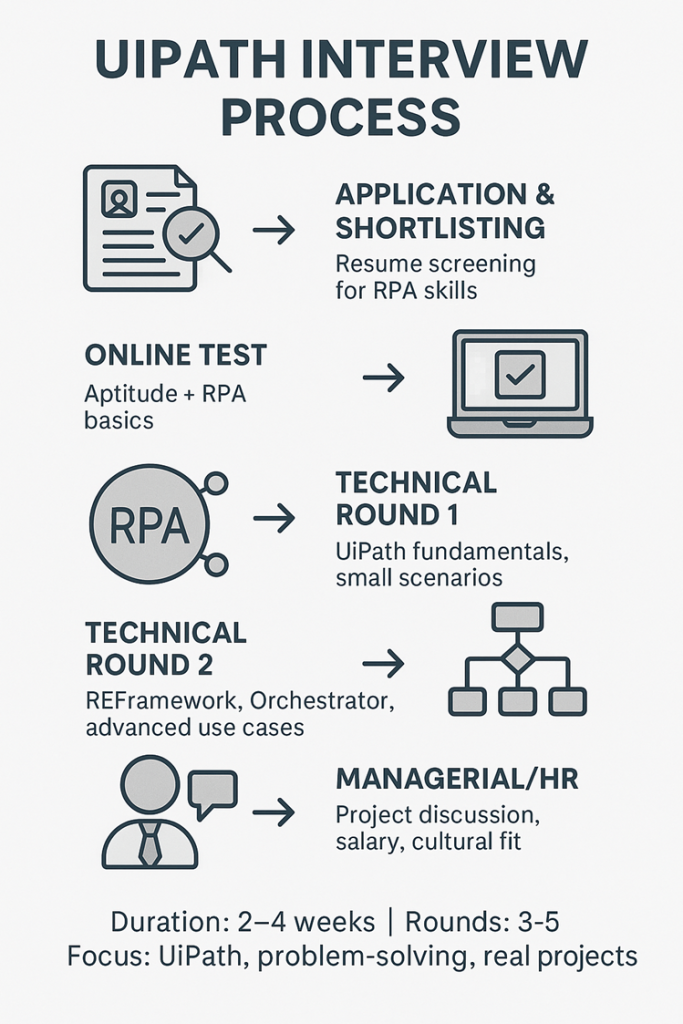
Note: We have covered a wide range of interview questions on UiPath including those for freshers, experienced professionals, developers, scenario-based cases, coding, MCQs, and more.
UiPath Interview Questions for Freshers
Here are UiPath interview questions and answers for freshers to help you understand the basics and get ready for entry-level roles.
- What is UiPath and why is it widely used in RPA?
UiPath is a leading Robotic Process Automation (RPA) tool that automates repetitive tasks. It is popular because it is easy to use, has a drag-and-drop interface, and supports large enterprise automation. Companies prefer UiPath as it reduces manual effort, improves accuracy, and integrates with many applications.
- Explain the main components of UiPath.
UiPath Studio is the design environment where workflows are built.
Robots are the agents that execute these workflows on machines.
Orchestrator is a web-based platform that helps deploy, monitor, and manage robots and automation processes.
- What are the different types of workflows in UiPath?
- Sequences: Best for simple linear processes.
- Flowcharts: Used for complex processes with branching logic.
- State Machines: Work on defined states and transitions.
- Global Exception Handler: Handles errors globally in a project.
- Difference between attended and unattended bots.
Attended bots work alongside humans and are triggered by user actions. They cannot run in locked screens. Unattended bots run without human input, in virtual environments, and can be scheduled from Orchestrator.
- What are variables and arguments in UiPath?
Variables store data within a workflow, like text, numbers, or tables. Arguments are used to pass data between workflows or projects. They have directions like In, Out, and In/Out.
- What is the difference between Data Scraping and Screen Scraping?
Data Scraping extracts structured data, such as tables from web pages or apps, and outputs it in a DataTable. Screen Scraping extracts unstructured data, including text from images or PDFs, usually returned as a string.
- What are selectors in UiPath and how are they used?
Selectors are XML tags that identify UI elements on a screen. They help robots interact with buttons, fields, or windows. Dynamic selectors with variables are used when elements change frequently.
UiPath Interview Questions for Experienced
Let’s go through important UiPath interview questions for experienced professionals to test advanced skills.
- Explain the REFramework and its key states.
The Robotic Enterprise Framework (REFramework) is a UiPath project template based on state machines. It standardizes logging, error handling, and retry mechanisms. Its main states are Init (initialization), Get Transaction Data, Process Transaction, and End Process.
- How do you handle exceptions in UiPath?
I use Try Catch blocks to catch errors at activity level. For business and application exceptions, I rely on REFramework’s built-in handling. Logging and retrying failed transactions is also critical in production.
- What are queues in UiPath Orchestrator and how do you use them?
Queues are containers in Orchestrator that store transaction data. They allow large workloads to be split among multiple bots. Using “Add Queue Item” and “Get Transaction Item” activities, I can build scalable automation.
- How do you secure credentials in UiPath projects?
I store credentials in Orchestrator as Assets of type Credential. Another option is the Windows Credential Manager. UiPath activities like Get Credential fetch them securely without exposing plain text.
- Difference between UiPath and Selenium for automation.
Selenium is limited to testing web applications, while UiPath automates desktop, web, PDF, email, and more. UiPath also provides ready activities, Orchestrator, and bots, which makes it a complete RPA solution. Selenium is still strong for testing, but UiPath is better for business process automation.
- How do you optimize the performance of large-scale automation workflows?
I minimize the use of delays and replace them with proper element exist checks. I use caching, reusable components, and efficient data handling with LINQ. Splitting processes into smaller workflows also improves maintainability and speed.
Note: We are covering additional interview questions on UiPath based on different experience levels.
Also Read - Top 70+ Selenium Interview Questions and Answers
UiPath Interview Questions for 3 Years Experienced
- What projects have you worked on using UiPath?
- What challenges have you faced in automation and how did you resolve them?
- Why did you choose RPA and UiPath as your career path?
- How do you use Orchestrator assets in real-time projects?
- Tell me about a time you had to fix a failed automation under tight deadlines.
UiPath Interview Questions for 4 Years Experienced
- How do you handle process changes when requirements evolve?
- What is the most complex automation you have built in UiPath?
- How do you keep your UiPath and RPA knowledge up to date?
- Explain how you manage transaction retries using queues.
- Share an example where you had to collaborate with non-technical stakeholders.
UiPath Interview Questions for 5 Years Experienced
- How do you approach designing enterprise-grade automation projects?
- What is your experience with scaling bots across multiple environments?
- How have you mentored junior UiPath developers in your team?
- How do you integrate UiPath with AI or OCR tools like Document Understanding?
- Describe a situation where a project failed in production and how you handled it.
UiPath Scenario Based Interview Questions
These UiPath interview questions are scenario-based and will help you practice solving real automation challenges faced in the workplace.
- A bot fails halfway through a long-running process. How do you debug and recover it?
I start with Orchestrator logs, filtered by Robot, job, and time. Check custom Log Message breadcrumbs. Reproduce in Debug with Slow Step and Highlight.
Capture exception details and screenshots. For recovery, build the flow in REFramework with transaction checkpoints so only the failed item retries. Use Retry Scope for flaky steps, save progress to queues or files, and add idempotent actions.
For true long-running work, split with Background processes or Action Center and use Persistence to resume.
- You need to automate data extraction from PDF invoices with varying formats; how would you approach it?
Use Document Understanding: classify invoices, digitize with OCR (e.g., OmniPage/Computer Vision), then extract using the ML Extractor plus Regex/Form extractors for fallbacks. Train and improve the model with validated data.
Add Validation Station for exceptions, route to Action Center when confidence is low, and store results in a consistent schema. Log field confidences.
- How would you design an automation that processes 100,000+ rows of Excel data daily?
Avoid loading everything at once. Read in chunks (ranges or CSV) and process per batch. Use Workbook activities for speed, or treat Excel as a database via UiPath.Database.Activities (OLE DB/ODBC).
Push items to an Orchestrator Queue with a Dispatcher/Performer pattern to parallelize across robots. Use in-memory transformations (LINQ) and write results in bulk. Add checkpoints, retries, and metrics.
- If a selector keeps changing dynamically, how would you make your automation stable?
Build selectors in UI Explorer using stable attributes and wildcards/regex. Use anchors and Modern UI descriptors with Target/Anchor and fuzzy matching.
Replace clicks with Keyboard shortcuts or API/integration when possible. Add Check App State and WaitForReady. As a last resort, use Computer Vision with reliable anchors.
Also Read - Top 15+ Python Automation Interview Questions and Answers
UiPath Developer Interview Questions
This section covers important interview questions on UiPath specifically asked for UiPath Developer roles.
- How do you use the Invoke Workflow activity in real projects?
I use Invoke Workflow to break large processes into smaller, reusable parts. For example, login, data validation, and reporting are separated workflows. Arguments are passed between them to share data. This improves readability, testing, and maintenance. It also allows multiple developers to work on different modules in parallel.
- What’s the difference between using Excel Application Scope and Workbook activities?
Excel Application Scope requires Excel installed. It provides full access, including charts, formatting, and macros. It can also handle password-protected files.
Workbook activities don’t need Excel installed. They are faster for plain read/write tasks but limited in advanced features. For large unattended bots on servers, Workbook activities are often more efficient.
- How do you optimize selectors for better reliability?
I inspect selectors in UI Explorer and remove volatile attributes like index or app IDs. Instead, I rely on stable properties such as name, text, or automation ID.
I use wildcards for variable parts, dynamic selectors with arguments for repeated patterns, and anchors when elements shift on the screen. In modern design, I also apply fuzzy selectors and target anchors for flexibility.
- Explain the use of Config file in UiPath projects.
The Config file, usually an Excel or JSON, stores key settings, credentials, URLs, queue names, and log levels. In REFramework, it is loaded during initialization and used throughout the process.
This allows central management of values without changing workflows. Updating settings becomes simple – only the Config file needs modification. It also improves reusability across environments like Dev, Test, and Prod.
RPA UiPath Interview Questions
These are commonly asked interview questions on RPA with a focus on UiPath.
- What is Robotic Process Automation and how does UiPath fit into it?
Robotic Process Automation (RPA) is the use of software bots to mimic human actions and automate repetitive, rules-based tasks. UiPath is one of the leading RPA platforms. It provides Studio for building workflows, Robots for execution, and Orchestrator for management, making end-to-end automation possible.
- Difference between RPA and traditional automation.
Traditional automation usually needs direct integration with applications and heavy coding. It is time-consuming and expensive. RPA, on the other hand, works at the user interface level, using drag-and-drop activities and minimal coding. This makes it faster to deploy and easier to scale across different applications.
- What are the key benefits of RPA in enterprises?
RPA reduces manual effort, cuts down errors, and saves time. It increases process speed, improves compliance, and allows employees to focus on higher-value work. With UiPath, enterprises can automate across desktop, web, and cloud platforms without changing their existing systems.
- How does RPA differ from Artificial Intelligence?
RPA automates structured, rule-based tasks. It follows predefined steps. AI, on the other hand, deals with unstructured data, learns patterns, and makes decisions. RPA can be combined with AI to build more advanced intelligent automation, but alone, it does not learn or think.
Note: Interview questions for RPA often focus on practical automation use cases, real-time problem solving, and knowledge of tools like UiPath.
RE Framework UiPath Interview Questions
Here are some advanced UiPath interview questions on the RE Framework to help you understand its components and applications.
- What is the role of the Init state in REFramework?
The Init state is where the process begins. It reads the Config file, loads settings, initializes applications, and checks system availability. If initialization fails, the framework retries or ends gracefully.
- How do you configure the Get Transaction Data state for queue items?
In this state, the next transaction item is fetched, usually from an Orchestrator Queue. The “Get Transaction Item” activity retrieves one item at a time. If no items are left, the state moves to the End Process. This setup allows high-volume data processing.
- What is the difference between Business Exception and Application Exception?
A Business Exception happens when the data itself is invalid or does not meet business rules, like a missing invoice ID. An Application Exception occurs when a technical issue happens, such as a timeout or system crash. Business Exceptions skip the item, while Application Exceptions usually trigger retries.
- How does the REFramework handle retries automatically?
Retries are managed at two levels. For failed transactions, Orchestrator retries can be set at the queue level. Inside the framework, the Set Transaction Status activity marks items and decides whether to retry based on exception type. This reduces manual error handling.
UiPath Orchestrator Interview Questions
These UiPath interview questions focus on Orchestrator and will help you prepare for managing, deploying, and monitoring automation processes effectively.
- What are the different types of Robots in Orchestrator?
There are mainly two types: Attended and Unattended.
Attended robots run with user input, often triggered by actions.
Unattended robots run without human presence, in virtual environments, and can be scheduled. Development and Non-Production robots are also available for testing and building.
- What is the difference between Standard Machine and Machine Template?
A Standard Machine is tied to one specific machine name. It’s useful when the robot always runs on the same computer. A Machine Template is flexible and allows floating robots to run on multiple machines, often used in enterprise environments.
- How do you schedule a process in Orchestrator?
In Orchestrator, go to the Triggers section. Choose the process, set start time, frequency, and target robots. For example, I can schedule a job to run daily at midnight. Orchestrator will then trigger the job automatically without manual intervention.
- What are assets in Orchestrator and how are they used in automation?
Assets are shared values like credentials, URLs, or settings. They can be of type String, Boolean, Integer, or Credential. In workflows, I fetch them using the Get Asset or Get Credential activities. This allows central management of values without hardcoding them in processes.
UiPath Coding Interview Questions
Here are some practical interview questions on UiPath coding that test your workflow design.
- How do you convert a string variable to integer in UiPath?
Use an Assign activity:
intValue = Convert.ToInt32(stringVariable)
Or:
intValue = CInt(stringVariable)
- What is the difference between For Each, For Each Row, and Parallel For Each?
- For Each (collection):
For Each item In myList
Log Message: item.ToString
Next
- For Each Row (DataTable):
For Each row In dataTable
Log Message: row(“ColumnName”).ToString
Next
- Parallel For Each:
Parallel For Each item In myList
Assign result = item * 2
End Parallel
- How do you pass data between workflows in UiPath?
Create Arguments:
- In Workflow1 → define out_Argument (Out argument).
- In Main.xaml:
Invoke Workflow: Workflow1.xaml
Arguments: out_Argument → in_Argument (In argument of next workflow)
- How do you use dictionaries in UiPath projects?
Create a Dictionary in an Assign activity:
dict = New Dictionary(Of String, String) From {
{“ID”, “101”},
{“Name”, “John”}
}
Access values:
value = dict(“Name”)
Update value:
dict(“Name”) = “David”
UiPath MCQs
Here are some multiple-choice UiPath interview questions to quickly test your knowledge and fundamentals.
- Which recording type is best for automating desktop applications?
- a) Desktop
- b) Web
- c) Basic
- d) Citrix
Answer: a) Desktop
- Which property allows an activity to continue even if it fails?
- a) ContinueOnError
- b) Timeout
- c) RetryCount
- d) None
Answer: a) ContinueOnError
- Which activity is used to extract structured data from a web page?
- a) Data Scraping
- b) Screen Scraping
- c) OCR
- d) Read Cell
Answer: a) Data Scraping
- Which queue status in Orchestrator indicates a transaction has been processed successfully?
- a) Successful
- b) Failed
- c) Abandoned
- d) New
Answer: a) Successful
- Which method is the fastest for input in UiPath?
- a) Simulate
- b) Send Windows Message
- c) Default
- d) OCR
Answer: a) Simulate
- Which activity is used to merge two DataTables?
- a) Merge DataTable
- b) Append Range
- c) Add DataRow
- d) Join DataTables
Answer: a) Merge DataTable
- Which asset type is NOT supported in Orchestrator?
- a) String
- b) Boolean
- c) Credential
- d) Float
Answer: d) Float
- Which activity is used to connect to a database in UiPath?
- a) Connect
- b) Open DB
- c) Execute Query
- d) Database Connect
Answer: d) Database Connect
- Which panel in UiPath Studio displays project hierarchy and variables?
- a) Outline
- b) Output
- c) Properties
- d) Activities
Answer: a) Outline
- Which OCR engine is available in UiPath by default?
- a) Google OCR
- b) Microsoft OCR
- c) ABBYY OCR
- d) None of the above
Answer: b) Microsoft OCR
How to Prepare for UiPath Interview?
Preparing for a UiPath interview requires strong technical knowledge and confidence in applying automation concepts. Follow these tips to prepare:
- Start with basics like RPA lifecycle, UiPath components, and types of bots.
- Practice common UiPath interview questions from freshers to advanced levels.
- Build small automation projects to show practical hands-on skills.
- Revise Orchestrator, RE Framework, and exception handling.
- Be ready with real examples of automation you built or tested.
- Learn how to debug processes and explain problem-solving clearly.
- Stay updated on the latest UiPath features released.
- Practice mock interviews for confidence and clear communication.
Wrapping Up
And that’s a wrap on the 30+ most asked UiPath interview questions and answers. Preparing with these will give you a solid foundation for both technical and scenario-based rounds. Stay consistent with practice and keep building real projects.
Looking for your next opportunity? Visit Hirist to find top IT jobs, including UiPath job roles.
FAQs
The process usually has an aptitude or technical screening, followed by one or two rounds of technical interviews focused on UiPath scenarios, and finally an HR round. Most questions test practical knowledge, not just definitions.
Here are some common Cognizant UiPath interview questions that candidates often face during selection rounds:
What are the main components of UiPath and how do they interact?
How do you handle exceptions in UiPath workflows?
Explain the REFramework and when you would use it in projects.
How do you manage credentials securely in UiPath Orchestrator?
Can you describe a real project where you implemented unattended automation?
UiPath is primarily an RPA (Robotic Process Automation) company but it integrates AI features such as Document Understanding, Computer Vision, and ML models to make automations smarter.
Thick client: An application where full properties of UI elements can be accessed, like MS Excel.
Thin client: An application where limited properties are accessible, like Citrix environments.
It offers a user-friendly interface, drag-and-drop features, strong Orchestrator, and enterprise scalability. UiPath also supports integration with cloud, AI, and third-party applications, making it a leader in RPA.
According to data from AmbitionBox, UiPath RPA Developers in India earn an annual salary range of ₹10.8 Lakhs to ₹19.4 Lakhs. The average salary is around ₹14.5 Lakhs per year, with a monthly in-hand of about ₹1.00 Lakh to ₹1.03 Lakh, depending on location, skills, and company.
UiPath RPA Developer Salary Overview (India, 2026)
| Metric | Value |
|---|---|
| Annual salary range | ₹10.8 Lakhs – ₹19.4 Lakhs |
| Avg. annual salary | ₹14.5 Lakhs |
| Monthly in-hand salary | ₹1.00 Lakh – ₹1.03 Lakh |
| Experience range in data | 0 – 7 years |
UiPath RPA Developer salary based on experience:
| Experience | Average Annual Salary |
|---|---|
| Fresher | ₹11.6 Lakhs per year |
| 1 year | ₹12.4 Lakhs per year |
| 2 years | ₹13.2 Lakhs per year |
| 3 years | ₹14.0 Lakhs per year |
UiPath RPA Developer salary at top companies:
| Company | Average Annual Salary |
|---|---|
| Accenture | ₹7.1 Lakhs per year |
| Cognizant | ₹6.6 Lakhs per year |
| Wipro | ₹6.0 Lakhs per year |
| Capgemini | ₹6.0 Lakhs per year |
| TCS | ₹5.2 Lakhs per year |
Cognizant, Accenture, Infosys, TCS, Capgemini, Deloitte, and IBM actively hire UiPath developers, architects, and automation testers worldwide.