Power Automate is a tool from Microsoft that helps people create automated workflows between apps and services. It was first introduced in 2016 as Microsoft Flow under the leadership of Satya Nadella, before being rebranded as Power Automate in 2019. The platform is now widely used to save time by automating repetitive tasks in businesses of all sizes. Many roles such as automation developer, business analyst, and IT professional use it daily. To prepare for these roles, let us look at the top 20 Power Automate interview questions and answers.
Fun Fact: Microsoft Power Platform, which includes Power Automate, has over 33 million monthly active users.
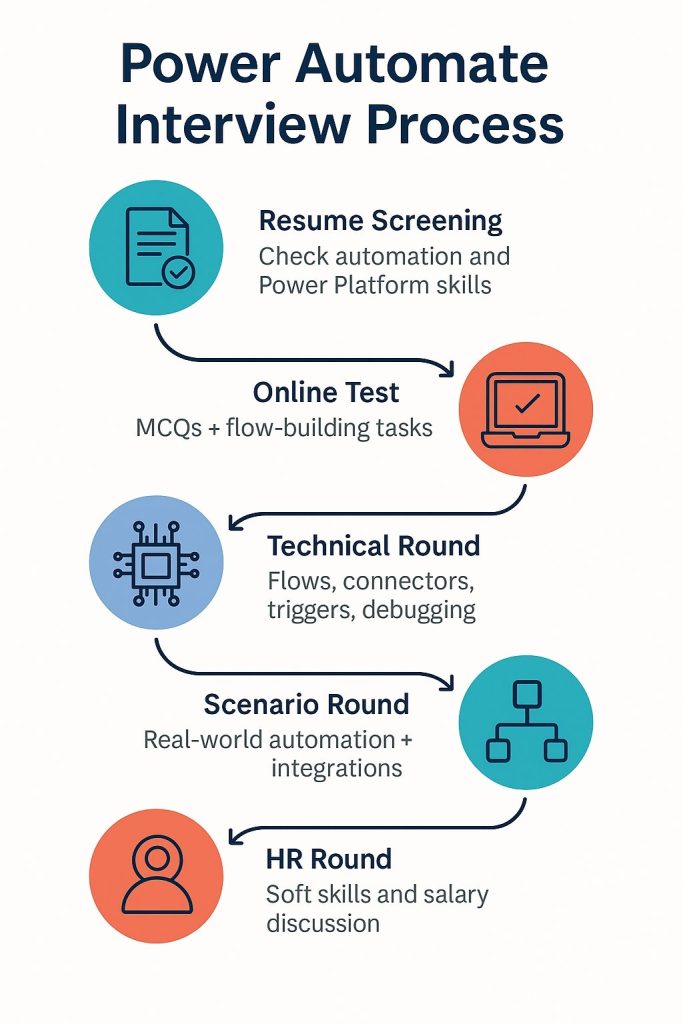
Power Automate Interview Process
Power Automate is a tool from Microsoft that helps people create automated workflows between apps and services. It was first introduced in 2016 as Microsoft Flow under the leadership of Satya Nadella, before being rebranded as Power Automate in 2019.
The platform is now widely used to save time by automating repetitive tasks in businesses of all sizes. Many roles such as automation developer, business analyst, and IT professional use it daily. To prepare for these roles, let us look at the top 20 Power Automate interview questions and answers.
Fun Fact: Microsoft Power Platform, which includes Power Automate, has over 33 million monthly active users.
Power Automate Interview Process
Power Automate Interview Questions for Freshers
Here are some of the most common Power Automate interview questions and answers to help beginners get ready for their first job role.
- What is Microsoft Power Automate and why is it used?
Power Automate is a Microsoft Power Platform tool launched in 2016. It helps automate workflows between apps and services. People use it to cut down repetitive tasks, improve productivity, and connect data across platforms like Outlook, Teams, and SharePoint.
- What are the different types of flows available in Power Automate?
There are three main types:
- Cloud flows, used for automated, instant, or scheduled triggers.
- Desktop flows, used for Robotic Process Automation (RPA) on web or desktop tasks.
- Business process flows, which guide users step by step through structured processes.
- What is the difference between Power Automate and Power Apps?
Power Automate focuses on automating tasks and connecting systems. Power Apps is for building custom applications with minimal code. Power Apps handles front-end apps, while Power Automate manages the background workflows.
- What are triggers and actions in Power Automate?
A trigger starts a flow when something happens, like receiving an email. An action is what follows, such as saving the email attachment to OneDrive.
- What are connectors in Power Automate and types of connectors?
Connectors let Power Automate talk to other apps. Standard connectors include Outlook, Teams, and SharePoint. Premium connectors cover services like Salesforce or ServiceNow. Developers can also create custom connectors for unique APIs.
- How do you schedule a flow in Power Automate?
I can use the Recurrence trigger. It allows me to set flows to run daily, weekly, or at custom intervals.
- What is dynamic content in Power Automate?
Dynamic content is data that flows from one step to another. For example, if I capture a form response, I can use the person’s name directly in an automated email.
- What are approval flows and where are they used?
Approval flows let me automate approvals for documents, leave requests, or purchase orders. They notify approvers in Teams or Outlook, track responses, and record the decision automatically.
Power Automate Interview Questions for Experienced
Let’s go through important power automate interview questions and answers for experienced professionals to prepare for advanced job roles.
- How do you handle errors in Power Automate flows?
I usually use the Configure Run After option. It lets me decide what happens if a step fails, is skipped, or times out. For complex flows, I also group steps inside a Scope and add fallback actions like logging errors or sending alerts.
- How do you optimize a flow for performance?
I reduce unnecessary actions, use filters early in SharePoint or SQL queries, and avoid looping large datasets when possible. I also monitor the flow analytics dashboard to track execution time and failure rates.
- How do you integrate Power Automate with external APIs?
I use the HTTP action or create a custom connector. With a connector, I define authentication and endpoints once, then reuse it across multiple flows. It’s the cleanest way to connect with APIs outside Microsoft services.
- How do you manage environment and solution deployments in Power Automate?
For enterprise projects, I package flows into Solutions. This helps when moving from dev to test or production. Connection references and environment variables make migration easier without breaking connectors.
- How do you handle approval workflows at scale?
I use the Start and Wait for Approval action. For high-volume approvals, I design parallel approval branches and use Dataverse or SharePoint lists to track status. This keeps flows stable even with hundreds of requests.
- How do you use Power Automate with Power BI?
I’ve set up flows to refresh Power BI datasets on a schedule or based on events, like when new data lands in SQL. I also use flows to send Teams alerts when a Power BI data alert is triggered.
- How do you handle security and governance in Power Automate?
I follow Data Loss Prevention (DLP) policies to restrict which connectors can be used together. Role-based access is important, so only authorized users can edit or run flows. I also track activity in audit logs for compliance.
Also Read - Top 50+ Power BI Interview Questions and Answers
Power Automate Scenario Based Interview Questions
These are practical interview questions on power automate that test how you apply concepts to real-world business situations.
- A flow keeps failing when processing large data from SharePoint. How would you fix it?
I would first check if the query can be filtered better, so fewer items load into the flow. If the dataset is still too large, I would use pagination with “Get Items” and process data in smaller batches.
- A manager wants approvals to go to two people, but the flow should continue once either one approves. How do you design this?
I would use the Start and Wait for Approval action with the option set to “First to respond.” That way, as soon as one person approves or rejects, the flow continues without waiting for the other.
- A desktop flow fails after a software update. What is your approach?
I would re-record the UI elements that broke due to the update. Sometimes, selectors change when software updates, so fixing the element references usually solves it. I also test the flow step by step to spot where it breaks.
- How would you design a flow that sends reminders until a task is completed?
I’d use a Do Until loop with a condition to check task status. Inside the loop, I’d add a delay (like 24 hours) and send a reminder email. Once the task is marked complete, the loop ends.
- If an API has rate limits, how do you avoid failures?
I would add a Delay action between requests to stay within the limit. For heavy usage, I’d also queue requests using Dataverse or SharePoint lists and process them gradually.
Tips to Prepare for Power Automate Interview
Preparing for a Power Automate interview needs both technical knowledge and practical problem solving skills. Here are some tips you can follow:
- Revise basics like flows, triggers, actions and connectors
- Practice building real workflows in cloud and desktop
- Learn common integrations with SharePoint, Teams and Outlook
- Review error handling and monitoring options
- Go through scenario based problems from past interviews
- Stay updated with latest features like work queues and AI Builder
- Practice explaining answers clearly in simple words
Wrapping Up
So, these are the 20 important Power Automate interview questions and answers you should prepare. They cover basics, advanced use cases, and real-world scenarios that recruiters commonly ask. Go through them carefully, practice hands-on, and stay updated with new features.
Ready to apply your skills? Find the top IT jobs including Power Automate job roles on Hirist.
FAQs
Here are some of the most commonly asked Power Automate Desktop interview questions:
What types of automation can be achieved using Power Automate Desktop?
How do you use UI elements in desktop automation?
What are Work Queues in Power Automate Desktop and how are they used?
How do you handle errors in Power Automate Desktop flows?
What are some common actions available for Excel automation in Power Automate Desktop?
The four pillars are automated at scale, smart automation, accelerated productivity, and seamless secure integration.
It is used to automate repetitive tasks, connect apps, improve workflows, and boost efficiency.
It is a low-code platform. Power Automate Desktop supports VBScript, JavaScript, Python, and PowerShell.