AutoCAD is a computer-aided design software developed by Autodesk in 1982 by John Walker and his team. It quickly became the go-to tool for engineers, architects, and designers to create precise 2D and 3D drawings. Over the years, AutoCAD has shaped industries by making design faster and more accurate. Because of its wide use, employers often check how well candidates know the software during interviews. To help you prepare, we have listed 30+ important AutoCAD interview questions with simple answers.
Fun Fact: According to an Autodesk productivity report, nine out of ten AEC (architecture, engineering, and construction) professionals use AutoCAD in their projects.
AutoCAD Interview Process Explained
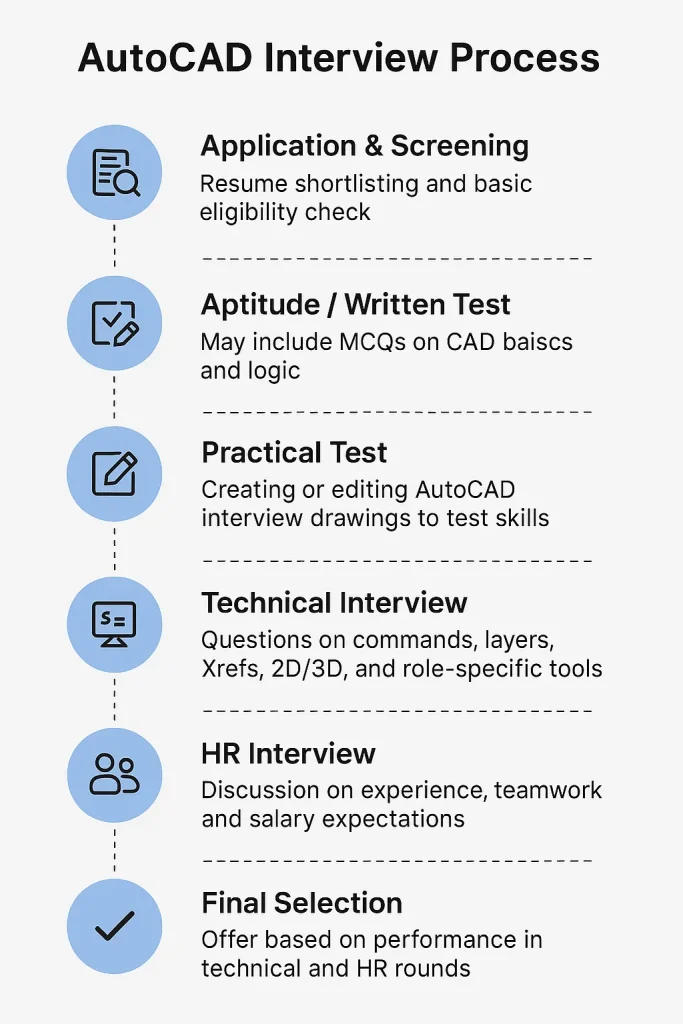
Note: In this list of AutoCAD job interview questions, we have included basics, fresher and experienced-level questions, role-based queries, viva points, and MCQs for complete preparation.
Basic AutoCAD Interview Questions
Here are some commonly asked AutoCAD basic interview questions that help test your fundamental knowledge of the software.
- What is AutoCAD and what are its primary uses?
AutoCAD is a computer-aided design software created by Autodesk in 1982. It is widely used for drafting, 2D drawings, and 3D modeling across industries like architecture, civil, mechanical, and electrical engineering. Its primary use is to create accurate technical drawings and models quickly.
- What file formats does AutoCAD support?
AutoCAD supports multiple file formats for design, sharing, and documentation.
- DWG – Native format that stores complete design data.
- DXF – Used for exchanging drawings with other CAD software.
- DWT – Template files for standard project setups.
- DWF – Lightweight format for easy viewing and sharing.
- PDF – Export option for documentation and printing.
- Explain the difference between Model space and Paper space.
Model space is where the actual design is created. Paper space is used for creating layouts, title blocks, and scaled views for printing.
| Aspect | Model Space | Paper Space |
| Purpose | Used for creating the actual design | Used for layouts, title blocks, and printing |
| Scale | Drawings are made in real-world dimensions | Views are scaled to fit sheets |
| Focus | Design and drafting work | Presentation and documentation |
| Usage | Suitable for 2D/3D modeling | Suitable for plotting and annotations |
- Describe the purpose of layers in AutoCAD.
Layers help organize a drawing by grouping similar objects. For example, walls, furniture, and electrical lines can be placed on separate layers. This makes it easier to control visibility, color, and plotting.
- What is the Offset command used for?
Offset creates a parallel copy of an object at a given distance. It is often used for walls, roads, or any design requiring consistent spacing.
- How do Trim and Extend differ?
Trim cuts an object to meet another boundary. Extend lengthens an object until it touches a defined edge. One shortens, the other lengthens.
- What are grips in AutoCAD and how are they used?
Grips are small squares that appear when objects are selected. They let you move, stretch, scale, or rotate objects quickly without typing a command.
Note: AutoCAD basic questions often include topics like common commands, drawing tools, shortcuts, and simple 2D design tasks that test your foundation in AutoCAD.
AutoCAD Interview Questions for Freshers
These AutoCAD interview questions and answers will help beginners understand the basics and get ready for entry-level interviews.
- How do you draw a circle (name two methods)?
You can use the CIRCLE command with a center point and radius. Another method is defining two or three points to set the circle.
- What does the Mirror command do?
The Mirror command creates a flipped copy of selected objects across a chosen axis. It’s very useful for symmetrical designs.
- How do you modify object properties?
I can select the object and change its properties in the Properties palette. Another way is to change them directly in the command line or layer dropdown.
- What is Ortho mode and when do you use it?
Ortho mode restricts cursor movement to horizontal or vertical directions. I use it when I need straight edges in floor plans or mechanical drawings.
- Explain what Object Snap (OSNAP) is.
OSNAP snaps the cursor to exact points like endpoints, midpoints, or centers. It removes guesswork and makes drawings more precise.
- How do you zoom and pan in AutoCAD?
I scroll the mouse wheel to zoom in and out. Holding the wheel lets me pan. Commands like ZOOM and PAN also give control over the view.
- What is the Hatch command and where is it used?
The Hatch command fills a closed area with a solid, gradient, or pattern. It is used to represent materials like concrete, brick, or steel.
AutoCAD Interview Questions for Experienced Professionals
Let’s go through some advanced AutoCAD interview questions with answers that focus on real applications and problem-solving.
- How do you create and manage dynamic blocks?
Dynamic blocks are reusable symbols that can be modified without recreating them. I create them using the Block Editor and add parameters like stretch, rotate, or visibility. Managing them saves time, reduces file size, and improves consistency across large projects.
- What are parametric constraints and how would you apply them?
Parametric constraints control geometry with rules. Geometric constraints fix relationships like parallel or perpendicular, while dimensional constraints set values like length or angle. I apply them to maintain design intent so that when one element changes, the related parts adjust automatically.
- How do you troubleshoot a slow or large AutoCAD drawing file?
I start by auditing the file with the AUDIT command, then use PURGE to clear unused items. I also check for unnecessary Xrefs, reduce hatch density, and simplify geometry. If needed, I split very large drawings into manageable sections.
- How do you automate tasks using scripts or AutoLISP?
Scripts and AutoLISP help automate repetitive work like renaming layers or batch plotting. I write small routines to run commands in sequence or customize workflows. This reduces manual effort and increases productivity, especially in firms handling hundreds of drawings.
- Explain how you manage external references (Xrefs) in large projects.
Xrefs link external drawings without merging them. I attach architectural, structural, and service drawings as Xrefs to maintain coordination. Regularly updating paths, using relative file locations, and layering controls make managing large, collaborative projects more organized and less error-prone.
- How do you use annotation scales to make text/dimensions consistent across viewports?
Annotation scaling lets text, dimensions, and symbols display at the right size in different viewports. I assign annotation scales so the same dimension looks correct on multiple sheets, avoiding duplication. This keeps printed drawings clear and readable at any scale.
AutoCAD Interview Questions by Job Role
Now, let’s cover important interview questions and answers on AutoCAD for different job profiles like civil, mechanical, electrical, and draftsman roles.
AutoCAD Interview Questions for Mechanical Engineer
Here are some commonly asked AutoCAD mechanical interview questions that test your design knowledge and mechanical drawing skills.
- What is the difference between Extrude and Revolve for 3D modeling?
The Extrude command extends a 2D profile along a straight path to create a 3D shape, like a cylinder from a circle. Revolve rotates a profile around an axis to form objects such as pipes, shafts, or wheels.
- How do you apply constraints to mechanical parts?
Constraints control relationships between objects. Geometric constraints keep lines parallel, perpendicular, or concentric. Dimensional constraints fix exact lengths, angles, or diameters. I use them in assemblies so when one part changes, the connected parts adjust automatically without losing accuracy.
- Explain how custom hatch patterns or material definitions might be used in mechanical drawings.
Custom hatch patterns can show material sections like steel, aluminum, or rubber. They make mechanical drawings clearer for manufacturing teams. I can load or create hatch definitions in AutoCAD to match company or industry standards for material representation.
- How would you use the Align or Mate tools in mechanical assembly drawings?
The Align tool positions parts relative to reference geometry. It is useful for aligning holes or shafts. The Mate tool helps define relationships, guaranteeing surfaces or axes stay connected properly. These tools reduce errors in mechanical assembly design.
AutoCAD Interview Questions for Civil Engineer
- What is AutoCAD Civil 3D and how does it differ from regular AutoCAD?
Civil 3D is a civil engineering design software built on AutoCAD. Unlike standard AutoCAD, it includes tools for terrain modeling, alignments, corridors, and grading. It is widely used for roads, highways, land development, and infrastructure projects.
- How are alignments and profiles used in civil design?
Alignments represent the centerlines of roads, railways, or pipelines. Profiles show the vertical design along those alignments. Together they form the base for corridor modeling. Engineers rely on them for accurate earthwork calculations and construction planning.
- How do you create and manage corridors or grading in Civil 3D?
Corridors model roadways by combining alignments, profiles, and assemblies. I define typical cross-sections, then apply them along the alignment. For grading, Civil 3D tools help create slopes, pads, and embankments, making terrain design more accurate and efficient.
- What is the role of surface creation in civil design?
Surfaces in Civil 3D, like TIN surfaces, represent terrain. Adding breaklines improves accuracy along edges like curbs or banks. Boundaries define surface extents. These tools are essential for earthwork estimates, drainage design, and visualizing site conditions.
AutoCAD Interview Questions for Electrical Engineers
- How do you draw wiring or circuit diagrams using AutoCAD?
In AutoCAD, I use lines and polylines to represent wires. Standard electrical symbols are inserted as blocks. Layers help separate circuits, making the drawing clear and easy to read.
- What methods do you use to symbolize electrical components?
Electrical components are usually represented using standard IEC or ANSI symbols. I create or import them as blocks in AutoCAD, then reuse them across projects. This maintains consistency and accuracy in electrical schematics.
- How would you manage layer standards in an electrical drawing?
Layers keep circuits organized. For example, I place power, lighting, signal, and conduit lines on separate layers with unique colors and linetypes. This makes drawings easier to interpret and reduces mistakes during design or review.
- How do you annotate or label wiring diagrams to reflect voltages, currents, and connections?
I use text, leaders, and dimensioning tools to label circuits with voltage, current, and cable details. Annotation scales keep the text readable in all viewports. Clear labeling is critical for installation and troubleshooting.
AutoCAD Draftsman Interview Questions
- How do you ensure accuracy in dimensioning and tolerancing in your drawings?
I use AutoCAD’s dimension tools with OSNAP for precise points. For tolerances, I apply standard dimension styles so measurements are consistent. Regular checks with the Properties palette help keep values accurate.
- Describe your drafting workflow from client requirement to final drawing.
I begin by reviewing client requirements and reference sketches. Then I create the drawing using standard templates and layers. After adding dimensions, annotations, and hatches, I review with the team before delivering the final version.
- How do you manage block libraries and reuse common elements?
I organize standard symbols and objects as blocks in libraries. Reusing them saves time and keeps drawings uniform. AutoCAD’s DesignCenter makes it easy to import blocks across multiple projects.
- How do you handle revisions – marking changes, version control, etc.?
I cloud changes using revision tools or markups. Layers help separate revisions from original content. I also maintain file versions with proper naming conventions so updates can be tracked easily.
AutoCAD Draughtsman Interview Questions
- How do you interpret technical sketches and convert them into CAD drawings?
Technical sketches are studied carefully, with attention to scale, notes, and design intent. The drawing is then recreated in AutoCAD using accurate units, OSNAP tools, and layers to ensure precision and clarity in the final output.
- What steps do you follow to check drawings for errors before submission?
The drawing is reviewed for dimension accuracy, proper use of layers, and drafting standards. Commands like AUDIT help detect errors. A print preview is also checked to confirm layout, annotations, and scale are correct before submission.
- Which drawing standards do you follow and why?
International or national standards such as ISO or BIS are usually followed. Proper units, line weights, and layer structures create uniformity across drawings, making them easier for multidisciplinary teams to read and work with.
- How do you collaborate with engineers or architects using drawing changes or comments?
External references (Xrefs) and layers are used for collaboration. Revision clouds highlight changes, while markups and notes provide clear communication. Updated files are shared promptly to keep project workflows smooth.
Other Important AutoCAD Interview Questions
This section highlights key AutoCAD software interview questions that cover general features, tools, and practical use of the software.
AutoCAD 2D Interview Questions
- What is the difference between Line and Polyline?
- How do you use the Divide or Measure command in 2D?
- Explain the Stretch command and its typical use.
- What is a viewport in 2D layouts and how is it managed?
- How do you manage annotation in 2D drawings?
Civil 3D Interview Questions
- What are data shortcuts in Civil 3D and why are they used?
- How does Civil 3D allow corridor transitions?
- Explain how superelevation is modeled in Civil 3D.
- What is grading optimization and how is it applied?
- How do alignments, profiles, and assemblies work together in a corridor model?
AutoCAD and SolidWorks Interview Questions
- What are the strengths of AutoCAD vs SolidWorks?
- How do you transfer a model from SolidWorks into AutoCAD?
- When would you prefer to use solid modeling in SolidWorks over AutoCAD?
- How do you handle synchronization of drawings if both tools are used in a project?
- What challenges arise when importing/exporting geometry between AutoCAD and SolidWorks?
AutoCAD Viva Questions
These questions are often asked in exams or quick assessments to check your basic AutoCAD knowledge and practical understanding.
- What is your workflow when starting a new project in AutoCAD?
A new project begins with setting up drawing units, limits, and templates. Layers are then created for organization, followed by drawing geometry, applying dimensions, and annotations. The workflow concludes with review and preparation for plotting.
- How would you explain the concept of layers to a non-technical person?
Layers in AutoCAD act like transparent sheets stacked on top of each other. Each sheet holds specific objects, such as walls, furniture, or wiring. Turning layers on or off controls what is visible without deleting anything.
- Which keyboard shortcuts are used most often and why?
Common shortcuts include L for Line, C for Circle, M for Move, and CO for Copy. These save time compared to navigating menus and are essential for drafting efficiency.
- If a drawing doesn’t open, what steps should be taken to recover it?
The RECOVER command can repair corrupted files. AutoCAD also creates backup (.bak) and autosave (.sv$) files, which can be renamed and opened to restore lost work.
- What is the importance of units and scale in CAD drawings?
Units and scale determine real-world accuracy. Without correct units, objects may be misrepresented. Proper scaling ensures drawings can be printed and interpreted correctly across design and construction teams.
AutoCAD MCQs
These multiple-choice questions help you test your knowledge of AutoCAD concepts in a quick and simple way.
- Which command is used to create a mirror of selected objects?
A) MIRROR
B) COPY
C) OFFSET
D) ROTATE
Answer: A) MIRROR
- What is the default file extension for an AutoCAD drawing?
A) .DXF
B) .DWF
C) .DWG
D) .DWT
Answer: C) .DWG
- Which command trims objects to meet the edges of other objects?
A) EXTEND
B) TRIM
C) FILLET
D) CHAMFER
Answer: B) TRIM
- Which mode restricts cursor movement to horizontal or vertical directions?
A) OSNAP
B) ORTHO
C) SNAP
D) POLAR
Answer: B) ORTHO
- Which command stretches parts of a drawing?
A) SCALE
B) STRETCH
C) MOVE
D) ROTATE
Answer: B) STRETCH
- What does “Xref” stand for?
A) eXternal Reference
B) XML Reference
C) Cross Reference
D) X-rotation
Answer: A) eXternal Reference
- Which command lets you place repeating copies of objects?
A) ARRAY
B) COPY
C) OFFSET
D) MIRROR
Answer: A) ARRAY
How to Prepare for Your AutoCAD Interview?
Preparing for an AutoCAD interview needs clear concepts, good practice, and confidence in practical tasks.
- Review common AutoCAD commands interview questions and practice them daily on sample drawings.
- Revise basics like layers, hatches, and dimensioning to show strong fundamentals.
- Go through CAD design interview questions and prepare examples from real projects.
- Learn shortcuts because they save time during technical rounds.
- Practice 2D and 3D drawings that reflect actual industry problems.
- Be ready to explain your workflow and problem-solving approach clearly.
Wrapping Up
So, these are the 30+ AutoCAD interview questions and answers that cover basics, advanced topics, and role-specific queries. Practicing these will help you feel confident and job-ready. If you are looking for IT opportunities, including AutoCAD-related jobs, find them on Hirist today.
FAQs
Interviewers may ask candidates to create simple floor plans, mechanical parts, or electrical layouts. These AutoCAD interview drawings check speed, accuracy, and knowledge of commands in real scenarios.
Common AutoCAD civil interview questions include the following:
How do you create a TIN surface in Civil 3D?
What is the role of breaklines in surface modeling?
How do you design a road corridor using assemblies?
What is the purpose of feature lines in grading?
How do you generate earthwork volume reports?
Not usually. Interview questions about AutoCAD depend on the role. For freshers, questions are mostly basic. For experienced professionals, they can go deeper into topics like dynamic blocks, Xrefs, Civil 3D, or parametric constraints. Difficulty often reflects the job level, not the software itself.
AutoCAD has many commands, but some are used daily for drafting and editing tasks.
LINE – creates straight lines between points
CIRCLE – draws circles by radius or diameter
TRIM – cuts objects to meet edges of others
OFFSET – creates parallel copies of objects
MIRROR – produces a flipped copy across an axis
According to AmbitionBox, the average annual salary of an AutoCAD Designer in India is about ₹4.4 lakhs, with a range between ₹1.2 lakh and ₹6.4 lakhs. An AutoCAD Draftsman earns around ₹4.1 lakhs on average, with salaries ranging from ₹1.2 lakh to ₹9 lakhs.
Auto CAD Draftsman Salary in India (Updated 2025)
| Detail | Information |
|---|---|
| Based on | 463 salaries |
| Updated | 21 Sep 2025 |
| Experience Range | 1 – 13 years |
| Annual Salary Range | ₹1.2 Lakh – ₹9 Lakhs |
| Avg. Annual Salary | ₹4.1 Lakhs |
| Monthly In-hand Salary | ₹22,000 – ₹23,000 |
| Salary Indicator | Salary of majority employees |
Auto CAD Designer Salary in India (Updated 2025)
| Detail | Information |
|---|---|
| Based on | 2.9k salaries |
| Updated | 27 Sep 2025 |
| Experience Range | 0 – 10 years |
| Annual Salary Range | ₹1.2 Lakh – ₹6.4 Lakhs |
| Avg. Annual Salary | ₹4.4 Lakhs |
| Monthly In-hand Salary | ₹17,000 – ₹19,000 |
| Salary Indicator | Salary of majority employees |
Top companies hiring AutoCAD professionals include Autodesk, Larsen & Toubro, Tata Projects, Siemens, Wipro, and Infosys. Firms in architecture, construction, manufacturing, and infrastructure regularly seek candidates with strong AutoCAD skills.