LangChain is an open-source framework that helps developers build applications with large language models. It began in late 2022 as a side project by Harrison Chase and soon became an important tool in AI development. Developers use LangChain to connect LLMs with prompts and data sources. It also supports APIs, memory, tools and agents. Today, LangChain skills are useful for AI engineers, Python developers, GenAI developers, chatbot developers and machine learning roles. This article includes 30 LangChain interview questions and answers for freshers and experienced professionals to help you prepare for these roles. You will also find important LangChain MCQs to test your knowledge.
Fun Fact: LangChain has crossed 140k+ stars on GitHub. This shows how quickly the framework has grown among developers working with LLMs and GenAI applications.
Understanding the LangChain Interview Process
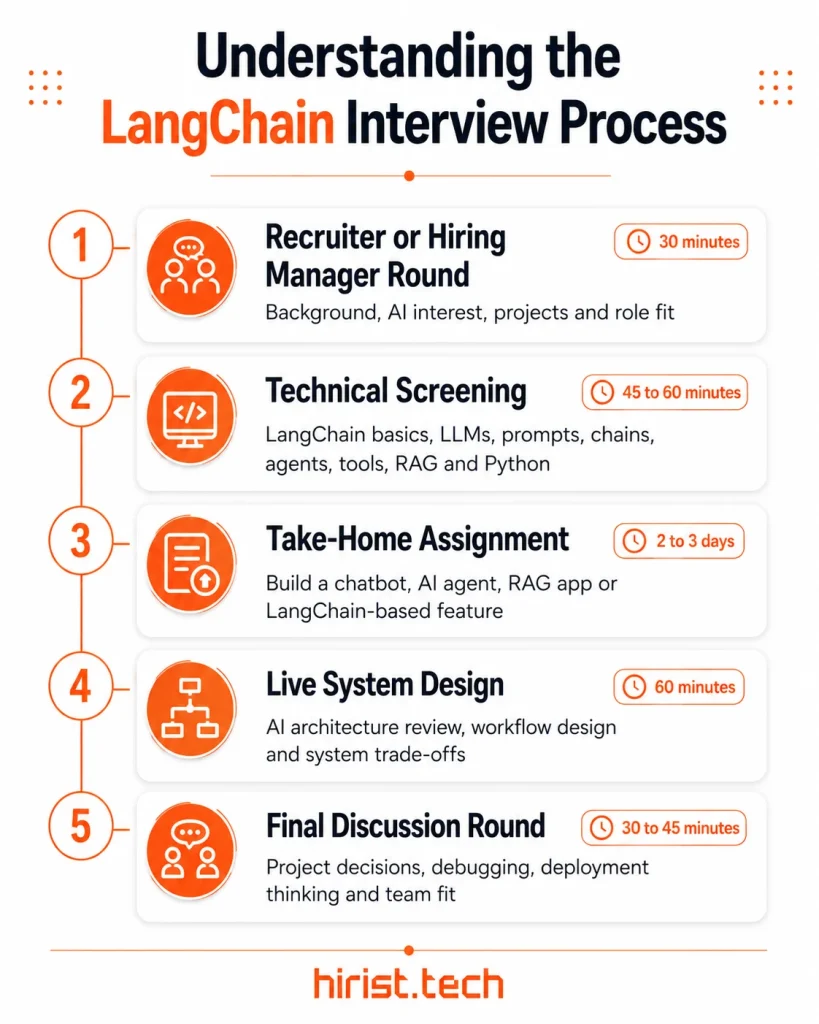
LangChain usually appears as an important part of GenAI, LLM and AI application development interviews. It is not always treated as a separate interview topic. Most interviews have 4 to 5 rounds.
- Hiring Manager Round: A short discussion about your background, AI interest, projects and role fit.
- Technical Round: Basic questions on LangChain, LLMs, prompts, chains, agents, tools, RAG and Python.
- Take-Home Assignment: You may be asked to build a small AI app, chatbot, agent workflow or LangChain-based feature.
- Live System Design: This may include reviewing an existing AI architecture and designing a new feature or workflow.
- Final Discussion Round: Focuses on project decisions, debugging, deployment thinking and team fit.
Note: We have divided these commonly asked LangChain interview questions into Basic, Intermediate, Advanced, Coding Questions and MCQs. This will help you revise the right questions based on your experience level and interview preparation stage.
Basic LangChain Interview Questions
Basic questions are often asked to freshers and candidates applying for entry-level GenAI roles. These LangChain interview questions and answers usually cover what LangChain is and how it connects with LLMs. You may also get questions on prompts, chains, models, tools, agents and simple use cases.
- What is LangChain and how is it used in building LLM-powered applications?
LangChain is an open-source framework for building applications with large language models. It gives developers ready components for models, prompts, tools, agents and data connections.
In interviews, explain that LangChain helps turn a plain LLM call into a working AI app. Examples include chatbots, RAG apps, AI agents and document Q&A systems.
- What are the core building blocks of a LangChain application?
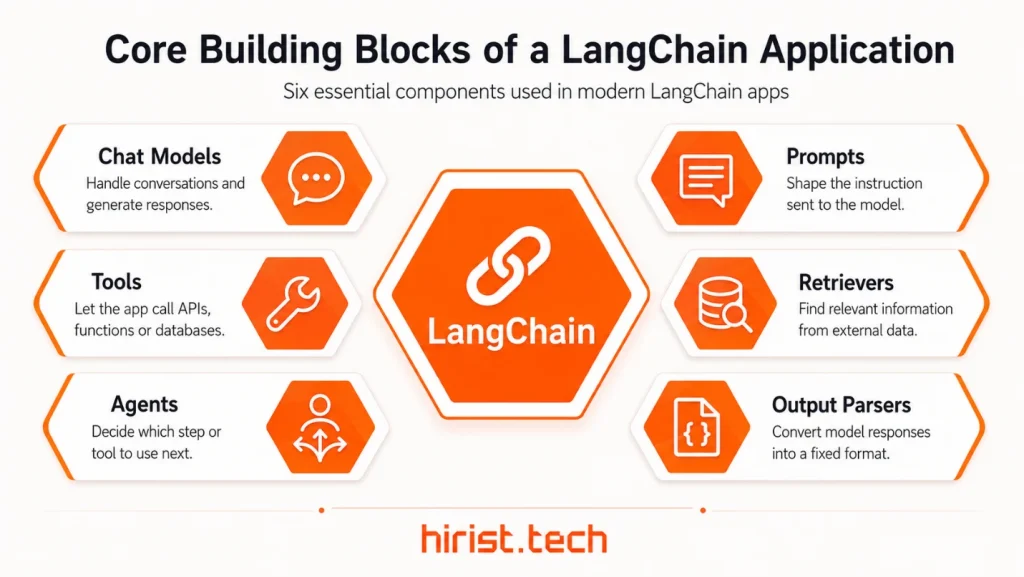
The main building blocks of a LangChain application are:
- Chat models: Handle conversations and generate responses.
- Prompts: Shape the instruction sent to the model.
- Tools: Let the app call APIs, functions or databases.
- Retrievers: Find relevant information from external data.
- Agents: Decide which step or tool to use next.
- Output parsers: Convert model responses into a fixed format.
- How does LangChain connect chat models with prompts, tools and external data?
LangChain connects different parts of an AI app into one working flow. First, the user sends a query. The prompt formats that query for the chat model. Then the app may call a tool or retriever when outside information is needed. The retrieved data is passed back to the model. Finally, the model uses the prompt and context to return the answer.
- What is a prompt template in LangChain?
A prompt template in LangChain is a reusable prompt format with placeholders. It helps developers write one clear instruction and pass different values into it when the app runs. This avoids writing the same prompt again and again.
For example, a template can be: “Explain {topic} in simple words for a beginner.” Here, the topic changes based on the user’s input while the instruction stays the same.
from langchain_core.prompts import PromptTemplate

# Instantiation using from_template (recommended)
prompt = PromptTemplate.from_template("Say {foo}")
prompt.format(foo="bar")

# Instantiation using initializer
prompt = PromptTemplate(template="Say {foo}")
- What is the difference between chat models and traditional LLM text-completion models in LangChain?
Chat models are designed for conversations. They take a list of messages with roles such as system, user and assistant. Text-completion models usually take one plain text prompt and return a text response. In modern LangChain apps, chat models are used more often because they work better for chatbots, agents and tool calling.
| Chat Models | Text-Completion Models |
|---|---|
| Work with structured messages | Work with a single text prompt |
| Use roles like system, user and assistant | Usually do not use message roles |
| Better for conversations and agents | Better for simple text completion |
| Common in modern LangChain apps | More common in older LLM workflows |
| Fit tool calling and multi-turn tasks | Fit direct prompt-response tasks |
- What is the difference between a chain, a workflow and an agent in LangChain?
A chain connects steps in a fixed order. A workflow also follows a planned path, but it may include more logic and branching. An agent is more dynamic. It can choose tools, read results and decide the next step until it reaches a final answer.
| Chain | Workflow | Agent |
|---|---|---|
| Runs steps in a fixed order | Follows a planned path with logic | Decides the next step dynamically |
| Best for predictable tasks | Best for multi-step app flows | Best when tool selection is needed |
| Developer controls each step | Developer defines the flow and branches | Model can choose tools and actions |
| Less flexible | More structured | More adaptive |
| Example: prompt → model → parser | Example: classify query → route → respond | Example: search web → read result → answer |
- What are the most common use cases of LangChain?
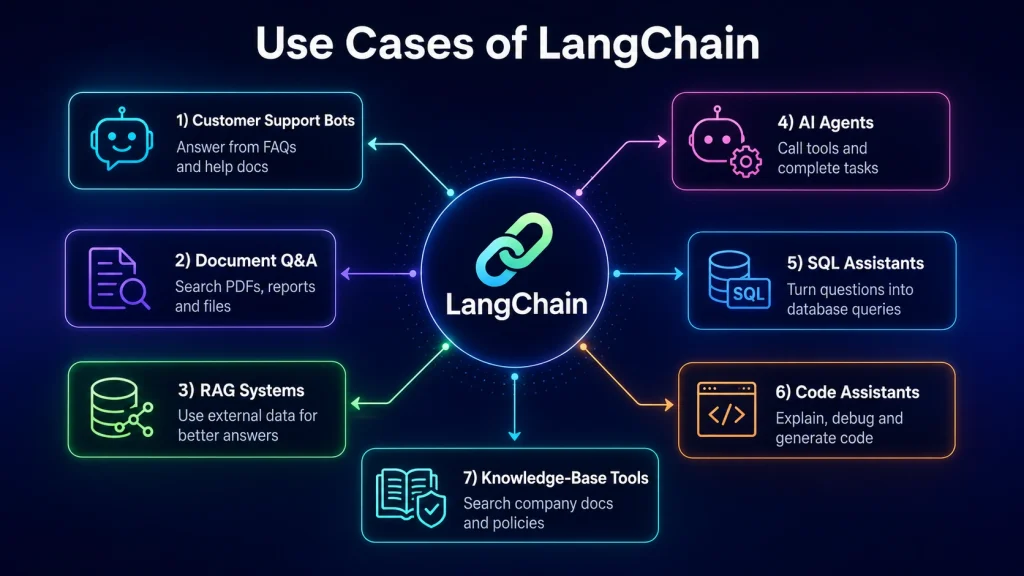
LangChain is used to build AI apps that need LLMs, external data and tool use. Common use cases include:
- Customer support bots: Answer from FAQs and help docs.
- Document Q&A: Search PDFs, reports and files.
- RAG systems: Use external data for better answers.
- AI agents: Call tools and complete tasks.
- SQL assistants: Turn questions into database queries.
- Code assistants: Explain, debug and generate code.
- Knowledge-base tools: Search company docs and policies.
Also Read - Top RAG Interview Questions and Answers
Intermediate LangChain Interview Questions
Here are the common LangChain interview questions and answers for candidates who have worked on small AI projects or built simple LLM applications. They often include memory, retrievers, vector stores, output parsers, RAG pipelines, document loading and API integrations.
- What is the Runnable interface in LangChain?
The Runnable interface is the standard way to run and connect LangChain components. A runnable can be invoked, batched, streamed and composed with other runnables. For example, a prompt, chat model and parser can be joined into one flow. Common methods include invoke, batch and stream.
- How does tool calling work in LangChain agents?
Tool calling lets an agent use outside functions during a task. A tool can be an API call, calculator, database query or custom Python function. The developer defines the tool’s input and output. The model then decides when to call it and what arguments to pass.
- What is structured output in LangChain and when should you use it?
Structured output means the model returns data in a fixed format. It can be JSON, a Pydantic model or a dataclass. Use it when your app needs clear fields like name, score, category or status. It is useful for extraction, classification and API responses.
- How does LangChain support Retrieval-Augmented Generation (RAG)?
LangChain supports RAG through indexing and retrieval. First, documents are loaded, split and stored in a searchable index. At query time, a retriever finds relevant chunks and sends them to the model as context. The model then answers using that context.
- What are document loaders and text splitters in a LangChain RAG pipeline?
Document loaders bring data into LangChain from sources like PDFs, web pages, files and apps. Text splitters break large documents into smaller chunks. This helps the system store, search and pass the right parts of a document to the model during retrieval.
- What role do embeddings, vector stores and retrievers play in LangChain?
Embeddings turn text into numerical vectors that capture meaning. Vector stores save those vectors and support similarity search. Retrievers use a query to find the most relevant documents. Together, they help a RAG app find useful context before the model writes an answer.
- How do output parsers help return clean JSON or typed results from LLM responses?
Output parsers convert raw model text into a format your app can use. They are useful for JSON-like output, lists or typed fields. In newer LangChain apps, structured output is often preferred when the model supports schemas. Output parsers still help when handling plain text responses.
Also Read - Top 25 LLM Interview Questions and Answers
Advanced LangChain Interview Questions
Let’s go through advanced LangChain interview questions and answers that are usually asked in experienced AI engineer and LLM application developer interviews. These questions focus on production-level thinking.
- How would you design a production-ready LangChain application for a customer support chatbot?
A good answer should show the full system. Explain the workflow like this:
- Knowledge layer: Load help docs, FAQs, policies and product guides.
- RAG layer: Split documents, create embeddings and store them in a vector database.
- Retrieval layer: Pull the most relevant chunks for each user query.
- Model layer: Send the query and context to a chat model.
- Tool layer: Connect tools for ticket creation, order lookup or CRM updates.
- Safety layer: Add guardrails, fallback replies and human handoff.
- Security layer: Control access to private customer or company data.
- Monitoring layer: Use LangSmith for traces, testing and production checks.
- What is LangGraph and when would you use it instead of a simple LangChain agent?
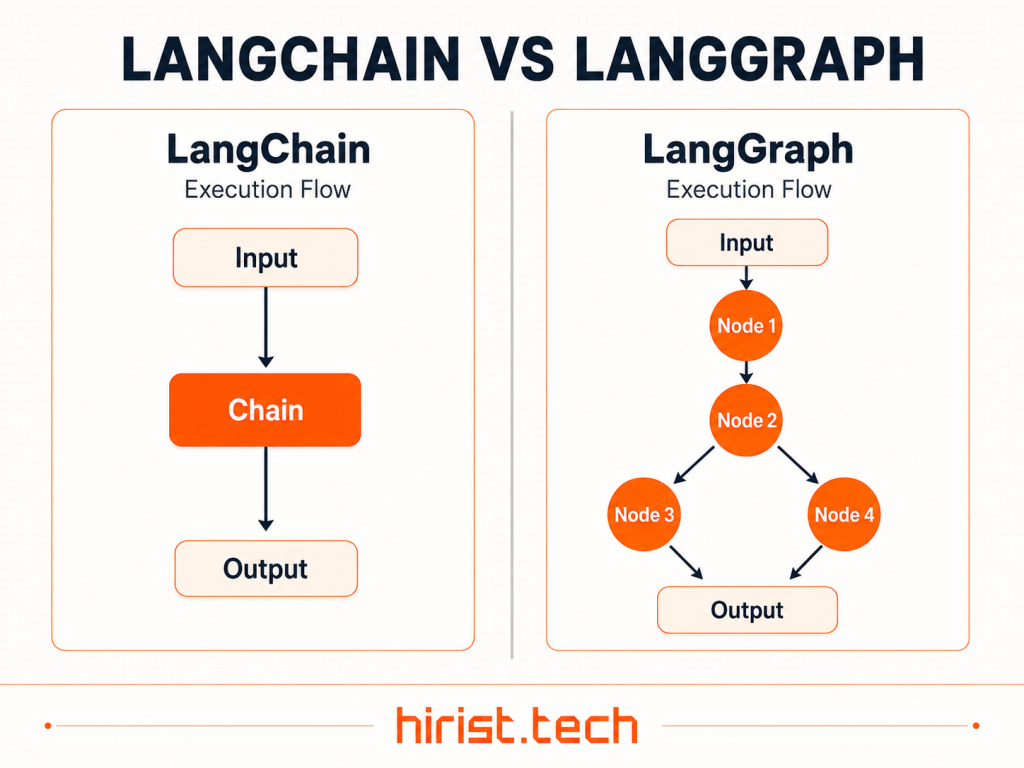
LangGraph is used to build controlled, stateful and long-running agent workflows. A simple LangChain agent works well when the task is short and the model can decide the next action. LangGraph is better when the workflow needs state, branching, approvals or recovery.
Use LangGraph when you need:
- Multiple steps with clear state
- Human approval before sensitive actions
- Long-running agent tasks
- Streaming responses
- Persistent memory
- Better control over agent flow
- Recovery after failure
- How would you reduce hallucinations in a LangChain-based RAG system?
Hallucinations can be reduced by improving retrieval and controlling how the model answers:
- Use trusted and updated data sources
- Split documents into clean chunks
- Retrieve only relevant context
- Use reranking for better chunk selection
- Ask the model to answer only from given context
- Add citations or source references
- Return “not found” when context is missing
- Test retrieval and generation separately
LangSmith supports RAG evaluation by testing retrieved documents and final answers. This helps find whether the issue is retrieval quality or model response quality.
- How would you control cost, latency and token usage in a LangChain application?
Cost and latency depend on model choice, prompt size, retrieval quality and number of calls:
- Use smaller models for simple tasks
- Keep prompts short and focused
- Limit retrieved chunks
- Avoid sending full documents to the model
- Cache repeated responses
- Use streaming for a faster user experience
- Batch calls where possible
- Track token usage and slow traces
- Use fallbacks only when needed
In interviews, mention that production systems need trade-offs. The most powerful model is not always the best choice for every step.
- How does LangSmith help with tracing, evaluation and debugging?
LangSmith helps developers see how an LLM application behaves from input to final output. It records traces of model calls, tool calls, prompts, outputs and decision points, which makes debugging much easier. LangSmith docs describe traces as a complete record of every step that runs during a request.
- Tracing: Shows the full path of a request from user input to final response.
- Debugging: Helps inspect prompts, model responses, tool calls, errors and failed steps.
- Evaluation: Tests app responses on datasets and compares different versions.
- Monitoring: Tracks production quality, latency, cost and usage patterns over time.
- How would you add retries, fallbacks, streaming and monitoring to a LangChain workflow?
I would add reliability at the model, tool and workflow level:
- Retries: Add retry logic for model calls, tool calls and API requests to handle rate limits, timeouts and temporary failures.
- Fallbacks: Use a backup model or simpler response path if the main model fails or becomes slow.
- Streaming: Stream tokens or agent progress so users can see the response while it is being generated.
- Monitoring: Use LangSmith to track traces, prompts, tool calls, errors, latency and token usage.
- State recovery: Use LangGraph persistence for complex workflows so the app can resume from saved checkpoints after failure.
Also Read - Top 90+ Machine Learning Interview Questions and Answers
LangChain Coding Questions
LangChain coding questions are useful for candidates who want to prepare for practical interview rounds. They may include writing prompts, building chains, creating agents, using retrievers, connecting vector stores and handling outputs with Python.
- Write a LangChain prompt template that accepts a role, task and user query.
from pydantic import BaseModel
from langchain.chat_models import init_chat_model
from langchain_core.prompts import ChatPromptTemplate

class Answer(BaseModel):
    summary: str
    example: str

prompt = ChatPromptTemplate.from_template(
    "You are a {role}. Task: {task}. Query: {query}"
)

model = init_chat_model("openai:gpt-5-nano", temperature=0)

chain = prompt | model.with_structured_output(Answer)

print(chain.invoke({
    "role": "AI tutor",
    "task": "Explain simply",
    "query": "What is LangChain?"
}))
- Write Python code to create a LangChain agent with one custom tool.
from langchain.agents import create_agent
from langchain_core.tools import tool

@tool
def get_order_status(order_id: str) -> str:
    """Return order status."""
    return f"Order {order_id} is ready for delivery."

agent = create_agent(
    model="openai:gpt-5-nano",
    tools=[get_order_status]
)

response = agent.invoke({
    "messages": [{"role": "user", "content": "Check order 4521"}]
})

print(response["messages"][-1].content)
- Write a small RAG pipeline that stores and retrieves context.
from langchain_core.documents import Document
from langchain_openai import OpenAIEmbeddings
from langchain_core.vectorstores import InMemoryVectorStore
from langchain_text_splitters import RecursiveCharacterTextSplitter

docs = [Document(page_content="Refunds are allowed within 7 days.")]

splitter = RecursiveCharacterTextSplitter(chunk_size=100, chunk_overlap=20)
chunks = splitter.split_documents(docs)

store = InMemoryVectorStore(
    embedding=OpenAIEmbeddings(model="text-embedding-3-small")
)

store.add_documents(chunks)

results = store.similarity_search("What is the refund policy?", k=1)

print(results[0].page_content)
Also Read - Top 40+ Generative AI Interview Questions & Answers
LangChain MCQs
LangChain MCQs are commonly used in screening tests and quick technical evaluations. You can also use these MCQs for quick revision before an interview.
- In LangChain, what is used to create reusable prompt structures?
- A. Vector store
- B. Prompt template
- C. Retriever
- D. Agent executor
Answer: B. Prompt template
- A model needs to call an external API during a task. What makes this possible in LangChain?
- A. Tool calling
- B. Text splitting
- C. Document loading
- D. Token counting
Answer: A. Tool calling
- What does structured output help you get from a LangChain application?
- A. Faster internet speed
- B. A fixed JSON or schema-based response
- C. More training data
- D. A larger vector database
Answer: B. A fixed JSON or schema-based response
- In a RAG pipeline, what finds the most relevant documents from a vector store?
- A. Prompt template
- B. Retriever
- C. Callback handler
- D. Output parser
Answer: B. Retriever
- LangSmith is mainly used for what purpose in LangChain applications?
- A. Creating embeddings
- B. Loading PDF files
- C. Tracing, debugging and evaluation
- D. Splitting long documents
Answer: C. Tracing, debugging and evaluation
- LangGraph is best suited for what type of AI workflow?
- A. Simple one-step prompts
- B. Static website forms
- C. Stateful agent workflows
- D. Basic text translation only
Answer: C. Stateful agent workflows
- What allows developers to combine prompts, model calls, tools and parsers into one execution flow in LangChain?
- A. Runnable interface
- B. CSV loader
- C. Tokenizer
- D. Web scraper
Answer: A. Runnable interface
How to Prepare for LangChain Interview?
Preparing for a LangChain interview means learning the concepts and also knowing how to build, debug and explain real LLM applications.
- Revise the basics first: Be clear about prompts, chat models, chains, agents, tools, retrievers, embeddings, vector stores and RAG.
- Build small projects: Create a chatbot, document Q&A app, basic agent and simple RAG pipeline. Interviewers value hands-on practice.
- Read existing code: Practice understanding unfamiliar LangChain code. Many interviews test how well you trace data flow and spot weak points.
- Learn LangSmith and LangGraph: LangSmith helps with tracing and evaluation. LangGraph is useful for stateful and controlled agent workflows.
- Practice coding questions: Write short snippets for prompt templates, structured output, custom tools, agents and RAG retrieval.
Wrapping Up
With these 30 LangChain interview questions and answers, you can revise key concepts and prepare for GenAI interview rounds without any hassle. Keep building small projects and follow tools like LangGraph and LangSmith. Ready to apply? Visit Hirist, an online job portal to find top IT jobs in India, including LangChain jobs and roles that need LangChain skills.
Also Read - Top 45+ Artificial Intelligence (AI) Interview Questions and Answers
FAQs
LangGraph questions are usually asked in advanced AI agent interviews. Common questions include:
Focus on prompts, chat models, agents, tools, RAG, retrievers, embeddings, vector stores, structured output, LangGraph and LangSmith. These are more useful than only memorising old chain examples.
LangChain helps, but it is not enough alone. You should also know Python, APIs, databases, vector stores, prompt design, LLM basics, RAG evaluation and deployment.
LangChain is used to build LLM apps with models, prompts, tools and agents. LangGraph is used when the agent workflow needs more control, state, branching, persistence or human review. LangGraph models workflows with state, nodes and edges.
There is no fixed salary for “LangChain jobs” because LangChain is usually a skill inside AI Engineer, GenAI Developer or LLM Developer roles. AmbitionBox data shows Generative AI Engineer salaries in India range from INR 6 LPA to INR 35 LPA, while fresher AI Engineer salaries with 0 to 3 years range from INR 7.7 LPA to INR 11.9 LPA.
You can find LangChain jobs on Hirist, an online job portal for IT roles in India. Search for roles like GenAI Developer, AI Engineer, LLM Engineer, RAG Developer and Python AI Developer.